Showing posts with label chat server. Show all posts

January 14, 2024

Meet "Sealed messaging" functionality

 New versions of Bopup IM client/server software introduce all-new functionality called "Sealed messages". This is a new type of instant messaging that requires an opening (unsealing) text messages before they can be viewed and read. Once message is unsealed the sender gets a notification on that and unsealed date/time is added into conversation.

The new function is enabled on the communication server and after that it appears in the messenger options. The sealed messages can be sent among regular instant messages since there can be 2 options available in the sending dialog — send sealed or regular message. But it is also possible to configure the messenger and always exchange with sealed messages.
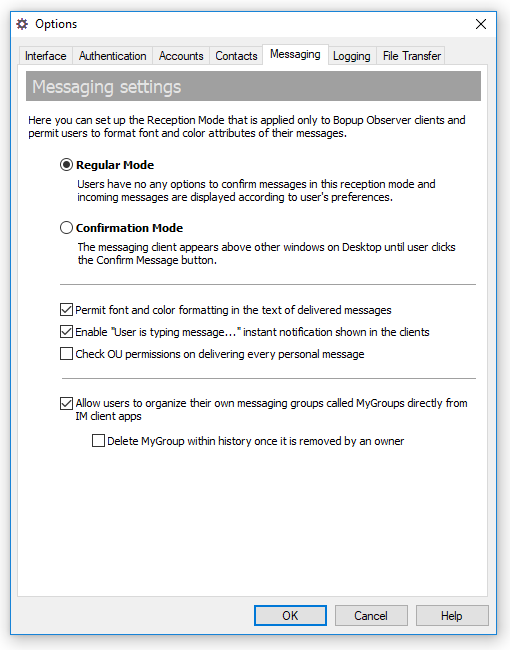
Turning on the sealed messaging on the IM server

When a new sealed message is received the messenger hides a whole conversation and notifies a user that it is required to unseal the message to see and read it.
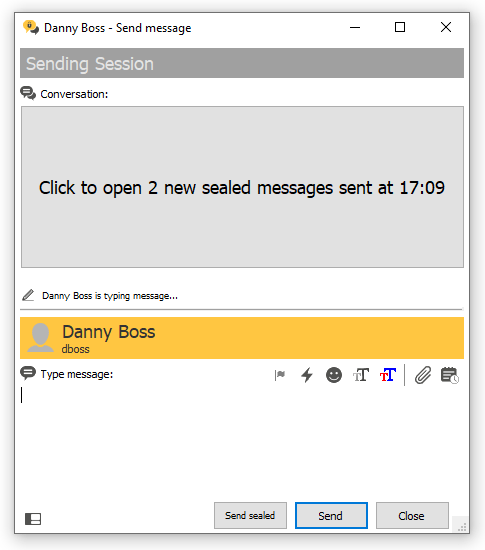
Receipt of sealed messages in Bopup Messenger client

Within a getting the recipient's reaction by a sender that the message has been opened and viewed the sealed messaging makes overall communication more secure and confidential. In some cases it prevents viewing and reading arrived messages by someone who may stay close to the recipient's workstation.

November 8, 2022

New versions of IM server and messenger clients improve Message History module

New versions of Bopup Communication Server, Bopup Messenger and Bopup Observer have been released. The new software totally improves the functionality to view Message History.

Now the server console lets search for transferred files for their filenames in the history. Previously the server performed the search only for message text.

New releases of the instant messaging clients added the search function in their Message Histore module. So it is possible now to find messages and files by enterring words which match that data.

Download Bopup Communication Server version 5.10.7, Bopup Messenger version 7.4.1 and Bopup Observer version 6.1.2 — Secure IM platform for office chat

July 5, 2021

Overall performance and new function called MyGroups: Meet new versions of IM server and secure messenger

 We are glad to inform that new major updates of Bopup Communication Server and Bopup Messenger are now available. There is a large list of changes and fixes described below:

What's new:

Added MyGroups feature
Recent versions of the software now support MyGroups feature that allow to create user groups directly from instant messenger clients. These function is available to Power User and Adminstrator account types only and it lets users to organize their own groups similar to Messaging Groups created on the IM server. Unlike regular groups MyGroups can be deleted by their owners. For more information about this feature refer online documentation https://www.bopup.com/onlinehelp/server/guide/mygroups/overview.html

Improved overall performance of the IM server
New version of the messaging server improves and fixes structure of the SQL database. We noticed that when the server database grows with a lot of transferred messages, user sessions and other internal information that causes different issues related to overall performance of the IM server. New update adds all necessary indexes and new fields to SQL tables to fix them so now the server should work faster and better.

Many interface improvements
The server console fixes issues in it's interface such moving between elements in the left tree using arrows on the keyboard, saving message/transfer log into text files, displaying last logon time in Find Users view, moving/deleting messages in archive views, and others.


March 16, 2020

YouTube: Update process of Bopup IM Server app is too easy

We uploaded new video tutorial on our YouTube channel that shows a process how to check for new updates from Management Console of the instant messaging server, download and install new versions on-the-fly above existing app.


We noticed that many of our customers could still use prior versions of the Bopup IM software even their subscription supports new versions and updates. But installation of a new version is too simple and easy, and it only requires to download new setup package and run it on target computer — all other things and work will be done by the setup which updates app files with keeping all existing data and history. We hope that this video helps to avoid many worries belong to software upgrade procedure.

Tutorial: Updating Bopup Communication Server to a new version