Showing posts with label user group. Show all posts

July 5, 2021

Overall performance and new function called MyGroups: Meet new versions of IM server and secure messenger

 We are glad to inform that new major updates of Bopup Communication Server and Bopup Messenger are now available. There is a large list of changes and fixes described below:

What's new:

Added MyGroups feature
Recent versions of the software now support MyGroups feature that allow to create user groups directly from instant messenger clients. These function is available to Power User and Adminstrator account types only and it lets users to organize their own groups similar to Messaging Groups created on the IM server. Unlike regular groups MyGroups can be deleted by their owners. For more information about this feature refer online documentation https://www.bopup.com/onlinehelp/server/guide/mygroups/overview.html

Improved overall performance of the IM server
New version of the messaging server improves and fixes structure of the SQL database. We noticed that when the server database grows with a lot of transferred messages, user sessions and other internal information that causes different issues related to overall performance of the IM server. New update adds all necessary indexes and new fields to SQL tables to fix them so now the server should work faster and better.

Many interface improvements
The server console fixes issues in it's interface such moving between elements in the left tree using arrows on the keyboard, saving message/transfer log into text files, displaying last logon time in Find Users view, moving/deleting messages in archive views, and others.


May 7, 2019

Great improvements of Bopup Messenger for Android platform

We improved our Bopup Messenger for Android application. It's new version 1.6.1 added support for notifications on new messages shown in Status Bar area on top of the device screen. Within a good visible message icon the app includes texts and senders of unread messages.


The latest release of the messenger also changes formatting for displaying group and News messages. Now groups are shown within # sign instead of @ symbol before their names in conversations which is now used for News messages, i.e. vice versa.

There is also many other changes in the messenger interface such as text color and other formatting.

Download Bopup Messenger for Android version 1.6.1 — Small and fast secure messenger for business networks including LAN, Wi-Fi and Internet

February 24, 2019

Chat server fixed critical issue with sending group message using ranges of IP addresses

New version 5.3.2 of Bopup Communication Server has been release and it is now available for download at https://www.bopup.com/downloads/ As always changes are available in the Update Center at https://updates.bopup.com/server/

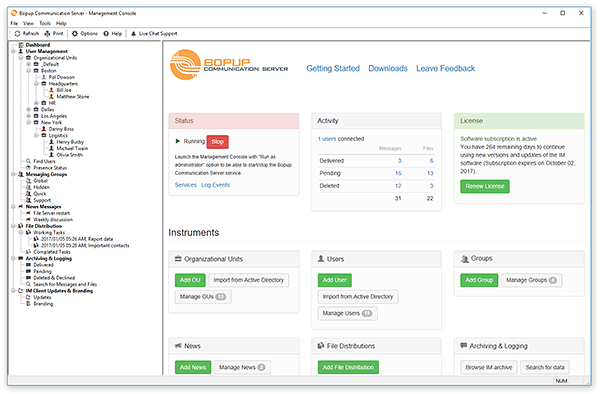
Management Console of the communication server application
What's new:

Fixed issue with sending group and messages to IP ranges
Since version 5.3.0 the server supports multiple ranges of IP addresses through which users can be dynamically assigned. We recommend to all users that use versions 5.3.0 and 5.3.1 to update the server software to avoid troubles with delivering instant messages using IP ranges.

Interface improvements in Management Console app
The server console also added a huge number of improvements and fixes. It's News list now displays ranges of IP addresses that assigned groups have. News message profile pages also show assigned groups if they have only IP ranges. For newly added users that are not yet assigned to groups/news/file tasks the account profile screen displays Users assignment pane with buttons to easily manage assigned groups, News and File Distributions tasks.

Download Bopup Communication Server version 5.3.2 — In-house chat server for companies and clinics

January 23, 2019

Messaging Groups of instant messaging server now support multiple IP ranges

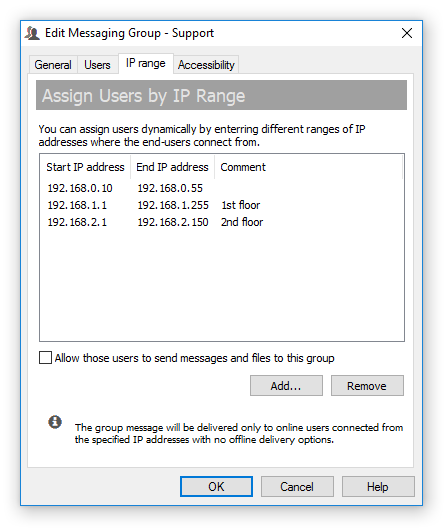
New version 5.3.0 of Bopup Communication Server is available for download. This is major release of the server product that added support for multiple ranges of IP addresses that can be now associated with each messaging group. Previous versions of the communication server supported only a single IP range that could be used to dynamically add users to the group. In some cases that was not enough if a customer has large and complicated network with different ranges of IP addresses. Now that question can be easily solved.

Assign users to group dynamically via multiple IP ranges

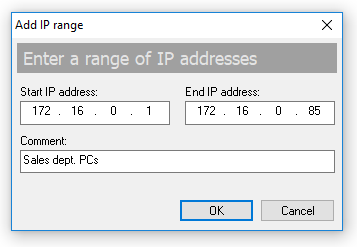
The "IP range" tab of the group properties dialog contains a list of associated IP ranges. Click Add... button to add a new range of addresses including a short comment string.

Adding a new range of IP addresses

To remove an existing IP range click Remove button.

All dynamically assigned users get an instant notification once they have been added or removed from a group.

The new version of the IM server also fixed a user display option that shows user names in the server console in a choosen format. It worked wrong regardless the selected format.

Download Bopup Communication Server 5.3.0 — Secure instant messaging server for small offices and corporate networks

November 18, 2015

Minor fixes and improvements of the IM server and messenger client

We updated both Bopup Communication Server and Bopup Messenger software. New version 4.4.1 of the IM server fixed issue with sending News messages in One time only mode. This update also resolved problem with installation of remote Management Console.

Both the server and messenger improved notification support for a change of show/hide assigned users option in the messaging group properties. Now the IM client immediately reflects to this change if the option has been modified on the server console.

Download Bopup Communication Server version 4.4.1 and Bopup Messenger version 6.7.1 — IM software for secure chat and real-time communication

October 29, 2015

Bopup IM software added support for IPv6 protocol

We are proud to announce that both the communication server and IM client software now support IPv6 protocol that is the most recent version of the Internet Protocol (IP). It is intended to replace current version IPv4. The IM server supports also IPv4 so the software can accept connections using different protocols at the same time from messenger clients.

Bopup Communication Server also added new option to Messaging Group profiles that allows to hide a list of assigned users to the group and to do not show them in user's Contact List. So the displayed group cannot be expanded.

Another improvement is related to sorting messages and file transfers shown in Pending, Sent and Deleted/Declined views under Message History in the console. Now the server uses DATETIME SQL data type instead of SMALLDATETIME type used previously that includes seconds within hour and minutes.

Download Bopup Communication Server version 4.4, Bopup Messenger version 6.7 and Bopup Observer version 5.6

October 21, 2015

Version 1.0.11 of the Android app added support for 12-hour clock format

We just updated Bopup Messenger for Android and released it's version 1.0.11. This update added support for 12-hour clock format (US-based time) that shows AM/PM indicators in time of messages. By default the messenger shows these indicators and new setting must be used from the Options to turn this off.

Another small improvement is about group conversations that now show '@' symbols in their titles in beginning group name.

Download Bopup Messenger for Android — Secure IM mobile client for office and business use

April 11, 2015

Important update for Bopup Messenger client

We released Bopup Messenger version 6.5.3 that fixes important issue with expanding groups shown in Contact List. A group is always kept collapsed even a user clicks on "+" sign to expand it to show assigned accounts. This bug came with previous version 6.5.2 that improved showing users in the contacts and displaying notifications on new messages from offline users. So it is strongly required to update the messenger client if prior version 6.5.2 was already installed.

Download Bopup Messenger version 6.5.3

January 26, 2014

Bopup Messenger fixed an issue with displaying groups and their assigned users

We released small updates both of Bopup Messenger and Bopup Observer messaging clients.

What's new:

Even the messengers come with minor fixes and improvements we recommend to update Bopup Messenger client because it fixes an issue with displaying groups that are longer than 32 symbols of length. Those groups were showing without any errors but the messenger displays no user contacts (assigned users) under them. We discovered and found the bug. Too funny but the problem was in a "hardcoded" length of a value in the code that was 32 bytes of length. We guess that was not modified since that time when messaging groups had only 20 symbols of length, bbut today they can be named up to 64 symbols.

Another useful change belongs to an initialization of a directory to save received files and folders used by the messengers. In prior versions the receiving directory was checked for availability and writing access only on the application startup but that was incorrect in some cases. Now the receiving folder is checked every time when a user or messenger accesses it, for example opens or incoming document are being received. And if that folder becomes invalid then a default path to store data is used that is located in user's profile directory.

Download now Bopup Messenger 6.3.4 and Bopup Observer 5.3.4

April 12, 2011

The communication server improves selection in the Organizational Units trees

New version 3.3.25 of Bopup Communication Server comes with a little but useful improvement. It adds a function called "Invert selection" that appears in the "OU Permissions" dialog to manage visible Organizational Units to a specific unit. The same button is added on the "Accessibility Options" tab of the Messaging Group properties.

This function inverts currently selected Organizational Units in the tree: checked boxes become unchecked, and vise versa, unchecked units are reverted to a checked state. The new function helps administrators and managers to select required Organizational Units with ease and more quickly.

Download Bopup Communication Server version 3.3.25

July 2, 2010

Ease to start a chat with your co-workers

The latest version 5.4.13 of Bopup Messenger comes with a new function that overrides how to reply to incoming group message. Now you can set up an option to reply directly to messaging group, not to send a personal message to the sender. This option offers to start a chat session with all users in the group instead of sending personal answer to the sender of group message. You can find the newly added option on the Messaging tab in the Options dialog box.

Version 5.4.13 also contains many other improvements. It marks incoming group messages that have been sent by us as read messages. This hides system tray notifications, sound alerts, etc.

Among the updates mentioned above the latest versions of Bopup Messenger and Bopup Observer fixes receiving new versions and brand image logo from Bopup Communication Server. Sometimes downloading an update of new version in the messenger might hang up and never compete.

Download new versions of the IM clients at Download Center.

May 29, 2010

New version 3.3.14 of Bopup Communication Server

Today, May 30, 2010, new update of Bopup Communication Server has been released. Since the , that was released on March 2010, we did a lot of work on the server and it includes many bug fixes and improvements.

The brings the fixed Active Directory Import Wizard which might hang up on importing user accounts using the Groups criteria. The wizard also contains an improvement which now supports and finds more than 1,000 user objects in the same AD Group/Organizational Unit (OU).

The most important bug fix relates to a deletion of a user account from a messaging group when the group suddenly disappears on other users from it.

February 16, 2010

Management Console fixes and improves displaying administrative accounts and user groups

New version 3.3.12 of Bopup Communication Server has been released. It brings small interface changes regarding users with the administrative account type and showing them in the console.

Previous versions of the IM server did not allow to see a list of groups to which an administrator is currently assigned. And group profile pages did not also show assigned administrators. So sometimes it was difficult to find a list of assigned groups for the administrator and vice versa. The new version fixes this.

Download and upgrade your communication server now

February 13, 2010

Working on issue with retrieving group contacts in messenger

One of our clients has reported that he experiences a strange issue with retrieving and displaying list of group users in Bopup Messenger. Sometimes there are no users in the group, sometimes users are shown but incorrectly: they can be mixed and displayed for groups for which they are not members. Does anyone have the same troubles? We're now working on this issue.

December 30, 2009

Known issue: File Distribution tasks are not applied to IP users

We inform you that the latest version 3.3.9 of Bopup Communication Server does not perform to users that are assigned to Messaging Group by a IP range criteria. This means that you if you have the File Distribution task with a list of assigned groups, and one or more from those groups assign users by a range of IP addresses, then the task will not be distributed to those users.

This is a known issue and it will be fixed in the next releases of the communication server.