Showing posts with label Management Console. Show all posts

April 10, 2023

Major update of Bopup Communication Server — Version 5.11.0 is released

 New version 5.11.0 of Bopup Communication Server is available for download. This version comes with great improvements in SQL queries that improves overall speed of the communication and fixes many related issues. Among internal improvements the server added many interface changes and enhancements.


Connectivity and overall speed improvements

The recent release of the IM server fixes issues that could appear on a greater amount of concurrent connections. Previous versions of the server could add many warnings and SQL exceptions to Event Log viewer, and users couldn't connect to the server at the same time. Another fixes belongs to connection limit error that could appear on messenger startup. So this version is an important update.

Fixed issue with logging file transfers on disabled Message History

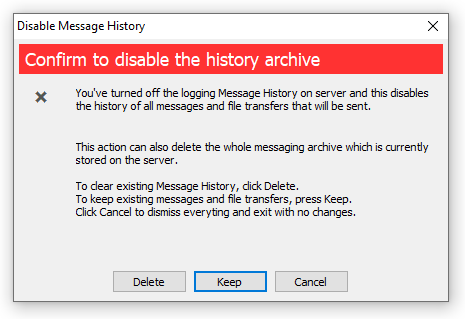
The new version fixes saving file transfers into history log when it is turned off. This problem occured only for file exchange. Now the server console shows a dialog when Message History option is switching off that lets keep or delete existing archive on the server.

Showing computer/DNS name for user accounts in addition to IP address

Now the server resolves and adds host name for connected users to show it everywhere in Management Console within IP address. It is a useful option if the server runs on a local network and lets administrator see user's workstation names. Host name is shown in the Presence Status, on user profile page and in archiving views that shows instant messages and file transfer information.

Download Bopup Communication Server version 5.11.0 — Fast, compact and secure self-hosted solution for instant messaging and file transfer

January 20, 2022

Major update of Bopup Communication Server and new version of Bopup Messenger

Bopup Communication Server product has been update to version 5.10.0 This is a major release of the IM server that comes with great improvements, changes and bugfixes. 

First of all we improved SQL database structure by removing unnecessary and adding new indexes to tables that speed up an overall performance. There are also a lot of changes and improvements in the IM service module that operates better and faster on a high number of concurrent users. 

Management Console of the IM server adds a faster load of message log. We improved the lists and now data is shown rapidly even thousands of records are loaded. 

Another improvement is related to displaying charts on the Welcome and other profile pages. We improved SQL queries that select data so now the charts do not delay loading pages.

A new version 7.2.16 of Bopup Messenger is also available. This is a critical release of the instant messenger that resolve the issue with message popup received from non-contacts user. We strongly recommend to update the messenger to the latest version.

Download Bopup Communication Server version 5.10.0 and Bopup Messenger version 7.2.16 — Office IM Suite for encrypted communication between employees


August 31, 2021

Bopup Communication Server version 5.9.2 adds minor improvements

 We release new version 5.9.2 of the communication server. It is a minor release of the software products that contains few important changes.

Charts in Management Console display data for the last 7 days only

Due to slow operation of the server console on showing charts we decided to decrease the period for which to show the data for. The new version of the IM server now shows charts for the last 7 days instead of 15-day period. This brings an affect on large databases with great number of users and exchanged data. Anyway the charts can be displayed optionally and this feature can be turned off in the server options https://www.bopup.com/onlinehelp/server/options/interface_settings.html

New version of IM Client Configuration Tool 

The setup package of the communication server comes with a new release of the IM Client Configuration Tool that lets configure and manage messenger settings from the server console. The recent version of the tool contains minor fixes and important confirmation box when a server name/address is changed. 

Download Bopup Communication Server version 5.9.2 — High-level IM solution for real-time communications


July 19, 2021

New version of the IM Server fixes displaying charts and many more

We release a new version 5.9.1 of Bopup Communication Server that is a mior update of the app. This release fixes issues with displaying charts on Dashboard screen in Management Console. Previous versions of the console brought SQL errors if the server database has a lot of users and delivered messages so we had to simplified query statements to get the charts working.

Version 5.9.1 also improves and avoid possible issues with network connections and requests from a huge number of IM clients so now the IM server must work better and faster.

There a lot of other small changes in the server console including app interface and performance.

Download Bopup Communication Server version 5.9.1 — Self-Hosted IM platform for secure corporate communications

May 1, 2021

Number of connected users, recent delivered data shown in charts. This and others in new version of Bopup Communication Server

 New version 5.8.7 of Bopup Communication Server is available. This version improves many functoins and adds great features in GUI of Management Console.

Graphical charts that display recent data in the console

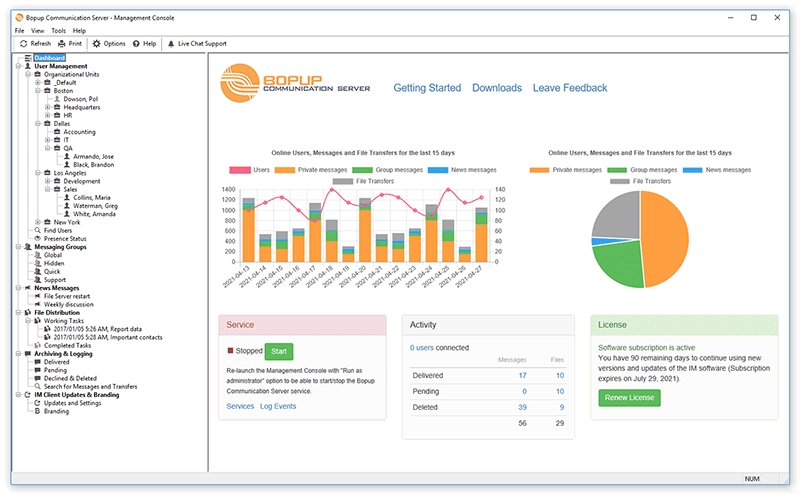
Most important addition is that now Management Console of the IM server displays charts on it's Dashboard, Account and Group profile pages. The chart show data for recent 15 days of the server activity and allow to view the number of online users, sent message and files for this period.

Dashboard screen displays charts within recent delivered data

Charts on the Dashboard screen show the number of connected users, delivered messages and files per day for the last 15-day period. It is easy now to see how many users have been connected and how many data have been transferred. There is also another chart that shows a total amount of data transferred for that period.

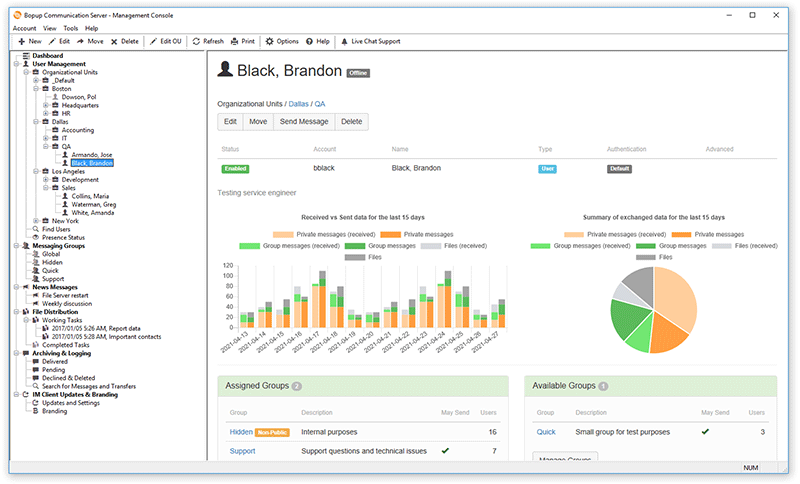
Charts on the account profile page display recent activity by the user per day

The account profile page contains similar chart that show the number of both sent and received private, group messages and file transfers by the user per day for the last 15 days. 

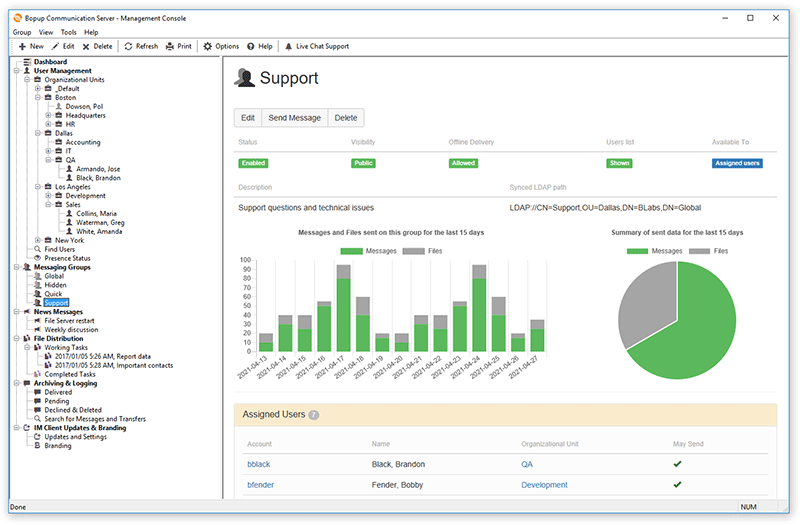
The group profile page with charts of recent activity

Charts on the group profile display the number of messages and documents sent on the group per day during the last 15 days.

Fixes possible issues with sending News messages

We did some changes in the function that transmits News messages from the messaging server. Sometimes the messages did not go if there are too many online users. So we moved that functionality to a separate thread to avoid that.

Fixed issues when running on PostgreSQL database

We found and fixes some errors when the server is running on PostgreSQL database server. Recent versions of the communication server contained bugs on upgrade function

Download Bopup Communication Server 5.8.7 — Self-hosted instant messaging system as a corporate communication solution

April 1, 2020

MInor update of Bopup Communication Server

New version 5.6.2 of the instant messaging server has been released. This version fixes some interface issues occurred in Management Console such as a number of days during which a user was connected to the IM server shown in Presence Status view and user profile page. The console also fixed another issue in Check for Updates dialog in Help menu, now it stores settings for automatic update check when Start button is clicked.

Download Bopup Communication Server version 5.6.2 — Instant Messaging Server to connect local and remote users over LAN and Internet

August 8, 2019

Minor update of the communication server console

New version 5.5.1 of Bopup Communication Server has been released today. It fixes displaying the number of currently connected users and amount of total delivered messages/files under Activity on the Dashboard view of Management Console. We noticed that previous version 5.5.1 that added support for PostgreSQL database servers mistakenly came with such issue.


As always it is easy to update an existing version of the IM server. Just download a new setup package and launch it on server computer.

Download Bopup Communication Server version 5.5.1 — Fully private, stand-alone and local instant messaging server

April 18, 2019

Known issue: Remote Management Console may cause issues on communication server

We discovered some critical bug with installation of remote Management Console. The issue occurs after a upgrade of the remote console installation to a new version. Once the update is installed it registers and runs a service module. That file named bcssrvc.exe is copied too by a mistake because the remote console should not have any running services. As a result customer is having two or multiple instances of the service running on different computers (where the remote console is installed) and all of them connect and use same SQL database. When a computer with such remote console is rebooted it's local IM service closes all opened sessions for users currently connected to working instance of the IM server. This causes showing zero users connected in another consoles at the same time within other critial issues that stops normal operation of the messaging server.

We fixed this issue and all future version of Bopup Communication Server will not install and run the service when only remote console is installed. For existing customers we advise to check for Bopup Communication Server service in the Services panel on all computers with remote Management Consoles, stop it and change the Startup type to Manual or Disabled. Then restart main service module running on primary communication server instance.

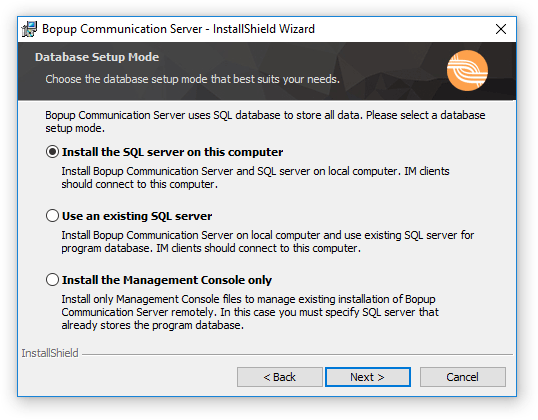
The remote management is a built-in feature of the IM server that allows to install only console application to connect and manage the messaging server. In order to use this function a primary instance of the communication server must permit it's remote control using secure password. To install the remote console a user can use same setup package file by choosing "Install the Management Console only" option during installation process.

Choosing installation mode of the IM server

Download Bopup Communication Server version 5.4.2 —  IM server for internal and public use with built-in message encryption and powerful management options


February 24, 2019

Chat server fixed critical issue with sending group message using ranges of IP addresses

New version 5.3.2 of Bopup Communication Server has been release and it is now available for download at https://www.bopup.com/downloads/ As always changes are available in the Update Center at https://updates.bopup.com/server/

Management Console of the communication server application
What's new:

Fixed issue with sending group and messages to IP ranges
Since version 5.3.0 the server supports multiple ranges of IP addresses through which users can be dynamically assigned. We recommend to all users that use versions 5.3.0 and 5.3.1 to update the server software to avoid troubles with delivering instant messages using IP ranges.

Interface improvements in Management Console app
The server console also added a huge number of improvements and fixes. It's News list now displays ranges of IP addresses that assigned groups have. News message profile pages also show assigned groups if they have only IP ranges. For newly added users that are not yet assigned to groups/news/file tasks the account profile screen displays Users assignment pane with buttons to easily manage assigned groups, News and File Distributions tasks.

Download Bopup Communication Server version 5.3.2 — In-house chat server for companies and clinics

September 12, 2018

New version 5.2.8 of Bopup Communication Server

We updated our Bopup Communication Server product and it's version 5.2.8 is available for download at https://www.bopup.com/downloads/


Among few minor fixes and improvements the new version creates and writes a log file for Active Directory (LDAP) integration function. So it is possible to check what user accounts were found and imported, and what not.

There is also an important fix for intercommunication between Management Console and service module. We found and fixed a critical issue when the server console run under non-administrator user account or remotely to manage an existing instance of the messaging server. The service did not get and process all delivered data via TCP/IP correctly so some data became missing. This could cause different issues on sending instant messaging from the console to multiple users and groups, adding/removing accounts and updating users' contacts, and many others. So we highly recommend to update an existing versions to the recent release.

Download Bopup Communication Server version 5.2.8 — On-premise instant messaging server that encrypts and logs all data

May 4, 2018

IM server and messenger client updates

Here are small updates of Bopup Communication Server and Bopup Messenger software available. Both products added possibility to select text in Message History interface.


So it is possible now to select and copy text directly from Preview area under Archiving & Logging views and everywhere in the server console app.


We believe that new additions will be useful to our customers.

New versions also include with minor bugfixes that improve and make the software product much stable.

Download Bopup Communication Server version 5.2.6 and Bopup Messenger version 7.0.1 — IM suite for encrypted and self-hosted messaging for wide-range of companies

March 24, 2018

IM server installers have been improved

We updated current installation packages of Bopup Communication Server by keeping the same version number 5.2.4. The updated installers improve installation of Management Console only (administrative mode) when the communication server is planned to be managed remotely.

Since new versions 5.x of the IM server creates and uses 'bcs50' SQL database by default then this could be an issue if the console is installed to manage an instance of the communication server that was previously upgraded from version 4.x or even from version 3.x. Those versions have 'bcs40' and 'bcs30' database names instead of 'bcs50' that made impossible installation of the remote console using setup files for versions 5.x

The updated installers add a new text field on the SQL Login setup dialog that allows to specify a proper database name. It's default value is 'bcs50' that can be changed in cases described above.

Download Bopup Communication Server version 5.2.4 — Private, stand-alone instant messaging server for offices and corporations

February 27, 2018

Display message history in conversation mode on the IM server

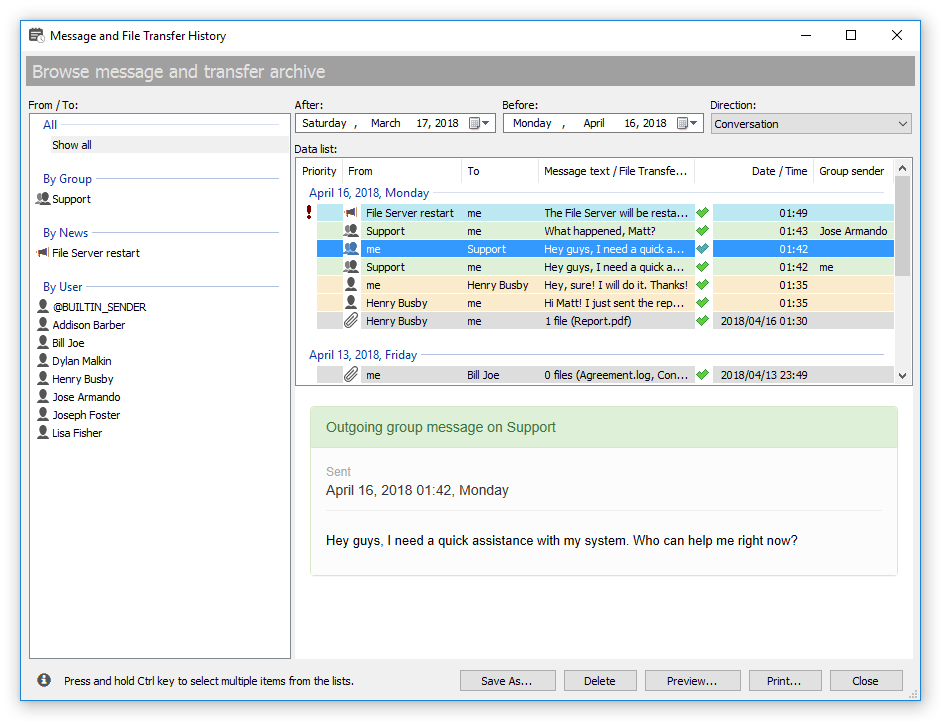
New version 5.2.3 of Bopup Communication Server is available for download in the Download Center. This release comes with a useful impevement of Management Console that now supports searching and displaying data from message archive in Conversation mode. This means that it is possible now to select two or more user recipients and show all messages that were sent only between them excluding all other messages and file transfers.

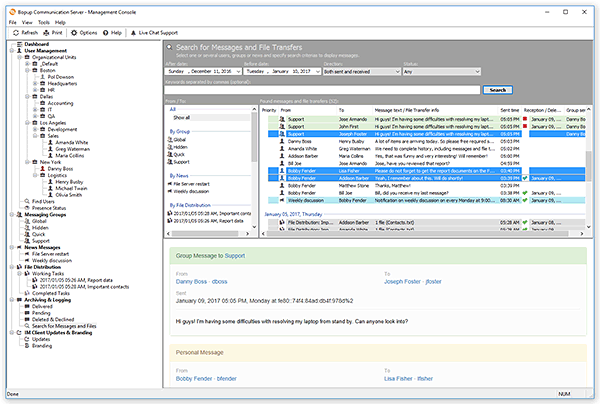
Search panel in the Manegement Console of Bopup Communication Server

In order to access the new function launch the server console and switch to Search for messages and file transfers view. Select recipients from the From / To list and use "Conversation mode" in the Direction drop-down list https://www.bopup.com/onlinehelp/server/guide/archiving_logging/search_messages_file_transfers.html Then click Search button to find and display only messages between the selected users.

Download Bopup Communication Server version 5.2.3 — A stand-alone corporate messaging server with data archiving and encryption

December 3, 2017

Bopup IM server fixes a delivery of user presence status

New version 5.2.2 of the communication server comes with minor fixes and improvements. At the same time this version is recommend for update because some fixes are important.

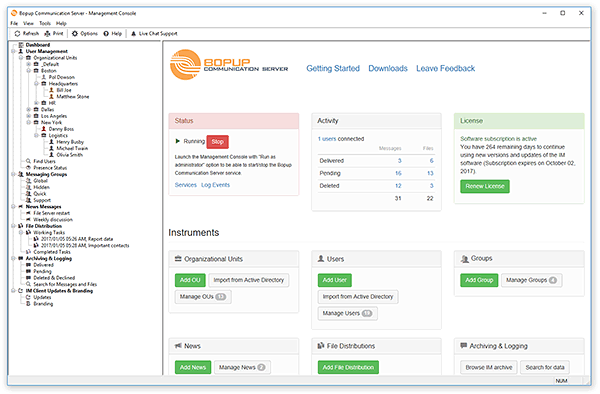
Management Console of Bopup Communication Server v5.x

What's new:

Fixed issues with delivery of contact's presence status to other users according to OU permissions
Bopup Communication Server now correctly delivers a presence status for contacts to users if there OU permissions are used on the server. Sometimes the IM server could not show a status of particular contact correctly, i.e. online/offline/away to others even everything works fine on his side.

Fixed error on console startup if it's another instance is already running
Another fix belongs to an error on console startup that appeared if another instance of the server console was already running. The latest release of the communication server fixed this issue.

Download Bopup Communication Server — EIM solution for encrypted, managed and archived communications

November 20, 2017

New version of the IM server with minor improvements

We release new version 5.2.1 of Bopup Communication Server. It comes with small changes and improvements, and also fixes some minor issues in the server console application.

As always an existing instance of the communication server can be easily upgraded to the new version. Just download new server package (a small setup file can be used for version upgrade) from Download Center and launch on a computer running the IM server. Information on upgrade of the server software is also available in How to install software patches and upgrades "on-the-fly" article.

Bopup Communication Server version 5.2.1 — In-house chat server with message encryption and conversatons archive

August 13, 2017

Known issue: The service returns error #1053 on start attempt

There is a possible issue with starting the service module of Bopup Communication Server that can bring error #1053 and fail to start. This issue usually occurs after installing latest Windows updates upgrading OS to recent Windows 10 or Windows 2012. In most cases the service must be re-registered in the system again that fix the problem. The information below contains steps on how to do this.

1. Access the instalation folder from a command line interface. Open Command prompt (CMD command in Start menu) under Administrative rights and navigate into installation folder of the IM server. By default the service is installed to \Program Files (x86)\Bopup Communication Server. So the command must be the following:

cd "\Program Files (x86)\Bopup Communication Server"

2. Unregister the service module by executing the following command:

bcssrvc /unregserver

Then ensure that Bopup Communication Server has dissappeared from Services list in Windows.

3. Register the service again by using the following command:

bcssrvc /service

Check that the Bopup Communication Server has been added to the Services list.

4. Close the command prompt window, launch the Management Console of the communication server and start the service.


March 26, 2017

New major update of Bopup Communication Server released

Our IM server application has been updated and it's version 5.1.0 has been released. This recent update of Bopup Communication Server comes with many new additions and changes, most of useful and important are described below.

What's new in Bopup Communication Server 5.1.0:

Added localization to Russian language
This release of the communication server added Russian translation including interface of the Setup Wizard, Desktop and Program menu shortcuts and the interface of Management Console. The localization also applied the IM Client Configuration Tool. This is the most useful and important update for our Russian customers and users.

Showing data from Messaging History is speed up
Management Console improved the speed of result list update showing data in Message History views. Prior versions could take a lot of time to refresh that lists if a huge number of messages and transfer have been selected. Now it should work faster and show up to 65,535 records instead of previous 10,000.

Management Console checks and registers IM service module if it is missing
Another annoying and common issue that our customers might face with is a sudden missing of Bopup Communication Server service from Services list. This could appear during Windows update or during a upgrade of the communication server software to a new version. Now the Management Console checks that the service exists in the system and registers it if otherwise.

Saving message logs to text files
The new version activates the option to save shown instant messages and file transfers in the Message History to a text file even no data is currently selected. In this case all shown data will be saved into a file. Otherwise only selected messages and transfers will be saved.

Fixed issues with upgrade previous versions
We noticed that sometimes new version 5.x of the IM server could not update an existing version 4.x correctly and interface of the Management Console started showing bugs like some resources missing. That could appear of the communication server was initially installed to a directory that differs from default location at "\Program Files\Bopup Communication Server\" (or "\Program Files (x86)\Bopup Communication Server\" on 64-bit systems) so some newly added resources of version 5.x still copied to default location. The version 5.1.0 fixed this.


January 18, 2017

A minor update: Bopup Communication Server 5.0.1 has been released

Here is a small update of the communication server available. Version 5.0.1 fixes a critial error that occurs when a user account is being deleted in Management Console. We adise to update an existing installation of the IM server to avoid any possible issues with deleting users.

Download Bopup Commuication Server 5.0.1 — Secure IM server with modern interface and powerful management options

January 14, 2017

Bopup Communication Server version 5.0 is available

We are proud to present a major version 5.0 of Bopup Communication Server software. The new release introduces great modern interface of Management Console that includes fully re-designed HTML views, flat icons and other images. We believe that version 5.0 of the communication server will be liked by our existing customers because it represents a new era of Bopup IM software platform.

A brief overview of the new interface changes

New modern design of the Management Console interface
We changed a lot of belonging the user's GUI in the new version of the console. Now the views to display user accounts, groups, news, file distirbution tasks look different. But same information can be read and accessed easily because some displayed details have been compacted.

How the few from new views look now
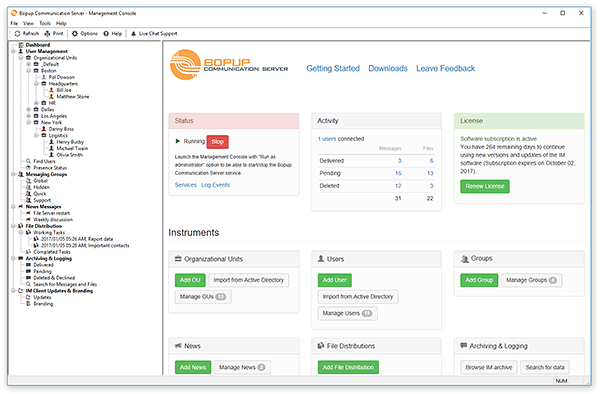
Dashboard view (former Welcome screen)
User account profile page
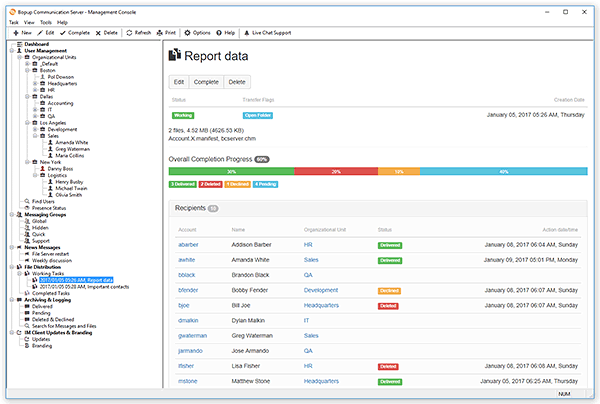
File Distribution task profile
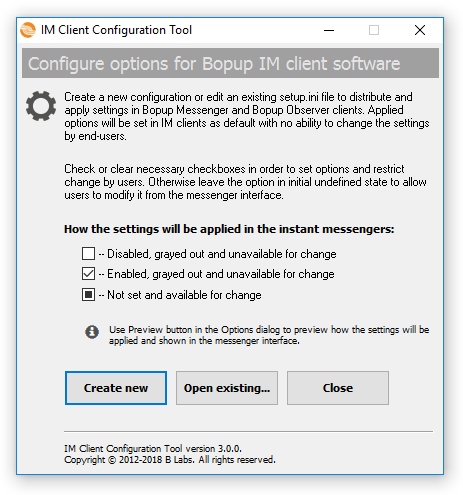
IM Client Configuration Tool
We renamed a well-known Setup.ini Configuration Tool that manages instant messenger settings from the server console.

IM Client Configuration Tool (former Setup.ini Configuration Tool)

That's because the Setup.ini file can be used on initial deployment of the software (to set the name of the IM server, for example) but in most of other cases the tool is used directly from Management Console to change and distribute new options to users with no handling the setup.ini file itself.

Added a check of Organization Unit permissions on moving user accounts
The new version now checks both previous and new OUs' permissions on moving users between then and if the permissions match then users' Contact Lists are not reset and keep unchanged.

Improved Active Directory Import Wizard
The interface of the Import Wizard added a log window that shows a process of the import procedure. That's the same log that can be accessed at any time from Tools menu.

A lot of minor and other important fixes and improvements
There are a huge number of small bug fixes and enhancements that the new version 5.0 of the communication server added. In overall the new release has become more stable and faster.

Download Bopup Communication Server version 5.0


October 4, 2016

Improvement updates of the messenger and observer applications

We released new versions of Bopup Messenger and Bopup Observer client. Recent updates come with a little improvement of a hidden option called UseSilentMode. The IM client does not show Connection Setup Wizard on startup of the setting is set to UseSilentMode=1. In this case only connection/disconnection balloon messages are shown in System Tray area.

By default UseSilentMode hidden option is equal 0 that means that the instant messenger displays all warnings/errors and automatically brings wizards to a user. This option can be set using setup.ini configuration file during initial setup or upgrade of the software, and also from the server console using IM Client Updates & Branding interface.

Download Bopup Messenger 6.8.4 and Bopup Observer 5.7.2 — Instant messengers with strong encryption for use on LAN or Internet