Showing posts with label remote console. Show all posts

March 1, 2021

Bopup Communication Server 5.8.4 improves remote management features and becomes much stable

We released new version of the communication server, it is version 5.8.4 This is a major release of the IM server application under which we were working few past months. 

This release contains a lot of changes, fixes and improvements belong to the main network (core) service. So now client connections and requests are performed faster and better. The service added caching functionality that reduces an overall number of requests to the database server.

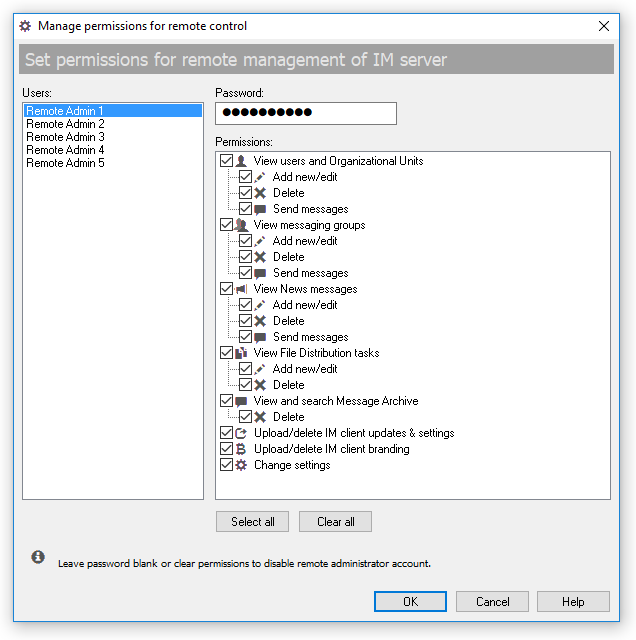
Another great change is a remote management function that is made much secure and safe. The server added 5 built-in administrator roles to make possible to assign permissions to each role. So now a remote Management Console can be run with restricted rights that are given by root administrator on the server.


These roles can be managed on Interface tab of the Options dialog in the server console

March 14, 2020

Bopup Communication Server version 5.6.1 released

New update of the instant messaging server is available for download. It's recent release is version 5.6.1 which added some new functionality and fixes minor issues.
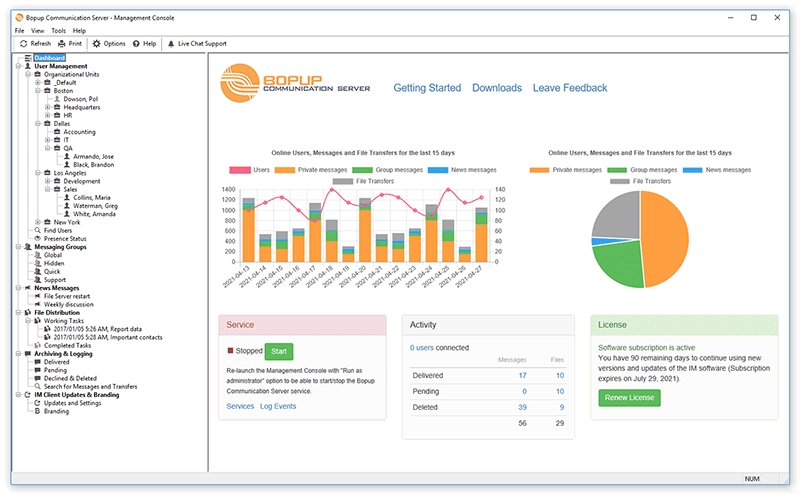
Management Console of the IM server (Dashboard screen)
What's new:

Added function to export message archive to CSV files
In addition to existing function that saves message history selected in Management Console to text files we extended the export functionality and added support to export archive to CSV files. CSV format is a text format in which the data is separated with semicolons. Such files can be opened in Microsoft Excel and similar office apps where the data is shown in different columns.

Added interface improvements in Management Console running in remote mode
This change belongs to the server console when it is running in administrator mode to manage a remote instance of Bopup Communication Server. Since the service module is running remotely in such cases then the console does not show Services and Event Log links on Dashboard screen. Also it changed a status of the service from Unknown to Running (since the remote console was  able to connect to IM server) without options to Start/Stop service.

Fixed error in remote Management Console if a wrong password is entered
There is an important fix in the server console that improves functionality of Management Console installed in administation mode. The new version fixes an error when an incorrect password is entered in the console on startup in order to connect to the server instance.

There are another fixes and mprovements that the new version 5.6.1 has.

Download Bopup Communication Server version 5.6.1 — Enterprise text messaging with Active Directory (domain) and mobile apps support
May 4, 2019

Bopup Communication Server 5.4.3 is released

We released new update of the self-hosted instant messaging server, it is version 5.4.3 The new release fixes issue with sender's first and last names that can be empty when the message is sent from Bopup Messenger for Android client. So we recommend to update the server software in anyway even mobile clients are not used in the system.


The new update also improves a version upgrade procedure of remote Management Console (Admin mode). Now the setup detects, stops and removes messaging service wrongly installed by prior versions of Bopup Communication Server.

Download Bopup Communication Server version 5.4.3 — Managed self-hosted instant messaging software for small office and large enterprise networks

April 18, 2019

Known issue: Remote Management Console may cause issues on communication server

We discovered some critical bug with installation of remote Management Console. The issue occurs after a upgrade of the remote console installation to a new version. Once the update is installed it registers and runs a service module. That file named bcssrvc.exe is copied too by a mistake because the remote console should not have any running services. As a result customer is having two or multiple instances of the service running on different computers (where the remote console is installed) and all of them connect and use same SQL database. When a computer with such remote console is rebooted it's local IM service closes all opened sessions for users currently connected to working instance of the IM server. This causes showing zero users connected in another consoles at the same time within other critial issues that stops normal operation of the messaging server.

We fixed this issue and all future version of Bopup Communication Server will not install and run the service when only remote console is installed. For existing customers we advise to check for Bopup Communication Server service in the Services panel on all computers with remote Management Consoles, stop it and change the Startup type to Manual or Disabled. Then restart main service module running on primary communication server instance.

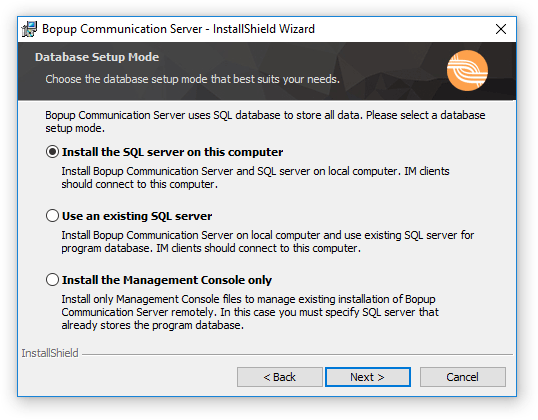
The remote management is a built-in feature of the IM server that allows to install only console application to connect and manage the messaging server. In order to use this function a primary instance of the communication server must permit it's remote control using secure password. To install the remote console a user can use same setup package file by choosing "Install the Management Console only" option during installation process.

Choosing installation mode of the IM server

Download Bopup Communication Server version 5.4.2 —  IM server for internal and public use with built-in message encryption and powerful management options


September 12, 2018

New version 5.2.8 of Bopup Communication Server

We updated our Bopup Communication Server product and it's version 5.2.8 is available for download at https://www.bopup.com/downloads/


Among few minor fixes and improvements the new version creates and writes a log file for Active Directory (LDAP) integration function. So it is possible to check what user accounts were found and imported, and what not.

There is also an important fix for intercommunication between Management Console and service module. We found and fixed a critical issue when the server console run under non-administrator user account or remotely to manage an existing instance of the messaging server. The service did not get and process all delivered data via TCP/IP correctly so some data became missing. This could cause different issues on sending instant messaging from the console to multiple users and groups, adding/removing accounts and updating users' contacts, and many others. So we highly recommend to update an existing versions to the recent release.

Download Bopup Communication Server version 5.2.8 — On-premise instant messaging server that encrypts and logs all data

March 24, 2018

IM server installers have been improved

We updated current installation packages of Bopup Communication Server by keeping the same version number 5.2.4. The updated installers improve installation of Management Console only (administrative mode) when the communication server is planned to be managed remotely.

Since new versions 5.x of the IM server creates and uses 'bcs50' SQL database by default then this could be an issue if the console is installed to manage an instance of the communication server that was previously upgraded from version 4.x or even from version 3.x. Those versions have 'bcs40' and 'bcs30' database names instead of 'bcs50' that made impossible installation of the remote console using setup files for versions 5.x

The updated installers add a new text field on the SQL Login setup dialog that allows to specify a proper database name. It's default value is 'bcs50' that can be changed in cases described above.

Download Bopup Communication Server version 5.2.4 — Private, stand-alone instant messaging server for offices and corporations