Showing posts with label major update. Show all posts

June 2, 2023

Bopup Communication Server version 5.11.5 is offered as a free for lifetime use with some minor limitations

 New version 5.11.5 of Bopup Communication Server is released. This update of the IM server comes with useful and important changes in the service module for a better support of a great number of user connections.

Another great change is an option to use the instant messaging server for free and for lifetime use. Starting from this release the server switches to a free limited mode after standard 45-day trial expires. In the free limited mode Bopup Communication Server delivers messages with length of 45 symbsols only and restricts file transfers for more than 1 Mb. At the same time up to 100 concurrent users from each type of the messaging clients are supported.

The activated free mode has no expiration so the server can be used in the limited mode for lifetime period.

Download Bopup Communication Server version 5.11.5 — Free for use IM server to send short insant messages and small files

January 20, 2022

Major update of Bopup Communication Server and new version of Bopup Messenger

Bopup Communication Server product has been update to version 5.10.0 This is a major release of the IM server that comes with great improvements, changes and bugfixes. 

First of all we improved SQL database structure by removing unnecessary and adding new indexes to tables that speed up an overall performance. There are also a lot of changes and improvements in the IM service module that operates better and faster on a high number of concurrent users. 

Management Console of the IM server adds a faster load of message log. We improved the lists and now data is shown rapidly even thousands of records are loaded. 

Another improvement is related to displaying charts on the Welcome and other profile pages. We improved SQL queries that select data so now the charts do not delay loading pages.

A new version 7.2.16 of Bopup Messenger is also available. This is a critical release of the instant messenger that resolve the issue with message popup received from non-contacts user. We strongly recommend to update the messenger to the latest version.

Download Bopup Communication Server version 5.10.0 and Bopup Messenger version 7.2.16 — Office IM Suite for encrypted communication between employees


July 5, 2021

Overall performance and new function called MyGroups: Meet new versions of IM server and secure messenger

 We are glad to inform that new major updates of Bopup Communication Server and Bopup Messenger are now available. There is a large list of changes and fixes described below:

What's new:

Added MyGroups feature
Recent versions of the software now support MyGroups feature that allow to create user groups directly from instant messenger clients. These function is available to Power User and Adminstrator account types only and it lets users to organize their own groups similar to Messaging Groups created on the IM server. Unlike regular groups MyGroups can be deleted by their owners. For more information about this feature refer online documentation https://www.bopup.com/onlinehelp/server/guide/mygroups/overview.html

Improved overall performance of the IM server
New version of the messaging server improves and fixes structure of the SQL database. We noticed that when the server database grows with a lot of transferred messages, user sessions and other internal information that causes different issues related to overall performance of the IM server. New update adds all necessary indexes and new fields to SQL tables to fix them so now the server should work faster and better.

Many interface improvements
The server console fixes issues in it's interface such moving between elements in the left tree using arrows on the keyboard, saving message/transfer log into text files, displaying last logon time in Find Users view, moving/deleting messages in archive views, and others.


May 15, 2020

Bopup Messenger for Android version 1.9.0

A new major release of Bopup Messenger for Android platform is available for download. Version 1.9 added support for 64-bit devices that were unable to run previous versions of the application.


The recent release also improves overall stability of the messenger which now remains working even it is removed from Tasks on the phone. Another improvement relates to outgoing messages, the messenger now removes all spaces and break lines at the end of text when a message is sent. The Sign in screen also shows a status of initialization, receiving groups and contacts under progress bar element.

Download Bopup Messenger for Android version 1.9.0 — Safe, internal and useful instant messenger for companies

May 3, 2020

A major update of Bopup Messenger for Android

New version 1.8.0 of Bopup Messenger for Android platform is available. In this release we added and improved a huge number of optons, and fixed many issues.


Time of last message is shown in Contact List and it's color depends on an age of the message 
A great addition is that now time of last message is shown in front of user/group in the Contact List. The time is also has different text color because it depends on an age of the last message: Most recent message are darker, and the color changes gradually to very light-gray if it was sent more than 6 hours ago.

Fixed an issue with connection to IM server that could occur on many Android phones and tablets
There was an issue in the messenger app when it returned #5000 error on presssin Sign in button on the Login page. That could be slow or busy device issue when internal resources of the application had not been initialized properly.

A huge number of other fixes, improvements and changes
There are too many minor fixes and improvements in application layout and design such as About dialog, conversation messages, and network connectivity.

Download Bopup Messenger for Android version 1.8.0 — Self-hosted, corporate, secure. IM client for business.

October 20, 2019

Great improvements of the secure messenger for Android

We released new major update of Bopup Messenger app for Android platform. It's new version 1.7.0 added support for application automatic launch on device startup for Android 8.0+ OS versions. Previous releases of the application had issues with auto-startup on latest versions of Android. Verison 1.7.0 also fully supports 64-bit devices according to Google guidance and requirements.


Download Bopup Messenger for Android version 1.7.0 — Safe and fast instant messenger for small offices and enterprise networks

March 25, 2019

Bopup Communication Server major update

We released new version 5.4 of Bopup Communication Server software that has great changes and improvements. The new version has changes in it's internal IM service that accepts and handles network connections made from users' messaging clients.

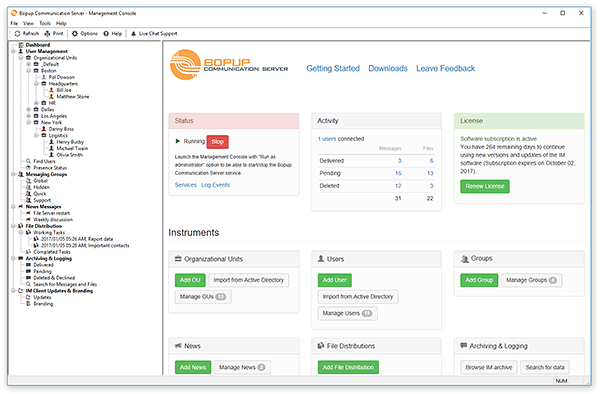
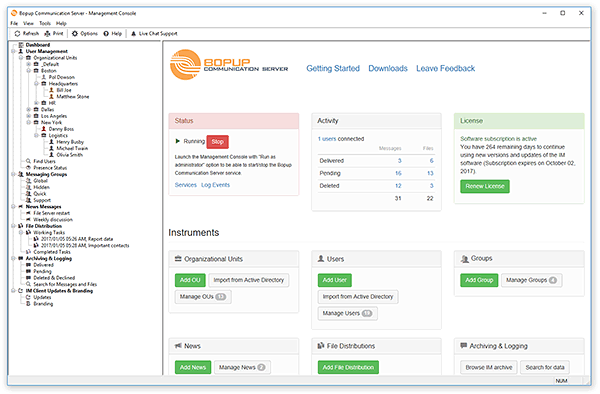
Startup page of the Management Console tool

What's new:

Added support for 3,200 concurrent users
The most important news that now the communication server can support up to 3,200 concurrent connections from Bopup Messenger and Bopup Observer clients. Previous value of 1,600 concurrent users was hard-coded in the software. We believe that now the IM server is ready to be used in large corporate and private networks.

Improvements in the service module to make the server much stable
There are a lot of improvements and enhancements we made in the service module that handles all users' connections over network. The service could hang or stop accept new connections from the messenger clients at some time so we reviewed and rebuilt it's source code to avoid all possible issues and problems. It works now faster, better and should take a smaller amount of computer RAM.

LDAP integration function fix
The function to automatically search and import user accounts from Active Directory include important fixes. It did not import users if non-default account is used by the function to connect to the AD catalog.

Localized event messages to Russian language
Now the service module writes information, warning and error messages to Event Log in Russian language if it is running on Russian version of Windows system.

Download Bopup Communication Server version 5.4.0 — Secure, fast and fully private instant messaging platform for encrypted corporate communications

January 23, 2019

Messaging Groups of instant messaging server now support multiple IP ranges

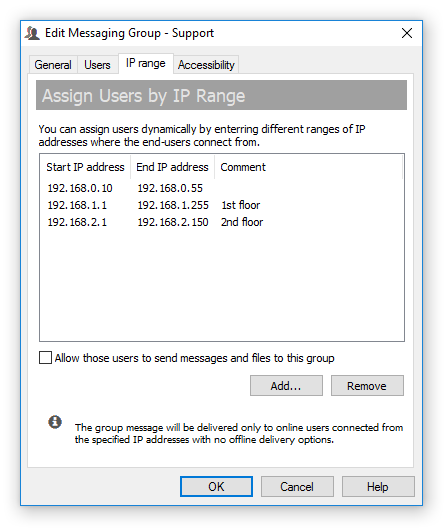
New version 5.3.0 of Bopup Communication Server is available for download. This is major release of the server product that added support for multiple ranges of IP addresses that can be now associated with each messaging group. Previous versions of the communication server supported only a single IP range that could be used to dynamically add users to the group. In some cases that was not enough if a customer has large and complicated network with different ranges of IP addresses. Now that question can be easily solved.

Assign users to group dynamically via multiple IP ranges

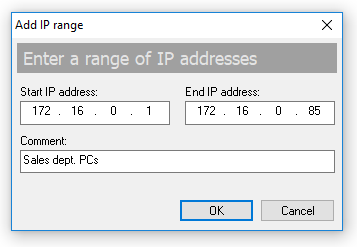
The "IP range" tab of the group properties dialog contains a list of associated IP ranges. Click Add... button to add a new range of addresses including a short comment string.

Adding a new range of IP addresses

To remove an existing IP range click Remove button.

All dynamically assigned users get an instant notification once they have been added or removed from a group.

The new version of the IM server also fixed a user display option that shows user names in the server console in a choosen format. It worked wrong regardless the selected format.

Download Bopup Communication Server 5.3.0 — Secure instant messaging server for small offices and corporate networks

August 21, 2018

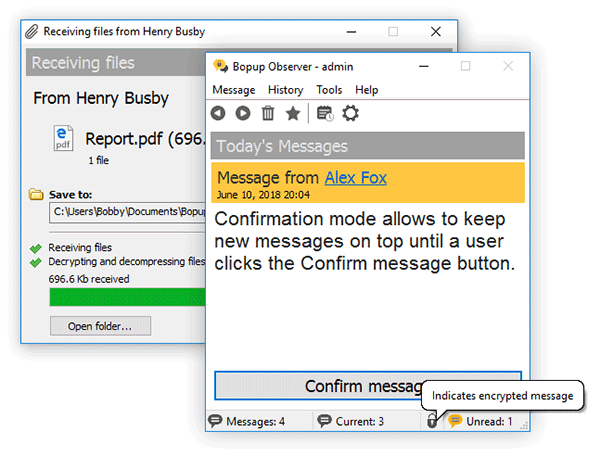
Bopup Observer 6.0 — Major version of the LAN pager software

We are proud to inform that new version 6.0.0 of Bopup Observer client has been released. This is a major update of the messenger software that contains a huge number of improvements, changes and additions.

Bopup Observer is a LAN messenger for one-way urgent messaging and alerting purposes

What's new:

New application interface with changed icons, wizards and toolbars
This release of Bopup Observer now looks similar to recent versions of Bopup Messenger client. It has a updated user interface with modern-look icons and images on toolbars. New graphic is performed in monochrome colors.

Improved exporting messages to a text file
Now the messenger exports and saves messages and file transfers from the history dialog in same order as the data appears in the list. We noticed that previous versions of the app exported data in reverse order.

Fixed error on clicking long URLs in the message text
There was an error in the messenger software when a user clicks on long length links shown in incoming messages. The new release fixes such issues.

Fixed issue with autologon on program startup or after disconnect from IM server
Bopup Observer fixed another annoying issue with automatic logon to the communication server on startup or when an established connection with the server has been interrupted. Now the messenger tries to connect to the messaging server again and again using previously entered credentials within the next 1-2 mins as it should.

Many other improvements and changes
Many unused menu items were removed from popup menu shown in System tray area and there is no confirmation message on program exit. New version of the observer operates smoother and better.

Download Bopup Observer version 6.0.0 — LAN pager software with modern look and built-in IM ecnryption

April 26, 2018

A new era has come: Bopup Messenger version 7.0 is released

Long 15 years. During the last 15 years our instant messaging client called Bopup Messenger was offerred within it's initial interface designed and produced in 2003 year! The messenger icons, bitmaps and toolbars were not changed from the time when Windows XP had been released.

Of course many things have changed from the beginning on the XXI century, and the vision of GUI and application design too. And those things that worked in the past started to look odd and ugly today. So the changes in the messenger interface became a critical need. So meet all-new Bopup Messenger version 7.0


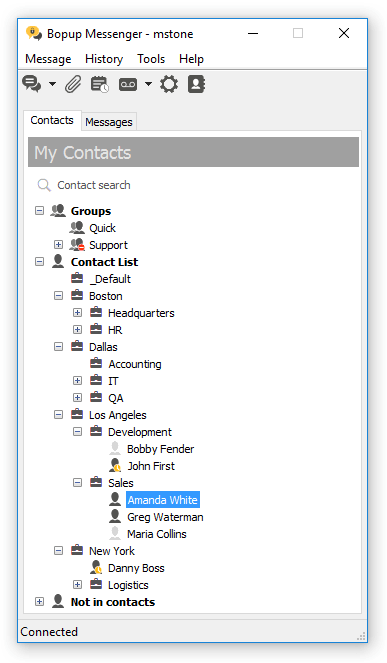
The new release of the messenger has flat windows and dialogs. We removed borders to make the interface more clear.


New toolbar images, new icons in Contact Lists and everywhere in the application. The new interface is performed in monochrome theme.

At the same time we tried to make new images similar to the previous interface so existing customers could continue using the software and the upgrade to the new software was not painful and difficult.


In addition the application removed many unnecessary functions that came from it's oldest versions, deleted some menu items to make the messenger much better, lighter and easier to use.

Bopup Messenger version 7.0 is fully compatible with previous versions of the communication server and IM clients so the version upgrade will not affect to instant communication and will not bring any issues to text messaging services.

Download Bopup Messenger version 7.0.0 — All-new and modern instant messaging client

April 24, 2018

Minor update of Bopup IM Server

Bopup Communication Server version 5.2.5 is available for download. This minor update of the IM server includes new version of IM Client Configuration Tools and comes with little improvements in the server interface that uploads MSI packages for automated messengers update.


The new version of the configuration tools looks similar to interface of Bopup Messenger version 7.0.0 whish is preparing to be released soonly.


April 13, 2018

Announce of Bopup Messenger version 7.0

We are too close to release a new major update of Bopup Messenger client. It's new version 7.0 will include a huge amount of improvements and updates. It comes with an all-new interface, new icons, images that looks amazing and modern.


October 13, 2017

Rebrand IM clients using the new versions of Bopup IM software

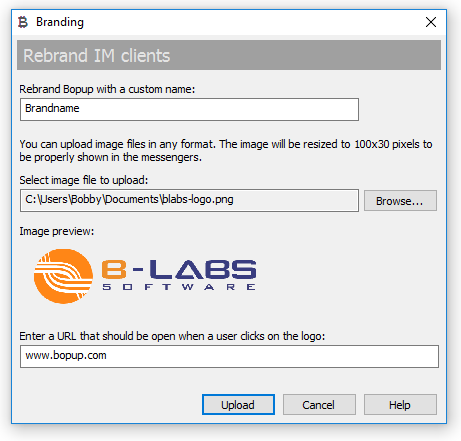
We release major updates Bopup Communication Server, Bopup Messenger and Bopup Observer software. The new versions introduce an enhanced functionality that allows to rebrand instant messengers from the server console and remove Bopup brand from the name of IM clients.

We implemented this according to many requests of our customers and because we also understand an importance of visual integration for the software that is used by employeers day by day. According to this the Bopup brand can be changed to any other brand name such as company/organization name, etc.

The rebrand function is now available in Management Console of IM server
Additional information can be also found in IM Client Branding document in the Online Help section that is also available in Russian language.

The rebrand function depends on a software license and it is available for free only to new customers during their 45-day evaluation period. Existing customers should pay additional cost depending on a total amount of client messengers they own to obtain the access to this function.

Download Bopup Communication Server 5.2, Bopup Messenger 6.9 and Bopup Observer 5.8 — The IM suite for secure and efficient real-time messaging over office LAN and Internet

October 3, 2017

Major update of Bopup Messenger for Android

We updated our application for Android platform and released it's version 1.1.0.


It has a huge of rewritten code and fixes many issues. The most important fix relates to lost of connection to IM server within few mins after the application went to background on Android device. Another fix is about playing sound notification on receipt of a new message. Version 1.1.0 also contains many other fixes and improvements. This is a recommended update for the application.

Download Bopup Messenger for Android — Secure messaging app for business and office communications

March 26, 2017

New major update of Bopup Communication Server released

Our IM server application has been updated and it's version 5.1.0 has been released. This recent update of Bopup Communication Server comes with many new additions and changes, most of useful and important are described below.

What's new in Bopup Communication Server 5.1.0:

Added localization to Russian language
This release of the communication server added Russian translation including interface of the Setup Wizard, Desktop and Program menu shortcuts and the interface of Management Console. The localization also applied the IM Client Configuration Tool. This is the most useful and important update for our Russian customers and users.

Showing data from Messaging History is speed up
Management Console improved the speed of result list update showing data in Message History views. Prior versions could take a lot of time to refresh that lists if a huge number of messages and transfer have been selected. Now it should work faster and show up to 65,535 records instead of previous 10,000.

Management Console checks and registers IM service module if it is missing
Another annoying and common issue that our customers might face with is a sudden missing of Bopup Communication Server service from Services list. This could appear during Windows update or during a upgrade of the communication server software to a new version. Now the Management Console checks that the service exists in the system and registers it if otherwise.

Saving message logs to text files
The new version activates the option to save shown instant messages and file transfers in the Message History to a text file even no data is currently selected. In this case all shown data will be saved into a file. Otherwise only selected messages and transfers will be saved.

Fixed issues with upgrade previous versions
We noticed that sometimes new version 5.x of the IM server could not update an existing version 4.x correctly and interface of the Management Console started showing bugs like some resources missing. That could appear of the communication server was initially installed to a directory that differs from default location at "\Program Files\Bopup Communication Server\" (or "\Program Files (x86)\Bopup Communication Server\" on 64-bit systems) so some newly added resources of version 5.x still copied to default location. The version 5.1.0 fixed this.