February 27, 2012

New versions of the instant messengers can export Message History to a text file

Today new minor updates of Bopup Messenger 6.0.3 and Bopup Observer 5.0.3 have been released. The new versions add a function to the Message History dialog that saves selected instant messages and file transfers to a text file. To export messages select one or multiple items from the list by pressing and holding Ctrl key and then click "Save as..." button in the window.

Download latest versions of the instant messaging clients

February 25, 2012

Bopup IM Client Software Development Kit (SDK) is now available!

We are proud to announce that Bopup IM Client SDK version 1.0 has been released and now is available for download. Using this Software Development Kit developers and companies can create instant messaging client applications and software that uses our Bopup Communication Server.


Bopup IM Client Software Development Kit (SDK) is a toolkit for Windows platform that provides documentation, samples and COM components for building powerful instant messaging functionality into existing applications, creating and developing a chat messenger software based a client/server architecture. Applications built on this SDK interact and communicate with Bopup Communication Server (IM server software) that must be installed as a server-side part of the instant messaging system.

Bopup IM Client SDK provides functions for connecting and establishing IM session with the communication server, sending/receiving personal and group instant messages, receiving urgent and high-priority tasks from the server, managing user's contacts, receiving presence status updates within the Contact List. This SDK supports various authentication methods to authorize users on the IM server: Simple, Windows Authentication (SSPI) and using Private login and password credentials entered by a end-user.

IM Client SDK allows to create two types of the end-user applications: one-way messenger like Bopup Observer software and full-featured IM client like our Bopup Messenger. The SDK is freely distributed and it depends on a 45-day trial of Bopup Communication Server. Pricing for IM client applications that are written using our SDK is based on a regular pricing for Bopup Messenger and Bopup Observer software. For more information on pricing please refer our order page at http://www.bopup.com/order/

To learn more about Bopup IM Client SDK and to download the development kit setup package please go to product page at http://www.bopup.com/products/sdk/

Developer's Guide and help is also available in the Online Product Documentation and can be found at http://www.bopup.com/onlinehelp/sdk/getting_started/overview.html


February 24, 2012

New version of Bopup Communication Server adds great functions

New version 4.0.9 of Bopup Communication Server has been released. This software is available with a free 45-day trial period and can be downloaded with no any registration from http://www.bopup.com/downloads/

What's new

Added function to save selected messages and file transfers from Archiving & Logging view to a text file

It is easy now to export selected data from the Message History shown in the Management Console to a text file. Select one or multiple messages and transfers by pressing and holding the Ctrl key and then go to "File\Save As..." in the main menu.


Added option to turn off logging and archiving instant messages sent through the communication server

Sometimes company's security policies require to do not store private information, instant messages and conversation history on it's servers. This improves an overall security and avoids situations when someone can access the message archive. But prior versions of our Bopup Communication Server log all messages sent between users by default and there was no option to disable the history.

New version of the IM server provides the setting to turn off the logging history. Now the Message History can be disabled on the "Logging" tab of the Options dialog box using the "Enable archiving and logging history on the communication server" checkbox. Please note that if you clear that box it will delete all messages currently stored in the IM server archive, i.e. all delivered (sent) and deleted & declined messages. Currently pending messages (offline messages) will not be deleted until those messages will be delivered to their recipients or deleted due to expiration timeout.

Download Bopup Communication Server version 4.0.9

February 12, 2012

Delpet Network Systems Ltd is our new VAR in Ghana and West Africa area

We are proud to represent our new partner and reseller, Delpet Network Systems Ltd company which became our distributor in Ghana and West Africa territory.


Delpet Network Systems Ltd Is an I.T. Outsourcing company. we provide the following services
  • I.T. Outsourcing services.
  • Remote helpdesk
  • VoIP Configuration and support
  • VAR (Symantec, Bitdefender, GFI, 3CX,AVG) etc.
Contact information

Delpet Network Systems Ltd
P.O.Box CT 2719
Cantonments-Accra
+233-266-497452
+233-307-033174
deladem@delpetnetworksystems.com
www.delpetnetworksystems.com

February 2, 2012

The server install is going back from MSI to EXE package

Today we released a new version of Bopup Communication Server that brings small improvements and changes. Version 4.0.8 is also distributed via EXE setup package files. We decided to move installation files from MSI extension to executable setups because it is easier to launch an EXE file with "Run as administrator" option on Windows Vista and later systems. Unfortunately Windows Explorer does not show that option in context menu if you right-click on a MSI file.

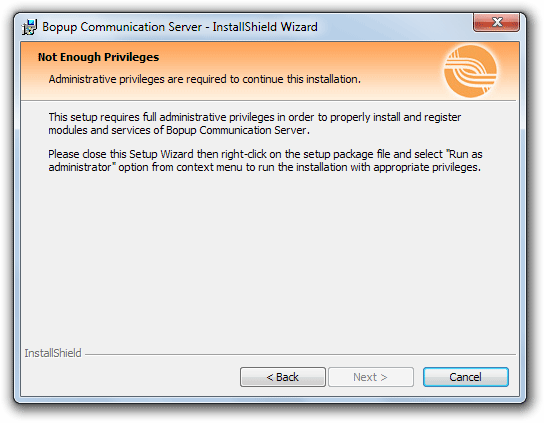
Since we received a lot of reports regarding installation issues of Bopup Communication Server on latest versions of Windows including 64-bit versions then we improved the setup and added additional verification of user's privileges (UAC). If the setup is running without required rights (full administrative privileges) then it shows appropriate error page.


It is strongly required to launch the setup package of the IM server with administrator privileges in order to properly install and register all modules and services in the system. It is easy to do that: right-click on the setup file and select "Run as administrator" option from context menu.

Download Bopup Communication Server version 4.0.8

January 30, 2012

Known issue: The communication service is not registered on 64-bit version of Windows

We were reported by our customers about installation issues of Bopup Communication Server software on 64-bit versions of Windows system. It seems the Setup Wizard cannot add and register the communication service module which is a part of the IM server software. That service accepts all incoming connections from instant messengers so if it is not running that causes a big trouble for all communications: IM is not possible!

We discovered that this may be an issue with current user's credentials in Windows system. In order to sure that the setup has appropriate rights to install and register the communication service you have to run the installation package with administrative rights. It is easy to do, just right-click on the setup file and select "Run as administrator" from the context menu.

But here is another issue: Windows Exporer does not show such menu option for MSI setup files, this is only available for EXE, BAT and other extensions of files. So you need to download this batch file and put it into the folder with the MSI setup package of Bopup Communication Server. Then right-click on the batch file and select "Run as administrator" menu and confirm selection.

You can also launch the setup without having to download the batch file above. Go to Start menu and type cmd and do not press Enter button. The cmd.exe should appear on the top of the menu. Right-click on it and select "Run as administrator". This will run the command prompt with administrative rights. Then navigate to folder with the MSI package. Type msiexec /i to run the installation.

Please note that this instruction is required only for 64-bit systems of Windows. If you have 32-bit version then you can run the Setup Wizard in a regular mode.


January 13, 2012

Bopup Communication Server: try for longer and pay less

We are proud to announce that new version 4.0.7 of Bopup Communication Server comes with great benefits.  We know that many companies and offices require a little more time to install, setup the server software and deploy client instant messengers. So we decided to extend standard trial period to give new customers more time to evaluate and test the IM software. And the new version of the communication server extends trial period from default 30 up to 45 days!

Another great news is the cost of the messaging server. We reduced the price of the application and now it costs only $190 US! Pay less and try for longer!

Download Bopup Communication Server version 4.0.7 with a 45-day FREE trial

January 11, 2012

BOPUP.DE: German version of our website has been re-designed

We have applied a new design for our german version of www.bopup.de website. Now it looks like our primary website at www.bopup.com and russian version at www.bopup.ru You can let us know what you're thinking on the new design and please report any issues you may found.

January 1, 2012

New version of the communication server improves and fixes security issues

In the latest days of the past 2011 year we released new version 4.0.4 of Bopup Communication Server. The new version adds an useful function which also closes an important security issue. That function is a password that can be set up on the communication server to allow or permit a remote administration of the IM server.

Prior versions of the communication server did no have any security functions and the Management Console could be installed on any computer in the Administrative Mode to manage and control an existing instance of Bopup Communication Server.

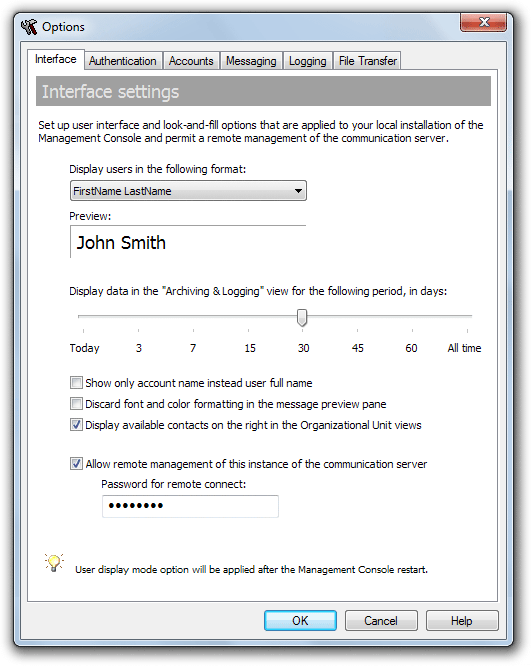
In order to enable the password proptection open the Options dialog box in the console and go to the "Interface" tab.

Click the "Allow remote management of this instance of the communication server" check box if you want to permit remote management of your IM server. Then enter a password that should entered in the remote console and in the Setup Wizard to protect your communication server.

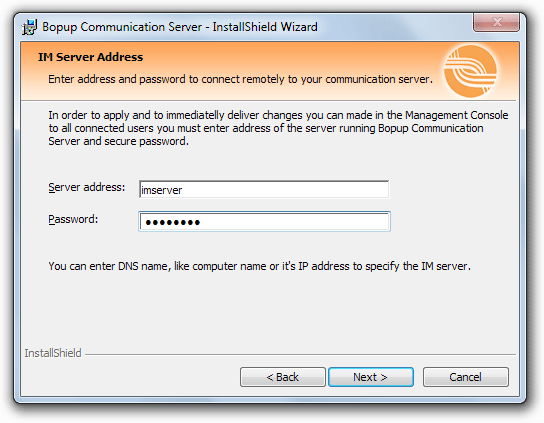
Now the Setup Wizard asks for security password if the Management Console is installed in the Administrative mode to manage an existing installation of the communication server. That password must be entered on the page which asks for the name/address of the IM server.


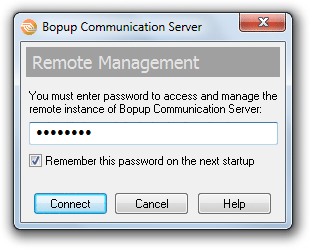
The same password is asked when the remote Management Console starts. You can save the password by checking the "Remember this password on the next startup" option.


Please note that communication service on the server computer must be started during installation/startup of the console on remote computer.

Download Bopup Communication Server version 4.0.4

December 12, 2011

New updates for the communicaton server and messenger software are available

New versions both of the communication server and IM client software have been released.

What's new

Bopup Communication Server version 4.0.3 adds xml manifest files into setup package that are placed into installation directory of the server application. Those manifest files added to support registration-free COM on latest versions of Windows system.

Latest versions of the instant messengers, Bopup Messenger version 6.0.2 and Bopup Observer version 5.0.2, fix automatic authorization with the communication server if Windows Authentication is used. Sometimes the IM clients might display the Login page to enter the user's name and password instead of automatic and silent authentication with Bopup Communication Server if the user is already logged to domain network.

Download the latest version of the instant messaging software

November 22, 2011

Critical update of Bopup Communication Server software

We need to inform our customers that new version of Bopup Communication Server is available for download. Version 4.0.2 fixes a critical bug with delivering offline messages to Bopup Observer messenger client. But at the same time sending offline messages to Bopup Messenger client works without any issues.

It is strongly recommended to update the IM server software if you have Bopup Observer clients on your network environment. Otherwise you can ignore this important update.

Download Bopup Communication Server version 4.0.2

November 13, 2011

Minor updates of the instant messenger software are available

New versions of Bopup Messenger and Bopup Observer IM clients have been released which fix small issues with Message History interface. These updates resolve errors with saving text messages into local history db containg a single quote (') sign. Now all messages can be properly saved into the Message History and displayed from it with no issues.

Download Bopup Messenger version 6.0.1 and Bopup Observer version 5.0.1