April 30, 2025

Bopup Messenger fixes displaying conversation on opening sending dialog

 There is a small but useful update of Bopup Messenger application. New version 7.6.2 fixes displaying previous messages when the conversation dialog is opened. There was an annoying issue with a scrollbar which hide messages and showed only a part of recent one regardles of size of the conversation window. Now the conversation is shown properly.

Download Bopup Messenger version 7.6.2 — Secure IM client for Windows PC

January 14, 2024

Meet "Sealed messaging" functionality

 New versions of Bopup IM client/server software introduce all-new functionality called "Sealed messages". This is a new type of instant messaging that requires an opening (unsealing) text messages before they can be viewed and read. Once message is unsealed the sender gets a notification on that and unsealed date/time is added into conversation.

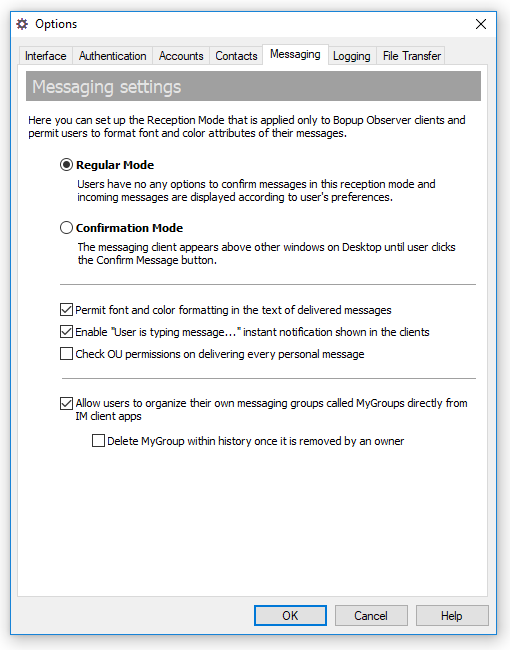
The new function is enabled on the communication server and after that it appears in the messenger options. The sealed messages can be sent among regular instant messages since there can be 2 options available in the sending dialog — send sealed or regular message. But it is also possible to configure the messenger and always exchange with sealed messages.

Turning on the sealed messaging on the IM server

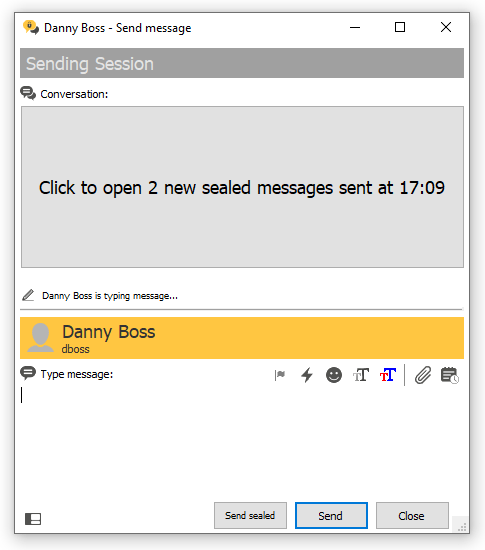
When a new sealed message is received the messenger hides a whole conversation and notifies a user that it is required to unseal the message to see and read it.

Receipt of sealed messages in Bopup Messenger client

Within a getting the recipient's reaction by a sender that the message has been opened and viewed the sealed messaging makes overall communication more secure and confidential. In some cases it prevents viewing and reading arrived messages by someone who may stay close to the recipient's workstation.

June 2, 2023

Bopup Communication Server version 5.11.5 is offered as a free for lifetime use with some minor limitations

 New version 5.11.5 of Bopup Communication Server is released. This update of the IM server comes with useful and important changes in the service module for a better support of a great number of user connections.

Another great change is an option to use the instant messaging server for free and for lifetime use. Starting from this release the server switches to a free limited mode after standard 45-day trial expires. In the free limited mode Bopup Communication Server delivers messages with length of 45 symbsols only and restricts file transfers for more than 1 Mb. At the same time up to 100 concurrent users from each type of the messaging clients are supported.

The activated free mode has no expiration so the server can be used in the limited mode for lifetime period.

Download Bopup Communication Server version 5.11.5 — Free for use IM server to send short insant messages and small files

May 6, 2023

Important update of Bopup Messenger application

 New version 7.4.18 of Bopup Messenger client is released. This update comes with critical fixes and important changes that affect to the application stibility and users status icons in Contact List.

The issue with updating users statuses started to appear from version 7.4.15 (April 2023), and the messenger did not change user statuses after conversation window opens for a first time. This is a critical bug so we strongly advise to update the messenger to recent version in order to avoid broken communication.

Download Bopup Messenger version 7.4.18 — Secure IM client with encrypted file transfer and text messaging


April 10, 2023

Major update of Bopup Communication Server — Version 5.11.0 is released

 New version 5.11.0 of Bopup Communication Server is available for download. This version comes with great improvements in SQL queries that improves overall speed of the communication and fixes many related issues. Among internal improvements the server added many interface changes and enhancements.


Connectivity and overall speed improvements

The recent release of the IM server fixes issues that could appear on a greater amount of concurrent connections. Previous versions of the server could add many warnings and SQL exceptions to Event Log viewer, and users couldn't connect to the server at the same time. Another fixes belongs to connection limit error that could appear on messenger startup. So this version is an important update.

Fixed issue with logging file transfers on disabled Message History

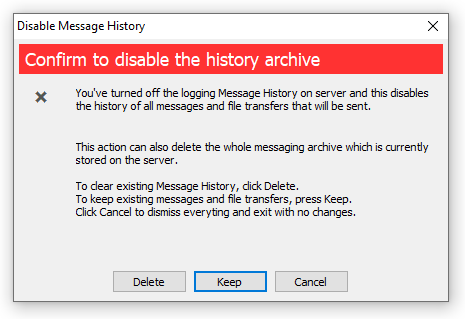
The new version fixes saving file transfers into history log when it is turned off. This problem occured only for file exchange. Now the server console shows a dialog when Message History option is switching off that lets keep or delete existing archive on the server.


Showing computer/DNS name for user accounts in addition to IP address

Now the server resolves and adds host name for connected users to show it everywhere in Management Console within IP address. It is a useful option if the server runs on a local network and lets administrator see user's workstation names. Host name is shown in the Presence Status, on user profile page and in archiving views that shows instant messages and file transfer information.

Download Bopup Communication Server version 5.11.0 — Fast, compact and secure self-hosted solution for instant messaging and file transfer

March 25, 2023

Bopup IM Client SDK version 1.3.0

 Our IM client SDK that is designed for C++, VB and Microsoft Office (VBA) developers has been updated to version 1.3.0 

The new release includes recent versions of libraries. This also avoids from issues when existing applications built on the SDK stopped working if recent version of Bopup Messenger/Observer client is installed on same workstation.

Review the following list of changes in order to properly apply modifications on migration from earlier versions of the development kit.

What's new in version 1.3.0:

  • OpenSession() method of all interfaces now includes new text parameter that receives a brand name.
  • Length of OU name passed by lpszOUName in TRANSFER_OU_STRUCT structure that is used by IServerClient interface (C++) was extended from 32 to 64 symbols.
Developer information is available in the online documentation.

March 7, 2023

Better integration with Active Directory in the IM server, and useful updates in the messenger apps

 We released new versions of both Bopup Communication Server and client applications including Bopup Messenger and Bopup Observer. 

The new version 5.10.10 of the instant messaging server provides great improvements in importing users from Active Directory catalog. It comes with a major update of bcscmd.exe command line tool which added support for new switches for better integration with LDAP.

New keys for /LDAP switch now can be the following:

/LDAP [update|sync|syncall] [bygroups] [createunits] [creategroups] <names> 

— [createunits] switch works like a checkbox in the Active Directory Import Wizard and allows to create Organizational Units on the communication server that are similar to OU tree in Active Directory or LDAP Groups (depending on import criteria);

— [creategroups] switch is similar to the key above but creates messaging groups on the server instead;

— <names> is an optional parameters that includes name of OUs or LDAP Groups to limit a search for user accounts in the specified objects. Several names must be separated by commas;

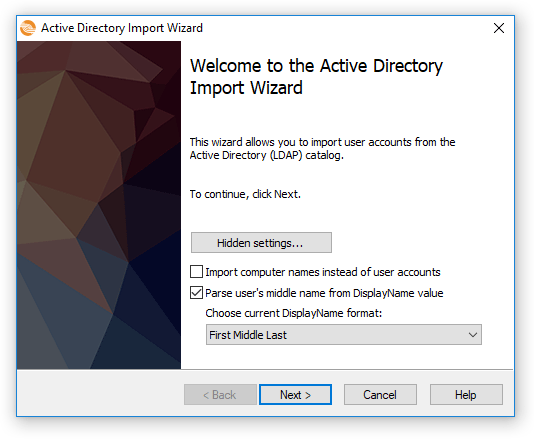
The Active Directory Import Wizard now can display hidden settings on it's Welcome page.

These settings can be also set from Windows registry and allows to import computer names instead of user accounts and parse for uses' middle names the DispayName value of a user object. This is mostly important in countries from Eastern Europe.

Client messengers now support hotkey button to call the application. Previously it could not be set up by administrator but now can be configured on the IM server from a range of A...Z letters.

Here is also improvement of automatic re-connect to messaging server on exiting from Sleep/Suspend mode in the messengers.

Download Bopup Communication Server version 5.10.10, Bopup Messenger version 7.4.7 and Bopup Observer version 6.1.4 — Simple, secure and fast to deploy instant messaging for enterprises

February 12, 2023

New server setup package with built-in SQL Server 2019 Express is available

 New installation package for Bopup Communication Server is available for download. We built a new setup file that now includes Microsoft SQL Server 2019 Express which can be installed as a built-in database server. 


This package will be useful for companies that plan to move their existing instances or install the messaging server onto latest Microsoft Windows OS such as Windows 10, 11 and Windows Server 2016, 2019 and 2022.

The new setup contains 64-bit version of the SQL Server software unlike other setup files ship with 32-bit versions of SQL Server 2005, 2008 and 2014. That caused an issue with installing Bopup Communication Server on recent releases of Windows operating system.

The new setup file is available for download in Download Center within other packages. It can be also downloaded using s direct link https://www.bopup.com/files/bcserverwsql2019.exe


December 12, 2022

Useful update of Bopup Messenger app for Windows PC

 New version 7.4.2 of Bopup Messenger for Windows OS is released. In this version we improved the instant messenger by adding enhancements to user interface and fixing some annoying issues.

This version added toolbar to main window of the messenger when it is switched to "All-In-One Chat" mode. That makes easier to access frequently used functions within main menu.


The new release of the application also fixes issue with automated reconnect to the communication server after previous loose of the connection or coming from sleep mode in Windows.

Another fix is related to window popup from system tray area. It is funny but the messenger did not want to restore it;s main window if the About dialog was opened before.

December 9, 2022

Bopup Communication Server added support of instant messengers for Linux OS

New minor update of Bopup Communication Server software is available, it' version 5.10.8 has been released. Among few fixes and improvements the new release added support for IM client for Linux platform. 


An instant messenger for Linux OS is currently in a development stage and it becomes our most priority task. We hope to release first preview version of the Linix app even in this year. 

Download Bopup Communication Server version 5.10.8 — IM server for encrypted text messaging and file transfer between company employees

November 17, 2022

Bopup Messenger app is now available in Samsung Galaxy Store

Bopup Messenger application for Android platform has been added to Samsung Galaxy Store. This makes easy to find and install the app on Samsung phones since they all have a built-in access to the store.


As always new users are able to evaluate Bopup Messenger for Android and Windows PC platform using a public instant messaging server running at bopup.me address. In order to connect to the shared instance of Bopup Communication Server we added few test user accounts such as demo, user and admin. Visit https://www.bopup.me for advanced details and credentials info.

Download Bopup Messenger for Android from Samsung Galaxy Store — Mobile client for private and secure texting over self-hosted IM


November 8, 2022

New versions of IM server and messenger clients improve Message History module

New versions of Bopup Communication Server, Bopup Messenger and Bopup Observer have been released. The new software totally improves the functionality to view Message History.

Now the server console lets search for transferred files for their filenames in the history. Previously the server performed the search only for message text.

New releases of the instant messaging clients added the search function in their Message Histore module. So it is possible now to find messages and files by enterring words which match that data.

Download Bopup Communication Server version 5.10.7, Bopup Messenger version 7.4.1 and Bopup Observer version 6.1.2 — Secure IM platform for office chat

November 1, 2022

Meet all-new "All-In-One Chat" interface mode in Bopup Messenger client

We are proud to announce new version 7.4.0 of Bopup Messenger client which now supports a single window mode.

Over the past years the messenger's user interface had not undergone global changes and included the main window with the user's contact list and separate chat dialogs with the ability to open several at once.

Classic interface with ability to have several conversation windows in the messenger

At the same time, thanks, among other things, to public messengers, instant messaging software started to use the interface with a single chat window. This became a de facto and affected, in turn, corporate IM software.

Therefore the new version of Bopup Messenger now supports a switch the interface mode within a single "All-In-One Chat" window.

"All-In-One Chat" interface mode in Bopup Messenger

The new mode is activate through program settings on the "Interface mode" tab. The regular look-and-feel mode with few conversation windows is now called "Classic Messenger".


Within the new release of the IM client we updated Bopup Communication Server which includes new  version of IM Client Configuration Tool. It lets enable the appearance mode in the messengers remotely and centrally on the server.


June 5, 2022

Обновления в интерфейсе сервера сообщений и клиентском ПО

Новые версии программных продуктов Bopup доступны для загрузки на вебсайте по адресу https://www.bopup.ru/downloads/

Bopup Communication Server версии 5.10.3 включает изменения в интерфейсе Консоли Управления, в которой отображаются соответствующие пиктограммы напротив учетных записей пользователей, групп, новостей и т.д. во всех списках, что в свою очередь облегчает идентификацию объектов. 

Вдобавок к этому все модули сервера были пересобраны с предыдущими более стабильными настройками, которые использовались до версии 5.10.0, так как в последнее время наша техническая поддержка столкнулась с массой отзывов о странной и нестабильной работе ПО.

Клиентские приложения Bopup Messenger и Bopup Observer также были обновлены. Версия 7.3.2 клиента Bopup Messenger содержит улучшения касающиеся интерфейсной части и теперь все отправленные скриншоты и изображения могут быть открыты по клику мышки в окне переписки подобно полученным данным.

Клиенты также поддерживают новое расположение файла настроек, который может быть скопирован в локальную директорию (папку установки), где находится исполняемый файл программы. Такой файл конфигурации имеет меньший приоритет по сравнению с downloaded.ini файлом загруженным с сервера мгновенных сообщений, но вместе с тем имеет больший приоритет по сравнению с общими настройками в профайле All Users и ProgramData.

Использование такого расположения для файла настроек может быть полезным на Linux системах, в частности ОС Astra Linux, когда рабочие файлы приложения копируются без установки и исполняются в среде Wine.

Загрузить Bopup Communication Server 5.10.3, Bopup Messenger 7.3.2 и Bopup Observer 6.1.1 — Приложения для организации системы мгновенных сообщений в среде предприятия


April 20, 2022

Exchange files smoothly without showing file transfer dialogs using the new version of Bopup IM

 Both Bopup Communication Server and instant messenger apps have been updated. The major addition is that now IM software supports sending and receiving files in the messenger clients without displaying separate file transfer windows. So now files can be sent immediately once they are dropped in conversation dialog.

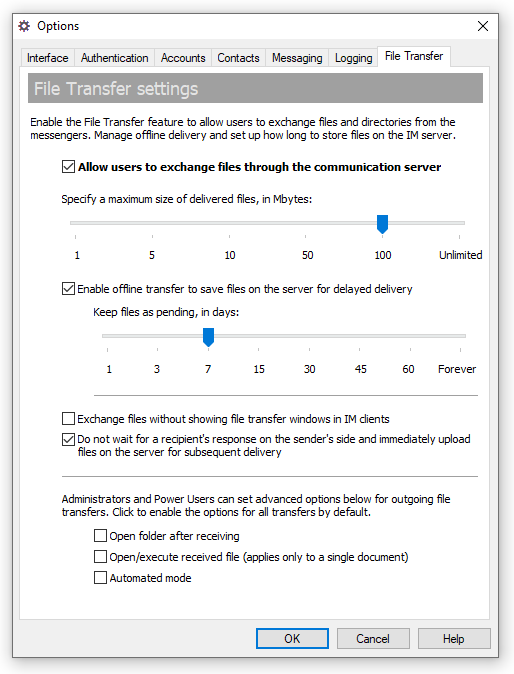
The new version is supported the latest version 5.10.1 of the communication server, Bopup Messenger version 7.3.0 and Bopup Observer version 6.1.0 In order to enable this feature go to Options dialog box in the Management Console of IM server and then switch to File Transfer. Enable "Exchange files without showing file transfer windows in IM clients" option.

Enable smooth file transfer through IM server settings

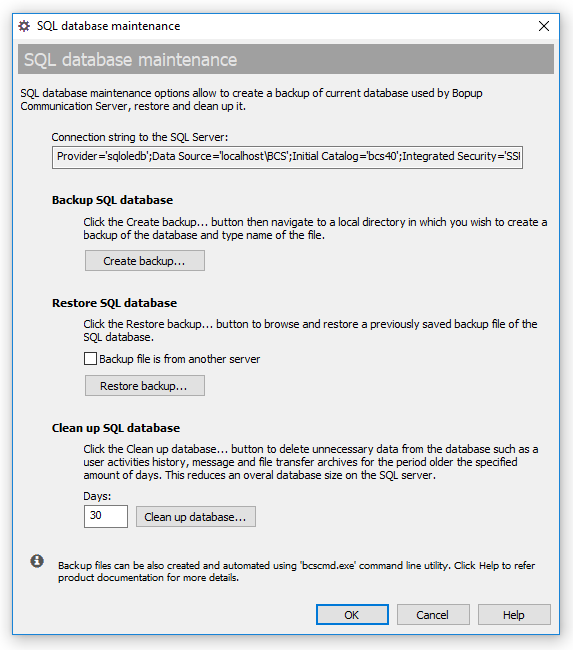
The new version of Bopup Communication Server also improves SQL database maintenance functionality. Now it is possible to specify the number of recent days for which to keep existing data on the communication server during the database cleanup.

Enter the number of days during the database cleanup

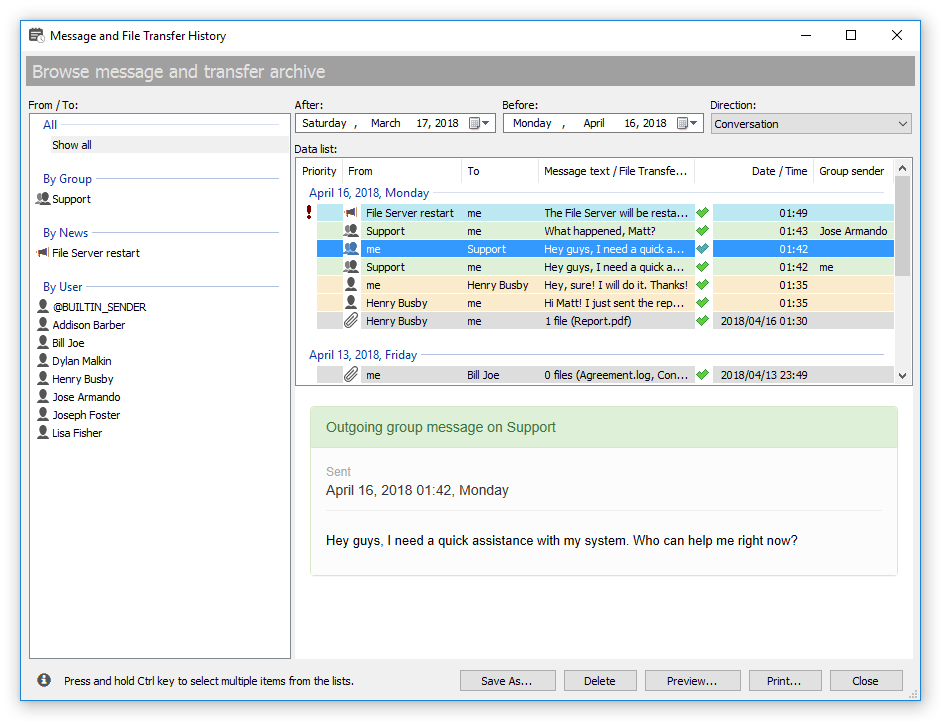
Both Bopup Messenger and Bopup Observer clients now come with improved Message History dialog that contains function to remove selected data from the local history archive.

Messages and transfers can be now deleted from the messenger history

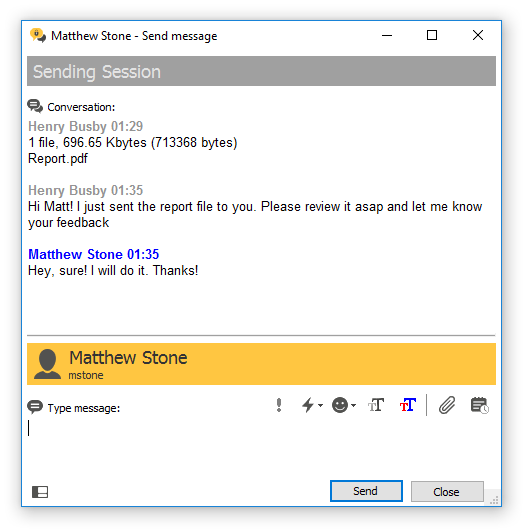
Bopup Messenger version 7.3.0 also adds File Transfer and Message History buttons on the conversation toolbar for a rapid sending file to recipient and displaying history for current recipient.

Improved toolbar in the conversation dialog of Bopup Messenger

February 26, 2022

Tips & Tricks: How to install Bopup IM clients for all users on a computer

Both Bopup Messenger and Bopup Observer clients installations occur to current user on a Windows computer by default. This means that automatic startup key in the system registry and program shortcuts are created in Start menu and applied to the user only under which the installation was running.

Another case this critical behavior occurs when the messenger app is deployed and set up remotely using Active Directory Group Policies (GPO) that lets run MSI files. Since such installations are run under System account then no shortcuts are created for any user account in Windows. 

In order to avoid this issue MSI files must be launched with ALLUSERS=1 passed to as a command line parameter. Please note that the parameter is a case-sensitive and must be typed in uppercase.

Example:

msiexec /i bopupmes.msi ALLUSERS=1

We hope that this information helps and makes deploying Bopup IM software much easier and handy.

February 12, 2022

A patch file for Bopup Communication Server version 5.10.0

A recent release of the IM server adds a huge number of improvements and changed to SQL Server database. This may cause issues on version update of the application. We build a special patch tool that fixes errors in the database. 

Download and launch this command line tool on a server running the communication server if you experience issues with starting the service after upgrading the application to version 5.10.0

Download patch file for Bopup Communication Server version 5.10.0


January 20, 2022

Major update of Bopup Communication Server and new version of Bopup Messenger

Bopup Communication Server product has been update to version 5.10.0 This is a major release of the IM server that comes with great improvements, changes and bugfixes. 

First of all we improved SQL database structure by removing unnecessary and adding new indexes to tables that speed up an overall performance. There are also a lot of changes and improvements in the IM service module that operates better and faster on a high number of concurrent users. 

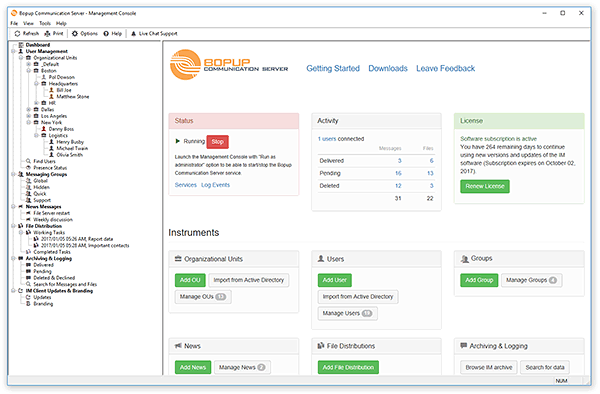
Management Console of the IM server adds a faster load of message log. We improved the lists and now data is shown rapidly even thousands of records are loaded. 

Another improvement is related to displaying charts on the Welcome and other profile pages. We improved SQL queries that select data so now the charts do not delay loading pages.

A new version 7.2.16 of Bopup Messenger is also available. This is a critical release of the instant messenger that resolve the issue with message popup received from non-contacts user. We strongly recommend to update the messenger to the latest version.

Download Bopup Communication Server version 5.10.0 and Bopup Messenger version 7.2.16 — Office IM Suite for encrypted communication between employees


November 21, 2021

Bopup Communication Server version 5.9.3 — Stable IM server with support of thousands concurrent users

 New version 5.9.3 of Bopup Communication Server is released. It is a critical update of the IM server software that fixes many issues and comes with great improvements. 

The general fix relates to a memory leak in the service module. Due to that problem the service could not be even properly stopped and remained in Windows memory all time with "Stopping" status. Another issue was the problem with data update when the service stopped reading data from the SQL database. In addition the service could stop sending News messages after couple hours of running.

We strongly recommend to our customers to update their existing instance of Bopup Commuication Server to the new version to avoid problems described above and the issue with using a huge amount of memory by the IM service.

As always the update procedure is too much simple — just download a new setup package and launch it on the server computer to upgrade program files with keeping all data and settings.

Download Bopup Communication Server version 5.9.3 — Organize secure instant messaging system over hundreds and thousands employees

August 31, 2021

Bopup Communication Server version 5.9.2 adds minor improvements

 We release new version 5.9.2 of the communication server. It is a minor release of the software products that contains few important changes.

Charts in Management Console display data for the last 7 days only

Due to slow operation of the server console on showing charts we decided to decrease the period for which to show the data for. The new version of the IM server now shows charts for the last 7 days instead of 15-day period. This brings an affect on large databases with great number of users and exchanged data. Anyway the charts can be displayed optionally and this feature can be turned off in the server options https://www.bopup.com/onlinehelp/server/options/interface_settings.html

New version of IM Client Configuration Tool 

The setup package of the communication server comes with a new release of the IM Client Configuration Tool that lets configure and manage messenger settings from the server console. The recent version of the tool contains minor fixes and important confirmation box when a server name/address is changed. 

Download Bopup Communication Server version 5.9.2 — High-level IM solution for real-time communications