June 1, 2012

Italian versions of the client instant messaging software are available

We are proud to inform our Italian users and customers that now Bopup Messenger and Bopup Observer IM clients are available in Italian language too. Localized versions include independent setup packages in Italian like we have for English, French, Spanish, Dutch, German and Russian languages. All setup packages are available in our Download Center at www.bopup.com/downloads/

Download Bopup Messenger version 6.0.6 and Bopup Observer version 5.0.6

May 31, 2012

The Setup Wizard of the communication server fixes issues with installing product on existing MS SQL Server

New update is available for Bopup Communication Server software. Latest version 4.0.13 fixes issues with installing the communication server on existing Microsoft SQL Server software. The main issue was that the Setup Wizard of Bopup Communication Server could not properly recognize an existing instance of the SQL Server running locally or on remote computer. Even a valid address of the SQL Server was entered. We found that this problem primary depended on a new version of InstallShield software which was changed a few versions ago and now is used to build setup packages of our IM software.

Download the latest version 4.0.13 of Bopup Communication Server 

April 25, 2012

Fixed saving Active Directory (LDAP) Integration settings on the IM server

Today new version of Bopup Communication Server has been released. Version 4.0.12 comes with built-in Microsoft SQL Server 2005 Express that was added in previous version of the server and also fixes problem with saving settings in the "Active Directory (LDAP) Intergation" dialog available in the Tools menu of the Management Console.

The problem with saving LDAP integration settings comes from version 4.0.0 of the communication server in which we moved that options from the Options dialog to a separate window. Starting from that version the Active Directory integration could not even turned on (by default it is off) so it was impossible to search, import and create user accounts "on-the-fly" from the LDAP catalog.

For more information about this feature please refer to online documentation of Bopup Communication Server available at http://www.bopup.com/onlinehelp/server/tools/active_directory_ldap_integration.html

Download Bopup Communication Server version 4.0.12

April 16, 2012

Bopup Communication Server is now shipped with MS SQL Server 2005 Express

We have good news regarding our communication server product. Now it's full setup package comes with built-in Microsoft SQL Server 2005 Express for both 32- and 64-bit Windows systems. The new SQL Server replaced MSDE 2000 software which was included to all previous versions of Bopup Communication Server.

What are benefits of using the new SQL Server software? We agree that size of the new setup package becomes bigger. But the main benefit is that Microsoft SQL Server 2005 Express is supported and can be installed on latest versions of Windows, i.e. Vista, 7 and later. This was the primary issue with the built-in MSDE 2000 software because it is not supported starting from Windows Vista.

Now there are no needs to learn our online guide and to manually install Microsoft SQL Server 2005/2008/2012 Express editions as a host SQL Server for the communication server software. The new setup package solves all these issues and Bopup Communication Server can be easily installed with the built-in SQL Server on all major Windows systems starting from Windows 2000.

Download Bopup Communication Server version 4.0.11

April 13, 2012

Microsoft SQL Server 2012 is fully supported by Bopup Communication Server

We glad to inform our users and partners that the setup of Bopup Communication Server has been tested on Microsoft SQL Server 2012 Express edition. Since that is the latest version of the SQL Server software from Microsoft then it is important to ensure that the server is fully supported by our IM server. The setup went fine with no issues.

We also updated our Step-by-Step Guide to Install Microsoft SQL Server 2005/2008/2012 Express Edition as a Host Database Server for Bopup Communication Server and added SQL Server 2012 to the list of supported versions. The download links for SQL Server 2005 and 2008 were also changed and now point to Microsoft SQL Server 2005 SP4 and Microsoft SQL Server 2008 SP3 setup packages.

April 11, 2012

Improved Live Chat support on Bopup.com

This is just a notification for our clients and customers about minor but useful improvements of Live Chat messenger available at www.bopup.com website. Now it's chat window can be resized in Microsoft Internet Exporer and other major web browsers. The messenger pop up window is also painted in orange color similar to a theme of a whole website.

Another great improvement is that a new floating bar painted green with "Live Chat" title added on the left of the pages. You always see it even you scroll the page up or down.

Do not forget that you can always and quickly contact us if you have some issues, problems or inquiries regarding our software, it's functions and pricing model. It is easy to start a live chat. Just click the Live Chat link on the top right of each page on the website or use the Request for a Live Chat link at the bottom under the Question & Support title.

March 30, 2012

Bopup Communication Server fixes a couple of issues if the logging Message History is disabled

New version 4.0.10 of Bopup Communication Server is released on March 30, 2012. This new version of the server fixes minor problems that may occur both on the server-side and instant messenger software if the option to log and archive Message History on the communication server is turned off.

Previous version 4.0.9 of Bopup Communication Server added a lot of improvements and went with new changes. Some of them was the option called "Enable archiving and logging history on the communication server" located on the "Logging" tab of the Options dialog box. Using that check box administrators can disable the Message History on the IM server at all. Sometimes that is useful and important in some companies.

Now version 4.0.10 fixes some issues that appear on IM client when an online message is successfully sent and the Message History is turned off on the IM server. In that case the instant messenger shows the sent message with the "The message has been saved on the server..." suffix in the conversation like for offline messages even the message goes to an online user.

The Setup Wizard also adds information on 19810 TCP/IP port that is used by the communication server as a primary port. Now it is easier to find and understand which network port should be configured and open on third-party firewall applications, router hardware, etc.

Download Bopup Communication Server version 4.0.10

March 16, 2012

Could Secure Instant Messaging Software Boost Your Business?

You'd be forgiven for thinking that instant messaging software is the sole domain of teenagers who want to chat to their friends — it happens a lot, after all — but there are actually a great many ways that a business can benefit from IM software. More specifically, an instant messaging suite that offers secure intra-office communication along with other features like file sharing and storage. Whether the business sells golf shoes or offers consumers a credit card transfer, IM can help. If you run a business or simply work in an office-based one, consider the amount that you use email over a given day or week. Hours and hours can be spent simply tapping emails back and forth to hammer out issues and discuss projects — but instant messaging offers a far more immediate solution. Rather than having to wait minutes or hours for replies, correspondence is sent in a matter of seconds. Provided each party is present at their end, an IM meeting can be a much quicker and more efficient way to organise a business. Let's take a look at some more ways that a secure IM solution could help give your business a shot in the arm.

Instantaneous communication wherever you are

While it's true that emails can now be received on phones and other mobile devices, for example if O2 mobile operator is used, there's nothing that has quite the same immediacy as an IM chat — except of course a face to face one. But at those times when a meeting like this isn't possible, IM can step in and fill the void. And with a secure solution like the Bopup Instant Messaging Suite, you can feel completely sure that all of the things you're talking about are in the strictest confidence. One of the major downfalls of popular IM clients is that they are susceptible to intrusion from malicious hackers and so on; with a bespoke IM system, your company can keep all of its IM communication within the walls of the business.

On-the-fly file sharing

Nothing is more frustrating than needing a file in the middle of a meeting, then having to walk all the way across an office or up and down an elevator just to find it. With a secure IM system at your business, you can send and receive files in a completely secure way. So no matter what you need, you can get it sent to you right away. This is particularly handy during meetings when files may need to be called upon at a moment's notice. Many IM suites also include a secure file system to keep all sent and received documents safe. When the risk of external interference is removed by running the IM software on a LAN or WAN, there comes an added benefit — the peace of mind of those in charge of running the business and securing business-critical information.

Message logging, accountability and tracking

Running a business is all about efficiency, so it's always useful when staff can track their progress. With a secure IM system like the Bopup Instant Messaging Suite, all messages can be logged on file. This means that managers or users can look up past chats and files that they've dealt with to double check details. Accountability is also important for businesses, so with everything tracked by an IM system, it's easy to see exactly who said what and when. All of these options need to be flexible, of course, so you can turn them on or off at will on most secure IM clients.

As you can see, chatting via IM is for far more than arranging birthday parties and social events — it can be used to genuine business advantage. It can make all communications within an organization centralized, and ensure that files are safe and secure at all times. With the flexibility offered by the options in a system like the Bopup Instant Messaging Suite, any business can turn the software into an invaluable tool for streamlining their processes and optimizing their intra-office communications. Whether they need to use it to encourage communication between colleagues, or they want to start optimizing meetings by holding them in virtual meeting rooms, a secure instant messaging solution can really help.

March 13, 2012

A new great tool to create and edit existing Setup.ini configuration file

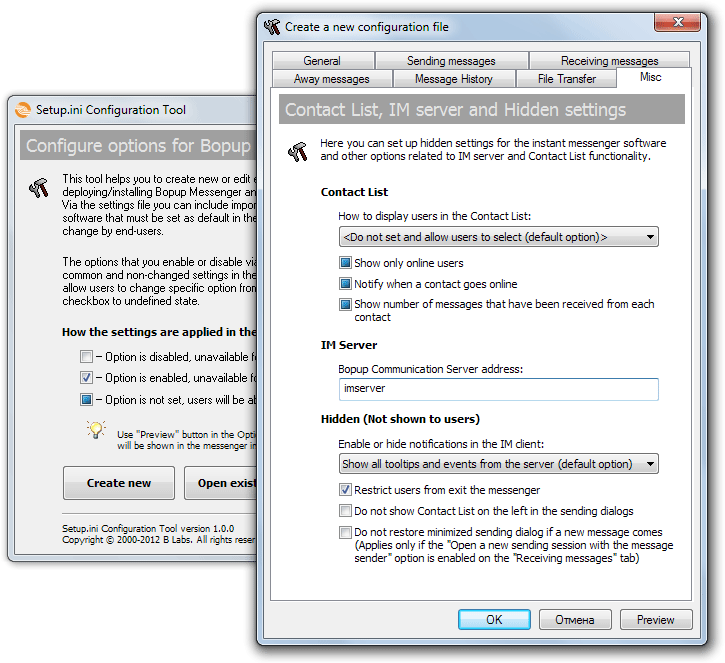
We are glad to inform our existing customers and new clients that we have released Setup.ini Configuration Tool that helps to easily and fast create new and edit existing setup.ini file.

As you know our IM client software, both Bopup Messenger and Bopup Observer clients can be installed and distributed with a set of pre-existing settings. In order to enable this the setup.ini must be placed into the same directory that contains installation package of the instant messenger. The main issue was that the setup.ini settings file includes a lot of options and it is a little difficult to learn which settings are for and to build a proper file by editing file's entry in a text editor.

To support our users we released Setup.ini Configuration Tool that is now available for download at http://www.bopup.com/files/setupcfg.exe This handy utility offers to set up all needed and required options via graphic interface that is similar to the Options window of the instant messenger software.


The options property dialog of the configuration tool looks like the Options dialog box in the Bopup Messenger client. So you can set and clear check boxes like you are working in the messenger. The most of the check boxes are 3-state and having checked, unchecked and undefined states. Each from these states applies the following in the end-user IM client software:
  • Checked — the option will be enabled and grayed out in the messenger client, users will not be able to change it
  • Unchecked — the option will be disabled and grayed out in the messenger client, users will not be able to change it
  • Undefined — the setting will not be included to setup.ini file that means that users will be able to change and modify it from the messengers
The configuration tool also provides a Preview function. It allows to quickly see how the settings will look in the instant messenger interface, i.e. which options will be enabled/disabled and which will be available for change to a user. To preview options click Preview button in the options property dialog.

March 8, 2012

Bopup IM software has been awarded as one of the Best Web Tools 2012

We are proud to inform that our IM software has been awarded and recognized by WebHostingSearch.com as one of the Best Web Tools for Instant Messaging Software category. They said that Bopup IM also provides the best quality products and services for your web solutions needs.

March 7, 2012

Bopup Messenger and Bopup Observer fix issues with a Sleep Mode in Windows

New versions of the instant messaging client software have been released. Bopup Messenger version 6.0.4 and Bopup Observer version 5.0.4 fix issues that are related to a Sleep (Suspend) Mode in Windows system. We were notified that if the conversation dialogs are left open on the desktop and the PC goes to suspend mode then the dialogs become blank and and contain no previous conversation when the computer resumes. This problem occurs only if the "Show only online users" option is enabled in the messenger which hides users in Contact List that are not on the IM network.

The new versions improve and now support a sleep/suspend mode in Windows. If the computer goes to a sleep then the messengers automatically disconnect from the communication server and do not try to re-connect again while the computer/laptop sleeps. Connection with the IM server is established only when Windows resumes and network connections are ready.

Download the latest versions of Bopup Messenger and Bopup Observer clients.

March 5, 2012

Tips & Tricks: How to reinstall Bopup Communication Server

This post explains issues and describes how to reinstall Bopup Communication Server software on the same computer. Since the communication server uses a SQL server database and can be also installed with built-in MSDE 2000 package (Microsoft SQL Server Desktop Engine) then it is required to do some operations manually after uninstall of the IM server software and before installing it again.

Below is a step-by-step instruction that helps to reinstall Bopup Communication Server on the same machine. Please note that this guide is valid only if the IM server was installed with MSDE 2000 software:

Step-by-step instruction on reinstalling Bopup Communication Server using built-in MSDE 2000: 
  1. Uninstall Bopup Communication Server from "Add/Remove Programs" panel.
  2. Uninstall Microsoft SQL Server Desktop Engine from "Add/Remove Programs" panel.
  3. Go to "Program Files" directory and remove "Microsoft SQL Server" subfolder from there.
  4. Reboot the computer if needed or to ensure that no any existing data will remain.
  5. Start the setup package of Bopup Communication Server.
There some differences if the communication server uses existing Microsoft SQL Server that is running on the same computer or externally. In that case both "BCS40" database and "bcsadmin" user login must be removed from SQL server using management tools. The subsequent installation of Bopup Communication Server will create the database and SQL login again otherwise if that data remains on the SQL server this will cause errors.

Step-by-step instruction on reinstalling Bopup Communication Server using external SQL server:
  1. Uninstall Bopup Communication Server from "Add/Remove Programs" panel.
  2. Remove "BCS40" and "bcsadmin" login name from the SQL server.
  3. Reboot the computer if needed or to ensure that no any existing data will remain.
  4. Start the setup package of Bopup Communication Server.