October 24, 2012

Access the instant messengers from Taskbar on Windows desktop

New versions both of Bopup Messenger and Bopup Observer client software added a new setting to the Options dialog that allows to show the application in Taskbar. This is a useful addition because it is possible to access and bring the main window of the messenger on the front of Windows desktop if it is already open by clicking it's icon in Taskbar.

The server-side application, Bopup Communication Server, has been also updated. It comes with new version of Setup.ini Configuration Tool that supports then new IM client setting.

The IM client software also improved applying settings that are instantly downloaded from the communication server. Previously downloaded options are now deleted from the messenger if there is no any settings file uploaded on Bopup Communication Server. This function allows to reset current settings in the messengers simply by removing configuration file from Management Console.

The latest version of Bopup Messenger improved a speed of sending messages. No delay occurs in the client if text messages are typed quickly and sent rapidly. Even there is some error with empty message field or selected recipient in the interface shown balloon tooltips do not block and do not freeze any more!

Download the latest releases of Bopup Messenger 6.1.2, Bopup Observer 5.1.2 and Bopup Communication Server 4.1.1

October 19, 2012

Updated Bopup IM Client SDK

Bopup IM Client SDK version 1.0.1 has been released. This version of Software Development Kit provides support for the latest version 4.1 of Bopup Communication Server and allows to receive structured tree-based contacts. It also includes updated CSClient.DLL and SecPrvdr.DLL COM modules that caused issues with their registration in Windows system.

Please note that SDK documentation has been updated too because it added new structures and constant definitions.

Download Bopup IM Client SDK version 1.0.1

October 14, 2012

Bopup Messenger User's Guide is available in a PDF file

Now User's Guide for Bopup Messenger client is available in a stand-alone PDF file. This documentation file includes help information for the product including software screens. A similar file is provided for Bopup Observer client too.

Thus it is possible now to browse help documentation for the messenger software online at Online Help, view CHM help files that are installed within the products or just download PDF help files to read the domentation locally on a computer or even print it.

Download Bopup Messenger User's Guide in a PDF file

October 13, 2012

Minor but useful updates of Bopup IM clients

We released new updates for the messenger software. Bopup Messenger version 6.1.1 and Bopup Observer 5.1.1 include some minor changes but important and useful additions.

Sending messages works faster

The new version of the messenger client removes a little delay on sending new messages in the conversation dialog. Prior versions disabled both the Send message button and message field while an outgoing message was delivering to the IM server. And this caused some nasty experience when outgoing messages are typed fast and need to be sent quickly. So we decided to remove the delay and to do not make the controls inactive. And the messenger "flies" now! Really!

Make it tiny

Now you can make the main window of the messenger shorter and thinner. It's a very useful ergonomic feature.

File Transfer dialogs remember their desktop positions

Both the sending and receiving files dialogs in the messenger now remember and keep their positions in order to restore the windows on the next appearance. If you transfer documents and set some Advanced options (available to Administrators and Power Users) then those settings are also remembered for subsequent transfers.

A lot of other improvements, minor changes and fixes

Download Bopup Messenger version 6.1.1. and Bopup Observer 5.1.1

October 9, 2012

Structured Contact Lists, instant update of IM client settings... Meet new versions of Bopup IM software!

We are happy to announce that new versions of Bopup IM software have been released. These major updates both of the communication server and instant messenger clients bring all-new and powerful functionality which makes our software more better, handy and useful.

What's new:

Structured Contact Lists

There was very annoying question in our software: plain Contact Lists in the messenger clients. Yes, it works fine if there is a little amount of users on the messaging network. But what's about if there is 50, 100 or more users?

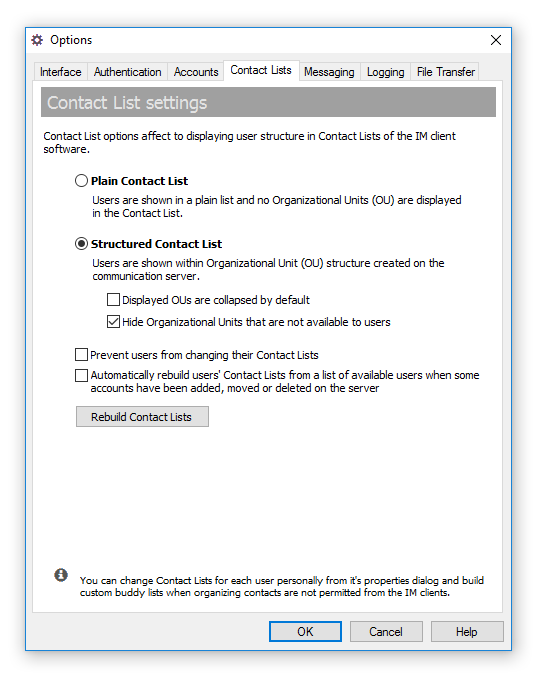
New version 4.1.0 of Bopup Communication Server added a new option that allows to deliver structured, tree-based contacts to connected users. Now users can be shown under their Organizational Units like you they are shown in Management Console on the server.


Instant update of IM clients settings

Another important features is a delivery new and changed settings to the messenger clients without having to wait for a new release. Now client settings can be distributed to users "on-the fly" — on the next connection to the IM server. New versions of the messengers always check for updated settings once they establish a connect with the IM server and download a new set of options if it is available.


Setup.ini Configuration Tool is now a part of the IM server

Do you know about our Setup.ini Configuration Tool? Did you have a chance to use it? Forget about changing and modifying the setup.ini file youself to set the options for the messenger software. Because we built a great tool that let generate or edit existing configuration file through a graphic interface that is similar to the Options dialog of Bopup Messenger.


Now this configuration tool is included to the communication server package. And it is also integrated to server's interface when you create and change IM client settings. Just click to edit the settings and the tool automatically uploads them onto the server.


Multiple conversations are opened in cascade mode

Bopup Messenger added a useful functions that checks and opens multiple sending dialogs in a cascade mode. This prevents a newly opened window from overlapping existings.


Show branding logo in the main window of Bopup Observer

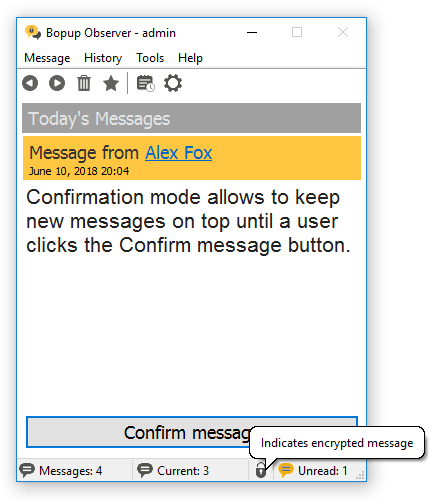
Bopup Observer now shows a branding logo uploaded on the IM server in it's main window too. We added a "Today's Messages" title too (like in Bopup Messenger client) to have a space to get branding logo visible.


Download Bopup Communication Server 4.1.0, Bopup Messenger 6.1.0 and Bopup 5.1.0

August 22, 2012

Our Live Chat support is now working again

We glad to inform customers and visitors that Live Chat sales & support is now available again on our websites. The Live Chat messenger stopped working about 1 month ago due to Microsoft's platform issues and we were not able to response to inquiries and questions via website messenger form. Anyway now it is working again that gives another way to reach us more quicker and faster.

August 21, 2012

New update of Bopup Communication Server is available

Bopup Communication Server version 4.0.14 is now available for download at http://www.bopup.com/downloads/ This is a minor update of the software but it comes with some great improvements.

What's new:

Added option to protect with password a launch of local Management Console

As you know you can manage your communication server remotely from another computer. It is possible just enable appropriate option and protect the sever with a secure password that must be entered during installation of remote Management Console and it's connection to the running instance of the IM server. But now a local installation of the console can be also protected. This version adds a new setting in the Interface tab called "Password protect launch of local Management Console" that asks for the password each time when you run your local Management Console. It is useful if the server computer is shared with users and they can work on it directly or via Terminal Services.


The new option is available only if remote management of the IM server is currently enabled.


Added ability to edit built-in and non-removable @BUILTIN_SENDER account on the IM server

This version of the communication server bring the built-in @BUILTIN_SENDER user account visible for editing in Management Console. This account is used by the server to send News messages and private messages to users and groups from the console. Some users asked us to change it's name because there was no option to change the account details or account name. Now this account is available in the console and you are able to add first and last names, edit it's descriptions, etc. Please note that the account cannot be deleted, disabled, renamed or moved to another Organizational Unit from the "_Default". The main idea was to make the sender name more friendly when it is showing in the messenger clients.


Fixed error in the Setup Wizard that occurs when only the Management Console is installed on Windows 64-bit systems

Version 4.0.14 of Bopup Communication Server also fixes setup error if only the Management Console is installed for remote control of an existing communication server. The error occurred only on Windows x64 platforms on the page of the Setup Wizard that asks the server address and password for connection.


Download the latest version of Bopup Communication Server

August 19, 2012

Annual cost for Upgrade Service is reduced for a small amount of the IM clients

Great news for small-size companies! We reduced the cost for Upgrade Service subscription for our customers who bought a small amount of the instant messengers. Now the annual fee for 10 and up to 20 IM clients is only $55 US. This cost includes upgrades to new versions of the starting from 2nd year. We reduced this price from 125 USD for companies that applied our offer for small-size companies and got the communication server at no cost. 

August 1, 2012

Live Chat is temporary unavailable

We have discovered that Live Chat application on our website at www.bopup.com is unavailable in the past few hours. We think that this is a Microsoft issue because Live Chat function is based on Windows Live Messenger service. We cannot say when it will start working again, and our apologizes for this problem.

Please notice that only website messenger form is temporary not working. Our toll free US/Canada phone within support and sales e-mails work as well.

July 19, 2012

Meet Bopup.It website

Today we launched an Italian version of our website at www.bopup.it Now information about our IM software products available in Italian language within localized versions of the client instant messengers that are offered in Italian too including setup package and user interface. We are glad to support native customers from Italy and Italian-spoken users around the World.

June 1, 2012

Italian versions of the client instant messaging software are available

We are proud to inform our Italian users and customers that now Bopup Messenger and Bopup Observer IM clients are available in Italian language too. Localized versions include independent setup packages in Italian like we have for English, French, Spanish, Dutch, German and Russian languages. All setup packages are available in our Download Center at www.bopup.com/downloads/

Download Bopup Messenger version 6.0.6 and Bopup Observer version 5.0.6

May 31, 2012

The Setup Wizard of the communication server fixes issues with installing product on existing MS SQL Server

New update is available for Bopup Communication Server software. Latest version 4.0.13 fixes issues with installing the communication server on existing Microsoft SQL Server software. The main issue was that the Setup Wizard of Bopup Communication Server could not properly recognize an existing instance of the SQL Server running locally or on remote computer. Even a valid address of the SQL Server was entered. We found that this problem primary depended on a new version of InstallShield software which was changed a few versions ago and now is used to build setup packages of our IM software.

Download the latest version 4.0.13 of Bopup Communication Server