July 29, 2011

Bopup Messenger 5.6.1 and Bopup Observer 4.4.1 fix issues with updating/removing existing common settings using a new setup.ini file

New versions of the have been released: Bopup Messenger version 5.6.1 and Bopup Observer version 4.4.1. These versions fix minor issues with deleting existing common settings from the [MESSAGING] section of the INI file on upgrade.

The new version of Bopup Messenger client also adds Ctrl+F5 hotkey in the main window to retrieve and update Contact List and assigned messaging groups from the communication server in manual mode.

We have also updated the SETUP.INI file in the Downloads section on our website because version of the configuration file did not include the most of newly added settings from the [RECEIVING] section designed for receiving group and news messages supported by the latest versions of the messengers.

Download new versions of the Bopup IM client software

July 28, 2011

Our new reseller in Russia: SoftMarket24

We have signed a partnership with SoftMarket24 company which now represents and sells our online in Russian Federation area. Our chat and IM products are available for purchase at SoftMarket24.ru

July 5, 2011

Purchase multiple IM software products at a single order page

A great improvement has been added to placing online orders functionality. Now if a customer purchases Bopup Communication Server, Bopup Messenger and/or Bopup Observer software there are no needs to fill out forms for each product separately. Just use our online calculation form to get a cost for the IM software at www.bopup.com/order/ page and click the Place online order for the IM software link appears within results. It forwards to a common checkout page of multiple IM products.

June 24, 2011

New versions of the instant messenger enhance receiving and notification usability

New major versions of the IM clients have been released today. Bopup Messenger version 5.6.0 and Bopup Observer version 4.4.0 add and improve message receiving performance. The new versions add separate notification settings for receiving personal messages, i.e. messages sent directly to a user, and for receiving group and news messages. This allows to tune the messengers more effectively and handy.


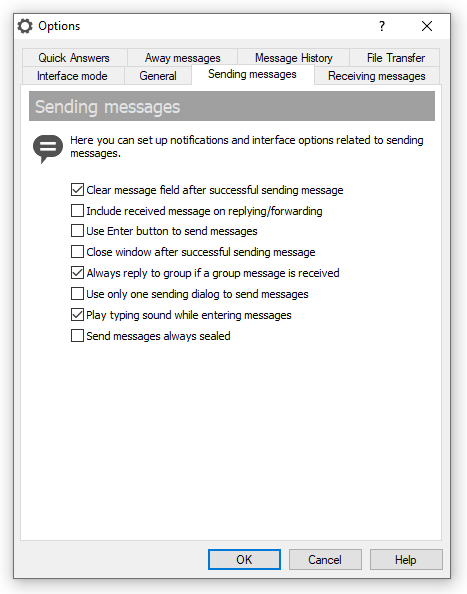
In addition in order to do not overload a single tab of the options dialog box Bopup Messenger adds different tab for the sending options.


SETUP.INI file changes
Since sending and receiving options have been moved to another tabs in Bopup Messenger client the SETUP.INI configuration file has been also changes by a little. Settings from [MESSAGING] tab have been moved to two different sections: to [SENDING] and [RECEIVING].

The new version of Bopup Messenger also moves the "OpenMinimizedSendingDialog" option from [HIDDEN] section of the SETUP.INI file to [RECEIVING] section. It is also available for receiving group/news messages and added as a new "GroupOpenMinimizedSendingDialog" setting too. For more information please download and see comments in the SETUP.INI configuration file So if you use and plan to distribute the new versions of the instant messaging clients via the setup.ini file please update your existing file first.

Download new versions of the instant messengers

May 23, 2011

Bopup Scanner version 2.1.7

New version of Bopup Scanner is available. Version 2.1.7 comes with minor improvements and changes.

This network tool is designed for administrators who want to scan a LAN and get NetBIOS names (logged user names) within MAC and IP addresses of available computers. Bopup Scanner does not require installation and can be simply copied on another computer, USB flash drive, etc.

Download Bopup Scanner 2.1.7

April 27, 2011

Minor version update of Bopup Communication Server

Bopup Communication Server version 3.3.26 has been released. This version of the IM server adds minor improvements and changes.

By the way, it is easy to install over existing software. Do you read our How to apply patches and upgrades for the Bopup Instant Messaging (IM) software article that describes an upgrading procedure both for the communication server and ?

Download Bopup Communication Server version 3.3.26

April 24, 2011

Meet our UK software reseller: QBS Software Limited company

We extend our software distribution channels and know how this question is important. We are proud to inform our customers in UK area that we start to sell our Instant Messaging (IM) and chat software products throught QBS Software Limited company, the largest, famous and leading software supplier in Europe.


About QBS Software Limited

Established in 1987 to provide tools to the developer community, QBS Software has expanded to become a leading software supplier in Europe providing thousands of products to developers, designers, IT Managers, Network Administrators, DBAs and Corporate Buyers. Products range from IDEs to code tools, components to Installation tools as well as security, reporting, installation, web, database, help creation, system tools and application software.

QBS has developed a keen expertise in product marketing and management alongside sophisticated in-house publishing and fulfilment. We have an extensive network of industry connections and commercial relationships with software publishers and vendors throughout the world, many of whom rely on QBS Software to build strong markets for them in the UK and Europe. QBS Software is an active participant in leading industry exhibitions, conferences and roadshows and works closely with various user groups.

The QBS web site is an integral part of our business, providing up-to-date news and product information and a practical and secure online purchasing facility.

We also provide software immediately via ESD (Electronic Software Delivery) for certain products.

Visit QBS Software Limited website at www.qbssoftware.com

April 12, 2011

The communication server improves selection in the Organizational Units trees

New version 3.3.25 of Bopup Communication Server comes with a little but useful improvement. It adds a function called "Invert selection" that appears in the "OU Permissions" dialog to manage visible Organizational Units to a specific unit. The same button is added on the "Accessibility Options" tab of the Messaging Group properties.

This function inverts currently selected Organizational Units in the tree: checked boxes become unchecked, and vise versa, unchecked units are reverted to a checked state. The new function helps administrators and managers to select required Organizational Units with ease and more quickly.

Download Bopup Communication Server version 3.3.25

April 9, 2011

Bopup Messenger fixes issues with sending instant messages to multiple recipients

New version 5.5.13 of Bopup Messenger is ready for download. This fixes issues that occur on sending messages simultaneously to multiple users and/or assigned messaging groups.

What's new:

As you know the messenger supports multiple selection in the Contact List/Groups by pressing and holding Ctrl key. So if a user selects multiple recipients on the "My Contacts" tab in the main window of the messenger, clicks "Send message" button to open sending dialog box, types his message and presses the "Send message" button then the following error message is shown even multiple users are selected: "Please select one or multiple recipients from your contacts".

Another issue is related to displaying message in the Conversation field of the sending dialog box if it has been sent to multiple recipients. The message text appears missing or with a very small size of the font.

Download Bopup Messenger version 5.5.13

April 8, 2011

Minor update of the communication server software for business IM

Today, 8th April 2011, new version of Bopup Communication Server has been released. Version 3.3.24 comes with minor bug fixes and improvements.

This version fixes several user's interface (UI) bugs when some text labels and captions were not shown properly. Another bug fixes are related to notification messages that are sent to connected users if some to another. The server might incorrectly send different notifications to the same connected user simultaneously instead of sending a single message only.

Download Bopup Communication Server 3.3.24

April 3, 2011

New version of our free network scanner software

Do you know that we also have Bopup Scanner freeware product? That network utility is a useful tool for network administrators and users who want to explore their local area network (LAN) and to find all available computers within IP and MAC addresses, logged user names from NetBIOS table. The scanner also recognizes and displays HTTP (Web) servers running on remote computers on a LAN by scanning 80 and 8080 TCP/IP ports.

New version 2.1.6 fixes a critical error which may occur immediately after the scan process completes.

Find our more about our Bopup Scanner software on the product page at www.bopup.com/products/scanner/

April 2, 2011

Critical fix: Issue with a blank convesation in the Sending Session dialog

New version of Bopup Messenger 5.5.12 have been released. It fixes a critical issue with a blank conversation dialog that appears in the Sending Session window if it automatically pops up on incoming new message. This bug occurs only of the local Message History in the messenger is turned on and only in versions 5.5.10 and 5.5.11 of the .

We strongly recommend our customers and clients to update their messenger software to avoid this issue. New version 5.5.12 can be downloaded from www.bopup.com/downloads/