December 12, 2011

New updates for the communicaton server and messenger software are available

New versions both of the communication server and IM client software have been released.

What's new

Bopup Communication Server version 4.0.3 adds xml manifest files into setup package that are placed into installation directory of the server application. Those manifest files added to support registration-free COM on latest versions of Windows system.

Latest versions of the instant messengers, Bopup Messenger version 6.0.2 and Bopup Observer version 5.0.2, fix automatic authorization with the communication server if Windows Authentication is used. Sometimes the IM clients might display the Login page to enter the user's name and password instead of automatic and silent authentication with Bopup Communication Server if the user is already logged to domain network.

Download the latest version of the instant messaging software

November 22, 2011

Critical update of Bopup Communication Server software

We need to inform our customers that new version of Bopup Communication Server is available for download. Version 4.0.2 fixes a critical bug with delivering offline messages to Bopup Observer messenger client. But at the same time sending offline messages to Bopup Messenger client works without any issues.

It is strongly recommended to update the IM server software if you have Bopup Observer clients on your network environment. Otherwise you can ignore this important update.

Download Bopup Communication Server version 4.0.2

November 13, 2011

Minor updates of the instant messenger software are available

New versions of Bopup Messenger and Bopup Observer IM clients have been released which fix small issues with Message History interface. These updates resolve errors with saving text messages into local history db containg a single quote (') sign. Now all messages can be properly saved into the Message History and displayed from it with no issues.

Download Bopup Messenger version 6.0.1 and Bopup Observer version 5.0.1

November 9, 2011

Minor update of Bopup Communication Server. It's version 4.0.1 released.

A new small update of Bopup IM Server software is available for download.

New version 4.0.1 fixes issues that are affected to new users of the . Thus some bugs were resolved in the Setup Wizard of the communication server which does not open a link to our Guide on installing MS SQL Server 2005/2008 Express Edition instead of built-in MSDE 2000 software. Another important error in the installation was incorrect name of the SQL database written into system registry. If the setup package without MSDE 2000 software was used (bcserver.msi setup file) then that problem affects to all users that tried to set up the communication server version 4.0.0 using an existing SQL server.

Download Bopup Communication Server version 4.0.1

November 8, 2011

Meet all-new BOPUP.COM website

This post is not related to our instant messaging software but refers to a new design of our website at http://www.bopup.com It is fully re-designed and made easy, modern and nice looking. We sure that the new design is a next level in our roadmap on development and growth of Bopup IM software. Thanks for staying with us.

October 26, 2011

New magor versions of Bopup IM software are now available!

We glad to announce that we released new major updates both of the communication server and instant messaging client software. Bopup Communication Server 4.0, Bopup Messenger 6.0 and Bopup Observer 5.0 are now available on our website at Download Center

The new releases look and work like prior versions of the software. But great improvements and changes are inside: the software is built on a all-new client/server communication protocol which was improved and made more stable and flexible.

Since version 4.0 of the communication server is incompatible with prior versions of the instant messaging clients then existing IM software should be updated in a right way. Please review the How to upgrade prior versions of Bopup Communication Server to version 4.0 and update the IM clients document which explains how to move and migrate to the new versions both of the IM server and messenger software more quick and easy.

Whats new:

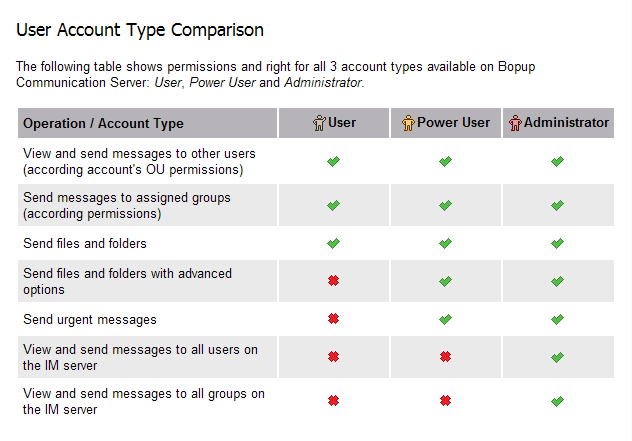
Among a huge number of improvements, changes and additions the new version of Bopup Communication Server introduces a new user account type: "Power User" to addition to existing "Administrator" and "User" types. This account type received permissions to send urgent messages and set advanced options for outgoing file transfers like administrators.

See the table below that shows permissions for all available user account types.

October 7, 2011

Tips & Tricks: How to connect to the communication server outside Windows Domain network?

Sometimes users ask us about how they can connect to Bopup Communication Server from the , for example from a home computer, if Windows Authentication (SSPI) is used by default on the IM server. They are supposed to get the Login pane but the messenger client shows only "User account not found on the IM server" error message and no login and password fields are displayed in the IM client. There is a small trick to enable this:

Create new active and unused user account (with any name) on the communication server and set the Private login/password authentication for it

This will force the instant messenger to display the Login tab when the default authentication fails and allow the user to enter his domain account name in the "DOMAIN\User" format and his password to connect to Bopup Communication Server if first authentication using SSPI returns an error.

September 8, 2011

New versions of Bopup Messenger and Bopup Observer clients have been released

New updates of are available: Bopup Messenger version 5.6.2 and Bopup Observer version 4.4.2

What's new
 
Fixed error on decompressing (unpacking) received files occurred on some computers.

We were reported by some of our customers that sometimes they experienced an error on receiving files from the IM server and other users in the messenger. They got an error on a step of decompressing receiving files after the data is properly received. We found that this issue refers to file system I/O in Windows when a temporary file created by the instant messenger could not be overwritten by a new one. This caused the error on unpacking received files.

Fixed issues with stored positions of windows and dialogs if the screen resolution in Windows changed.
Another strange and funny problem may appear if the screen resolution in Windows on a user's monitor is changed. Since the messenger stores it's previous positions and sizes of windows and dialogs then the program can be displayed out of bounds of the user's desktop if a new screen resolution is lower.

Download the latest versions of the messenger and observer clients

August 10, 2011

Known issue: Bopup Communication Server service disappears from Windows Services list

Sometimes due to unknown reasons Bopup Communication Server may disappear from Services List in Windows so the communication server stops working. In order to resolve this problem you have to register the service manually to get it visible and start from the Management Console again. Follow the step below to register the service file.

  1. Open installation directory of the communication server in Windows Explorer. By default that directory is located at \Program Files\Bopup Communication Server. 
  2. Click Start menu and choose Run... option from there. This will open a command field.
    Select bcssrvc.exe file (communication service) and drag-n-drop it from opened folder to the Run... text field. 
  3. Type /service command line argument after full path of the inserted service file so the run string looks like as "PATH\bcssrvc.exe" /service. 
  4. Press Enter to run the command and register the communicaton server in Windows system. Then open the Management Console and start the service.

July 29, 2011

Bopup Messenger 5.6.1 and Bopup Observer 4.4.1 fix issues with updating/removing existing common settings using a new setup.ini file

New versions of the have been released: Bopup Messenger version 5.6.1 and Bopup Observer version 4.4.1. These versions fix minor issues with deleting existing common settings from the [MESSAGING] section of the INI file on upgrade.

The new version of Bopup Messenger client also adds Ctrl+F5 hotkey in the main window to retrieve and update Contact List and assigned messaging groups from the communication server in manual mode.

We have also updated the SETUP.INI file in the Downloads section on our website because version of the configuration file did not include the most of newly added settings from the [RECEIVING] section designed for receiving group and news messages supported by the latest versions of the messengers.

Download new versions of the Bopup IM client software

July 28, 2011

Our new reseller in Russia: SoftMarket24

We have signed a partnership with SoftMarket24 company which now represents and sells our online in Russian Federation area. Our chat and IM products are available for purchase at SoftMarket24.ru

July 5, 2011

Purchase multiple IM software products at a single order page

A great improvement has been added to placing online orders functionality. Now if a customer purchases Bopup Communication Server, Bopup Messenger and/or Bopup Observer software there are no needs to fill out forms for each product separately. Just use our online calculation form to get a cost for the IM software at www.bopup.com/order/ page and click the Place online order for the IM software link appears within results. It forwards to a common checkout page of multiple IM products.