Our Step-by-Step Guide to Install Microsoft SQL Server 2005 Express Edition as a Host Database Server for Bopup Communication Server that is available on our websites has been updated. This guide helps to install and setup MS SQL Server 2005 Express Edition on a computer in order to use it as a database server. Since MSDE 2000 software (shipped with the setup package of Bopup Communication Server) is not supported by latest versions of Windows then you cannot install and use it on Windows 2008/Vista/7 operational systems and higher. In order to run Bopup Communication Server on these systems you should install MS SQL Server 2005 Express Edition first.
This guide has been appended with information about SQL Server Browser service. This service, part of the SQL Server 2005, should be started if you plan to connect and manage the IM server remotely. It is also required if the communication server is installed on another computer, i.e. if both the SQL Server and Bopup Communication Server are running on different workstations.
Below is the information that has been added to the guide.
You need to configure a little SQL Server 2005 after it's installation will complete. You should enable TCP/IP protocol for it, start the SQL Server Browser service and add the SQL service to Windows Firewall exceptions list.
Start the SQL Server Configuration Manager from the "Start -> Programs -> Microsoft SQL Server 2005" menu. Then open the "SQL Server 2005 Network Configuration" and select the "Protocols" in the left tree. You must enable TCP/IP protocol and then start the SQL Server Browser service to allow connections from Bopup Communication Server to the SQL server and also to support remote connections to the database if you will install the Management Console of the communication server to administrate the IM server remotely. Select and right-click on the TCP/IP protocol in the list and select "Enable" item from the popup menu.
To start the SQL Server Browser service click the "SQL Server 2005 Services" in the left tree and double-click on SQL Server Browser, the Properties window will show up. Move to Service tab and change Start Mode to Automatic. Therefore, the service will be start automatically when the computer starts. Click OK to apply changes. Back to SQL Server Configuration Manager, right-click on SQL Server Browser on the right window and select "Start" to start the service.
Then restart the Microsoft SQL Server service from the console or reboot computer to apply changes.
Our guide on installing the SQL Server 2005 Express Edition is also valid and can be used for Microsoft SQL Server 2008. You can access the step-by-step guide at www.bopup.com/products/install_sql_server_2005_as_database_server.html

November 30, 2010
Bopup Communication Server adds a function to print a tree structure of Organizational Units and user accounts
Today a new version of Bopup Communication Server has been released. Version 3.3.21 contains small improvements and adds printing support for a tree of Organizational Units and contacts that are available to currently selected OU. That tree structure can be displayed on the right from the users list if an Organizational Unit is selected in the Management Console.

Previous versions of the communication server did not show that tree structure by default. In order to enable it and get visible the appropriate option called "Display available contacts on the right in the Organizational Unit views" must be checked on the Interface tab in the Options dialog box. See the "Options. Interface settings" topic available in Online Help.
Download the latest version of Bopup Communication Server
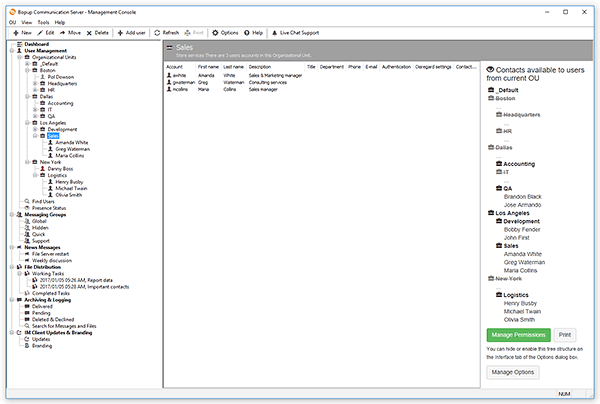
Previous versions of the communication server did not show that tree structure by default. In order to enable it and get visible the appropriate option called "Display available contacts on the right in the Organizational Unit views" must be checked on the Interface tab in the Options dialog box. See the "Options. Interface settings" topic available in Online Help.
Download the latest version of Bopup Communication Server
November 26, 2010
Tips & Tricks: How to get users connected under different IM accounts if they have the same Windows logon name
We get a lot of requests and inquiries from our customers and clients that ask us regarding our software and its functions. Sometimes the customer explains his situation which he want to get resolved or avoided with Bopup instant messaging products. Since the products have rich functionality and options so it is possible to set up and tune the software in most cases. You can find some answered and solved requests here, in our blog, under the "Tips & Tricks" label.
How to get users connected under different IM accounts if they have the same Windows logon name
Sometimes users on the network enter to Windows under the same logon ID, for example "Administrator" account name. If you install and use the communications server you need to separate that users and give them different and unique names in order to contact them personally and to allow the users to communicate with others.
It is possible to do that. You should create new users on the communication server with different logon (account) names and set a personal authentication method for each user.
In addition to the global Authentication Mode that you can find in the Options window of the Management Console you can set up an authentication method for each account personally. Get the properties of the user account on the server and go to the Authentication tab. Then enable the “Use personal authentication method” check box and choose an appropriate mode to authorize the user.

How to get users connected under different IM accounts if they have the same Windows logon name
Sometimes users on the network enter to Windows under the same logon ID, for example "Administrator" account name. If you install and use the communications server you need to separate that users and give them different and unique names in order to contact them personally and to allow the users to communicate with others.
It is possible to do that. You should create new users on the communication server with different logon (account) names and set a personal authentication method for each user.
In addition to the global Authentication Mode that you can find in the Options window of the Management Console you can set up an authentication method for each account personally. Get the properties of the user account on the server and go to the Authentication tab. Then enable the “Use personal authentication method” check box and choose an appropriate mode to authorize the user.
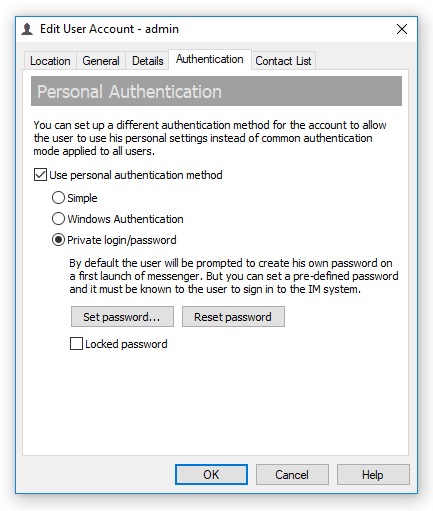
Now let's return to our question and our situation. In order to accept connections from the same Windows logon ID, let's call it "Administrator", as different users on the communication server you should delete (or rename) the “administrator” account on the IM server and create new user accounts with any other names. Those accounts can have any names like user’s e-mail address or something else. And for each newly created account you should specify a personal authentication with the “Private login/password” mode (if the IM server uses Windows Authentication). When your users with the “Administrator” Windows logon ID will connect to the communication server then messengers will show the Login tab in their interface to allow the users to enter their private login and password to enter to the IM network.
By the way if you only disable the “administrator” user account on Bopup Communication Server then your users with such Windows logon name will not be able to proceed because the messenger will display an error message that the account is disabled on the server and the login interface will not be shown.
November 22, 2010
Added support for pre-defined settings in the IM client software
New versions of the secure instant messengers have been released. Bopup Messenger version 5.5.2 and Bopup Observer version 4.3.16 add support for pre-installed options in the setup.ini file in addition to "common" settings.
The new versions of the IM client software now provide support for new options set with the "Pre_" prefix in the name that are located in the setup.ini configuration file. Those options can be used to set up pre-defined settings in the messenger software that can be changed by users in the future.
This gives more functionality on installing and tuning the IM client software because now not only "common" settings can be specified in the setup.ini file.
Download the new versions from www.bopup.com/downloads/ and do not forget to update your setup.ini file to use newly added options.
The new versions of the IM client software now provide support for new options set with the "Pre_" prefix in the name that are located in the setup.ini configuration file. Those options can be used to set up pre-defined settings in the messenger software that can be changed by users in the future.
This gives more functionality on installing and tuning the IM client software because now not only "common" settings can be specified in the setup.ini file.
Download the new versions from www.bopup.com/downloads/ and do not forget to update your setup.ini file to use newly added options.
November 18, 2010
A really great review of Bopup Messenger on www.findmysoft.com
"Thanks to the internet we can easily communicate with one another in real-time. This is mostly done via messenger applications, like Yahoo! Messenger or Windows Live Messenger. But what if you do not have access to the internet? What if all you have is a local network, with limited or restricted access to the internet? How do you communicate with others on the network in real-time?
Why you use the right piece of software of course. And the right piece of software in this situation is the B Labs Software-developed Bopup Messenger. This application, as its name so adequately points out, is a messenger. Unlike Yahoo! Messenger for example, it doesn’t need an internet connection; it works over the local network, making it a good choice for office environments where people need to communicate but don’t necessarily need access to the internet."
Read a good written review of Bopup Messenger product at bopup-messenger.findmysoft.com/review/
Why you use the right piece of software of course. And the right piece of software in this situation is the B Labs Software-developed Bopup Messenger. This application, as its name so adequately points out, is a messenger. Unlike Yahoo! Messenger for example, it doesn’t need an internet connection; it works over the local network, making it a good choice for office environments where people need to communicate but don’t necessarily need access to the internet."
Read a good written review of Bopup Messenger product at bopup-messenger.findmysoft.com/review/
November 15, 2010
Bopup Communication Server version 3.3.20 has been released
New version 3.3.20 of Bopup Communication Server is available to download at www.bopup.com/downloads/
What's New
About Bopup Communication Server
Bopup Communication Server is an instant messaging server for private IM, internal chat and secure collaboration over corporate and business networks. It provides Active Directory support and integration, message and file archiving, offline messaging and document distribution with a strong encryption of transmitted data. The server offers various authentication modes to accept user connections, manages user groups from a single place, supports and handles easy and very effective distribution of documents and important events from the IM server to employees and users.
Since the communication server is designed for business and enterprise-level environments it is intended to install and organize a private and internal chat system and real-time communication platform for companies with no outside access too. Bopup Communication Server is easy and fast to set up which takes about few minutes to get completed. It comes with embedded SQL server to host it's database or can be installed using an existing MS SQL Server software.
The communication server includes a built-in functionality to upgrade IM client software with uploading new versions of the messengers on the server. End-user messaging applications can be also distributed and deployed with pre-installed settings and options that reduces an overall time of software setup. And the IM client branding feature lets upload company's image, logotype on the communication server and show it in the messengers interface. It is highly important for companies and organizations that want to get their messaging software in a common corporate style.
More information is available on IM Server product page
What's New
- Information on user's current/last session is shown under his account details on the profile page.
- User's account profile page contains the name of Organizational Unit and it's location (path) within parent units.
- This version gives another 30-day trial if it is installed above an existing version.
About Bopup Communication Server
Bopup Communication Server is an instant messaging server for private IM, internal chat and secure collaboration over corporate and business networks. It provides Active Directory support and integration, message and file archiving, offline messaging and document distribution with a strong encryption of transmitted data. The server offers various authentication modes to accept user connections, manages user groups from a single place, supports and handles easy and very effective distribution of documents and important events from the IM server to employees and users.
Since the communication server is designed for business and enterprise-level environments it is intended to install and organize a private and internal chat system and real-time communication platform for companies with no outside access too. Bopup Communication Server is easy and fast to set up which takes about few minutes to get completed. It comes with embedded SQL server to host it's database or can be installed using an existing MS SQL Server software.
The communication server includes a built-in functionality to upgrade IM client software with uploading new versions of the messengers on the server. End-user messaging applications can be also distributed and deployed with pre-installed settings and options that reduces an overall time of software setup. And the IM client branding feature lets upload company's image, logotype on the communication server and show it in the messengers interface. It is highly important for companies and organizations that want to get their messaging software in a common corporate style.
More information is available on IM Server product page
November 11, 2010
B Labs starts to distribute and sell it's IM software through Softline company
B Labs is proud to inform clients and customers from Russia and ex-USSR area that Bopup IM software is now available for distribution and purchase through Softline company. And we have been also included to their Vendors catalog at soft.softline.ru/b-labs/

About Softline
Since it’s foundation in 1993, SoftLine has been consistently building it’s marketing strategy using direct-marketing approach. SoftLine-direct is the name that stands behind all our direct-marketing activities. Our vision of the software market implies utilization of the two major marketing cornerstones: qualitative information and qualitative database. With the personalized channels-based approach we reach most of the contemporary IT sector in Russia and CIS countries. And in all our communications, the ultimate goal remains bringing the most value to our customers. This enables us to keep our database clean and updated and measure the volume of marketing pressure we attribute to each market segment.
www.softline.ru

About Softline
Since it’s foundation in 1993, SoftLine has been consistently building it’s marketing strategy using direct-marketing approach. SoftLine-direct is the name that stands behind all our direct-marketing activities. Our vision of the software market implies utilization of the two major marketing cornerstones: qualitative information and qualitative database. With the personalized channels-based approach we reach most of the contemporary IT sector in Russia and CIS countries. And in all our communications, the ultimate goal remains bringing the most value to our customers. This enables us to keep our database clean and updated and measure the volume of marketing pressure we attribute to each market segment.
www.softline.ru
November 8, 2010
30% discounts are offered for Bopup IM software to medical and educational organizations
Do you know that we offer great discounts for our software products to non-profit organizations? Medical and educational institutions and organizations can receive 30% discount from a total cost of the instant messaging software. Want to get a discount? Just contact us via any e-mail address you can see on our website, by phone, or via Live Help system.
We also have another great offer available to small-size companies and offices. We provide our server-side software, Bopup Communication Server, for free to those clients that are interested in a small number of instant messengers, i.e. the number of concurrent connections to the IM server. And if the number of purchased licenses for the IM client software is between 10 and 20 licenses then there is no need to buy Bopup Communication Server too — it comes FREE! This is -$219.00 US discount per a single purchase!
Please visit our pricing and order page to calculate the cost for your amount of licenses.
We also have another great offer available to small-size companies and offices. We provide our server-side software, Bopup Communication Server, for free to those clients that are interested in a small number of instant messengers, i.e. the number of concurrent connections to the IM server. And if the number of purchased licenses for the IM client software is between 10 and 20 licenses then there is no need to buy Bopup Communication Server too — it comes FREE! This is -$219.00 US discount per a single purchase!
Please visit our pricing and order page to calculate the cost for your amount of licenses.
November 1, 2010
B Labs technical support and sales dept are available seven days a week
Do you know that our customer and technical support are available 7-days a week including holidays and celebrations? So you can contact us by US toll free phone 877-99-BOPUP (877-992-6787), via e-mails, through our feedback Web form at www.bopup.com/support or via online messenger installed on our website every day a week from Monday to Sunday!
Have a question, issue or need our immediate assistance? No problem! Just get in touch us with the best way for you.
Have a question, issue or need our immediate assistance? No problem! Just get in touch us with the best way for you.
October 30, 2010
Bopup Messenger 5.5.1: New hidden option is added
As you know we always work on the software and improve our instant messaging products. We also hear our clients and add a suggested functionality. So we've just released new version 5.5.1 of Bopup Messenger which adds the "OpenMinimizedSendingDialog" hidden option to the setup.ini configuration file. Let's explain how it works.
Our messenger includes a standard setting in it's options which allows to open a new conversation dialog on receipt of new instant messages. And that sending dialog box is opened above all other windows on the desktop. That's good.
But what should we do if we want to open that conversation automatically in a minimized state?
Then you can use the "OpenMinimizedSendingDialog" specified in the setup.ini file. When a new message comes and the option to open a new conversation is enabled then the sending dialog will be opened and minimized in the Task Bar.
Try the new feature by downloading the new version of Bopup Messenger.
Our messenger includes a standard setting in it's options which allows to open a new conversation dialog on receipt of new instant messages. And that sending dialog box is opened above all other windows on the desktop. That's good.
But what should we do if we want to open that conversation automatically in a minimized state?
Then you can use the "OpenMinimizedSendingDialog" specified in the setup.ini file. When a new message comes and the option to open a new conversation is enabled then the sending dialog will be opened and minimized in the Task Bar.
Try the new feature by downloading the new version of Bopup Messenger.
October 14, 2010
Bopup Messenger 5.5.0: Tune the messenger as you want!
New version 5.5.0 of Bopup Messenger has been released. This major build includes a huge number of usability improvements and enhancements which offer to tune and use the messenger more effectively.
Added ability to disable the "Today's Messages" screen
Now the messenger supports disabling the "Today's Messages" tab and pane with received messages by user's current session. This will let use the messenger as a standard messaging client with Contact List shown in the main window.
Added option to use only single sending dialog
New setting that restricts opening multiple sending sessions is added. Now Bopup Messenger can operate with a single sending dialog box without using several sending windows in the application.
News Messages are now shown in the Contact List
This interface improvements adds incoming News Messages to Contact List under the "News" root. Since the "Today's Messages" screen can be now disabled in the program then a user is able to access and read News from the Contact List.
Conversations now contain user's text font and color
Another great improvement relates to conversations between you and sender in the sending sessions. Now the conversations includes text font and color settings that are applied to both sent and received messages.
Both sent and received messages are now shown in conversations even a local Message History is not logged
New version of Bopup Messenger extends its functionality and shows conversations between you and other users/groups/news even logging local Message History is not enabled.
Sending dialogs are now shown in the Task Bar area
Tried to find open sending dialog boxes on your Desktop? Now the messenger adds its open sending sessions to Task Bar and it is easy and quickly to find and switch between sessions or from another applications.
Added new hidden settings to setup.ini configuration file
Two new hidden options have been added to the setup.ini file.
The first setting called "DisableExtendedSendingDialog" hides Contact List in sending dialog boxes. And the second "DisableRestoreSendingDialog" option disables restore minimized sending windows if a new message comes.
Fixed opening links/addresses/URLs shown in messages
This bug fix related to internet/network/etc addresses shown as links in instant messages. Sometime it was impossible to open some addresses by clicking the link and new version of Bopup Messenger fixes this problem.
Download Bopup Messenger version 5.5.0 from our Download Center at www.bopup.com
Added ability to disable the "Today's Messages" screen
Now the messenger supports disabling the "Today's Messages" tab and pane with received messages by user's current session. This will let use the messenger as a standard messaging client with Contact List shown in the main window.
Added option to use only single sending dialog
New setting that restricts opening multiple sending sessions is added. Now Bopup Messenger can operate with a single sending dialog box without using several sending windows in the application.
News Messages are now shown in the Contact List
This interface improvements adds incoming News Messages to Contact List under the "News" root. Since the "Today's Messages" screen can be now disabled in the program then a user is able to access and read News from the Contact List.
Conversations now contain user's text font and color
Another great improvement relates to conversations between you and sender in the sending sessions. Now the conversations includes text font and color settings that are applied to both sent and received messages.
Both sent and received messages are now shown in conversations even a local Message History is not logged
New version of Bopup Messenger extends its functionality and shows conversations between you and other users/groups/news even logging local Message History is not enabled.
Sending dialogs are now shown in the Task Bar area
Tried to find open sending dialog boxes on your Desktop? Now the messenger adds its open sending sessions to Task Bar and it is easy and quickly to find and switch between sessions or from another applications.
Added new hidden settings to setup.ini configuration file
Two new hidden options have been added to the setup.ini file.
The first setting called "DisableExtendedSendingDialog" hides Contact List in sending dialog boxes. And the second "DisableRestoreSendingDialog" option disables restore minimized sending windows if a new message comes.
Fixed opening links/addresses/URLs shown in messages
This bug fix related to internet/network/etc addresses shown as links in instant messages. Sometime it was impossible to open some addresses by clicking the link and new version of Bopup Messenger fixes this problem.
Download Bopup Messenger version 5.5.0 from our Download Center at www.bopup.com
October 3, 2010
New version 4.3.15 of Bopup Observer comes with small improvements and enhancements
Version 4.3.15 of Bopup Observer is available. The new version of this secure one-way messenger provides small improvements and bugfixes. See the changed below.
Extended support of SETUP.INI configuration file
Added support of the "DisplayMode" option in the setup.ini file to format displayed user names. This value contols how to display user names in the program interface. The "DisplayMode" setting is located under the [CONTACTS] section and previously this value was used only by Bopup Messenger client. Please note that the option cannot be changed from a program interface, it can be set only as a common option on installing/deploying the software.
The setup.ini configuration file also contains the [HIDDEN] section. Options from that section are used to control and tune the messaging clients more efficiently. Since options under this section are hidden then they are not shown as standard checkboxes in the messengers. The new version of the observer now can override previously set hidden options when a new hidden options are specified in the setup.ini configuration file on version upgrading.
For more information on download the setup.ini file or refer to our IM Software FAQ section.
GUI and functionality bug fixes
Fixed an availability of the "Log history" menu item if common option is set. There was a bug in the messenger when a logging history option can be managed by a user from main menu even that option was set as common and non-changed for all users on a computer.
This version also fixes opening URL/network/e-mail and other types of links shown in incoming messages.
Download new version from www.bopup.com/downloads/
Extended support of SETUP.INI configuration file
Added support of the "DisplayMode" option in the setup.ini file to format displayed user names. This value contols how to display user names in the program interface. The "DisplayMode" setting is located under the [CONTACTS] section and previously this value was used only by Bopup Messenger client. Please note that the option cannot be changed from a program interface, it can be set only as a common option on installing/deploying the software.
The setup.ini configuration file also contains the [HIDDEN] section. Options from that section are used to control and tune the messaging clients more efficiently. Since options under this section are hidden then they are not shown as standard checkboxes in the messengers. The new version of the observer now can override previously set hidden options when a new hidden options are specified in the setup.ini configuration file on version upgrading.
For more information on download the setup.ini file or refer to our IM Software FAQ section.
GUI and functionality bug fixes
Fixed an availability of the "Log history" menu item if common option is set. There was a bug in the messenger when a logging history option can be managed by a user from main menu even that option was set as common and non-changed for all users on a computer.
This version also fixes opening URL/network/e-mail and other types of links shown in incoming messages.
Download new version from www.bopup.com/downloads/
Subscribe to:
Posts (Atom)