October 7, 2011

Tips & Tricks: How to connect to the communication server outside Windows Domain network?

Sometimes users ask us about how they can connect to Bopup Communication Server from the , for example from a home computer, if Windows Authentication (SSPI) is used by default on the IM server. They are supposed to get the Login pane but the messenger client shows only "User account not found on the IM server" error message and no login and password fields are displayed in the IM client. There is a small trick to enable this:

Create new active and unused user account (with any name) on the communication server and set the Private login/password authentication for it

This will force the instant messenger to display the Login tab when the default authentication fails and allow the user to enter his domain account name in the "DOMAIN\User" format and his password to connect to Bopup Communication Server if first authentication using SSPI returns an error.

September 8, 2011

New versions of Bopup Messenger and Bopup Observer clients have been released

New updates of are available: Bopup Messenger version 5.6.2 and Bopup Observer version 4.4.2

What's new
 
Fixed error on decompressing (unpacking) received files occurred on some computers.

We were reported by some of our customers that sometimes they experienced an error on receiving files from the IM server and other users in the messenger. They got an error on a step of decompressing receiving files after the data is properly received. We found that this issue refers to file system I/O in Windows when a temporary file created by the instant messenger could not be overwritten by a new one. This caused the error on unpacking received files.

Fixed issues with stored positions of windows and dialogs if the screen resolution in Windows changed.
Another strange and funny problem may appear if the screen resolution in Windows on a user's monitor is changed. Since the messenger stores it's previous positions and sizes of windows and dialogs then the program can be displayed out of bounds of the user's desktop if a new screen resolution is lower.

Download the latest versions of the messenger and observer clients

August 10, 2011

Known issue: Bopup Communication Server service disappears from Windows Services list

Sometimes due to unknown reasons Bopup Communication Server may disappear from Services List in Windows so the communication server stops working. In order to resolve this problem you have to register the service manually to get it visible and start from the Management Console again. Follow the step below to register the service file.

  1. Open installation directory of the communication server in Windows Explorer. By default that directory is located at \Program Files\Bopup Communication Server. 
  2. Click Start menu and choose Run... option from there. This will open a command field.
    Select bcssrvc.exe file (communication service) and drag-n-drop it from opened folder to the Run... text field. 
  3. Type /service command line argument after full path of the inserted service file so the run string looks like as "PATH\bcssrvc.exe" /service. 
  4. Press Enter to run the command and register the communicaton server in Windows system. Then open the Management Console and start the service.

July 29, 2011

Bopup Messenger 5.6.1 and Bopup Observer 4.4.1 fix issues with updating/removing existing common settings using a new setup.ini file

New versions of the have been released: Bopup Messenger version 5.6.1 and Bopup Observer version 4.4.1. These versions fix minor issues with deleting existing common settings from the [MESSAGING] section of the INI file on upgrade.

The new version of Bopup Messenger client also adds Ctrl+F5 hotkey in the main window to retrieve and update Contact List and assigned messaging groups from the communication server in manual mode.

We have also updated the SETUP.INI file in the Downloads section on our website because version of the configuration file did not include the most of newly added settings from the [RECEIVING] section designed for receiving group and news messages supported by the latest versions of the messengers.

Download new versions of the Bopup IM client software

July 28, 2011

Our new reseller in Russia: SoftMarket24

We have signed a partnership with SoftMarket24 company which now represents and sells our online in Russian Federation area. Our chat and IM products are available for purchase at SoftMarket24.ru

July 5, 2011

Purchase multiple IM software products at a single order page

A great improvement has been added to placing online orders functionality. Now if a customer purchases Bopup Communication Server, Bopup Messenger and/or Bopup Observer software there are no needs to fill out forms for each product separately. Just use our online calculation form to get a cost for the IM software at www.bopup.com/order/ page and click the Place online order for the IM software link appears within results. It forwards to a common checkout page of multiple IM products.

June 24, 2011

New versions of the instant messenger enhance receiving and notification usability

New major versions of the IM clients have been released today. Bopup Messenger version 5.6.0 and Bopup Observer version 4.4.0 add and improve message receiving performance. The new versions add separate notification settings for receiving personal messages, i.e. messages sent directly to a user, and for receiving group and news messages. This allows to tune the messengers more effectively and handy.


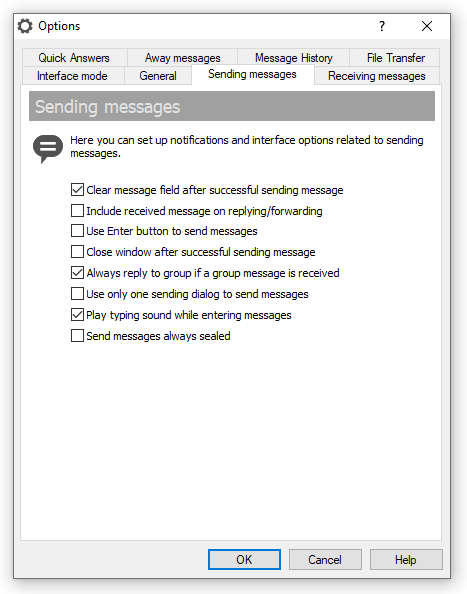
In addition in order to do not overload a single tab of the options dialog box Bopup Messenger adds different tab for the sending options.


SETUP.INI file changes
Since sending and receiving options have been moved to another tabs in Bopup Messenger client the SETUP.INI configuration file has been also changes by a little. Settings from [MESSAGING] tab have been moved to two different sections: to [SENDING] and [RECEIVING].

The new version of Bopup Messenger also moves the "OpenMinimizedSendingDialog" option from [HIDDEN] section of the SETUP.INI file to [RECEIVING] section. It is also available for receiving group/news messages and added as a new "GroupOpenMinimizedSendingDialog" setting too. For more information please download and see comments in the SETUP.INI configuration file So if you use and plan to distribute the new versions of the instant messaging clients via the setup.ini file please update your existing file first.

Download new versions of the instant messengers

May 23, 2011

Bopup Scanner version 2.1.7

New version of Bopup Scanner is available. Version 2.1.7 comes with minor improvements and changes.

This network tool is designed for administrators who want to scan a LAN and get NetBIOS names (logged user names) within MAC and IP addresses of available computers. Bopup Scanner does not require installation and can be simply copied on another computer, USB flash drive, etc.

Download Bopup Scanner 2.1.7

April 27, 2011

Minor version update of Bopup Communication Server

Bopup Communication Server version 3.3.26 has been released. This version of the IM server adds minor improvements and changes.

By the way, it is easy to install over existing software. Do you read our How to apply patches and upgrades for the Bopup Instant Messaging (IM) software article that describes an upgrading procedure both for the communication server and ?

Download Bopup Communication Server version 3.3.26

April 24, 2011

Meet our UK software reseller: QBS Software Limited company

We extend our software distribution channels and know how this question is important. We are proud to inform our customers in UK area that we start to sell our Instant Messaging (IM) and chat software products throught QBS Software Limited company, the largest, famous and leading software supplier in Europe.


About QBS Software Limited

Established in 1987 to provide tools to the developer community, QBS Software has expanded to become a leading software supplier in Europe providing thousands of products to developers, designers, IT Managers, Network Administrators, DBAs and Corporate Buyers. Products range from IDEs to code tools, components to Installation tools as well as security, reporting, installation, web, database, help creation, system tools and application software.

QBS has developed a keen expertise in product marketing and management alongside sophisticated in-house publishing and fulfilment. We have an extensive network of industry connections and commercial relationships with software publishers and vendors throughout the world, many of whom rely on QBS Software to build strong markets for them in the UK and Europe. QBS Software is an active participant in leading industry exhibitions, conferences and roadshows and works closely with various user groups.

The QBS web site is an integral part of our business, providing up-to-date news and product information and a practical and secure online purchasing facility.

We also provide software immediately via ESD (Electronic Software Delivery) for certain products.

Visit QBS Software Limited website at www.qbssoftware.com

April 12, 2011

The communication server improves selection in the Organizational Units trees

New version 3.3.25 of Bopup Communication Server comes with a little but useful improvement. It adds a function called "Invert selection" that appears in the "OU Permissions" dialog to manage visible Organizational Units to a specific unit. The same button is added on the "Accessibility Options" tab of the Messaging Group properties.

This function inverts currently selected Organizational Units in the tree: checked boxes become unchecked, and vise versa, unchecked units are reverted to a checked state. The new function helps administrators and managers to select required Organizational Units with ease and more quickly.

Download Bopup Communication Server version 3.3.25

April 9, 2011

Bopup Messenger fixes issues with sending instant messages to multiple recipients

New version 5.5.13 of Bopup Messenger is ready for download. This fixes issues that occur on sending messages simultaneously to multiple users and/or assigned messaging groups.

What's new:

As you know the messenger supports multiple selection in the Contact List/Groups by pressing and holding Ctrl key. So if a user selects multiple recipients on the "My Contacts" tab in the main window of the messenger, clicks "Send message" button to open sending dialog box, types his message and presses the "Send message" button then the following error message is shown even multiple users are selected: "Please select one or multiple recipients from your contacts".

Another issue is related to displaying message in the Conversation field of the sending dialog box if it has been sent to multiple recipients. The message text appears missing or with a very small size of the font.

Download Bopup Messenger version 5.5.13