New important feature is now available on all our websites including www.bopup.com, www.bopup.es, www.bopup.de and www.bopup.ru domains. It is called "Live Help" and allows to send questions, feedbacks, inquiries and get a response instantly via Windows Live Messenger system. This built-in system does not require users and visitors to have their own Live ID to use this IM system. So if a user has no Windows Live Messenger account he is also able to send messages to us and get a reply with a few seconds.
How this looks and works
When a visitor browses our websites he is able to see the "Live Help" window on top left corner of pages. If a user clicks the orange button with B Labs caption there then a new pop-up window appears in the browser with the Messenger interface. It also contains current presence status of our support and pre-sales department, i.e. Online or Offline. To start a conversation with us click "Begin a conversation" link, then the built-in messenger offers to choose which an IM account to use. If a user already has his own Windows Live ID installed in the system then he is able to choose to use that account or send messages to us anonymously.
By the way, if you already have a Windows Live ID account and use MSN/Windows Live Messenger you can find and contact us via IM system by searching blabsoft@gmail.com e-mail address.
September 17, 2010

September 16, 2010
B Labs become a sponsor of gaming event in Germany
We proud to announce that our company has become a sponsor of the gaming event in Schwebda, Germany. This gaming event will take place on 15th—17th October 2010 and include about 150 participants in various game genres, from 3D shooters to strategies. This event called "LAN Party" is organized by the "Group 36 Lan Team" (Gruppe 36 in German) since 2005 year. In order to extend and improve LAN communication and file transfer options between gamers and connected computers we offer Bopup Communication Server and Bopup Messenger licenses for free.
For more information on this gaming event please visit Gruppe 36 Homepage.
For more information on this gaming event please visit Gruppe 36 Homepage.
September 14, 2010
FAQ on Bopup IM software has been appended with 2 new questions/answers
Our FAQ section at http://www.bopup.com/support/faq/has added new questions and answers that briefly overviews the new functionality of the server and messengers.
The first question sounds: Can instant messages be sent from the communication server using a command line interface? An answer contains a brief information on bcscmd.exe command line utility which is designed to send personal and group messages from external applications and programs.
The second answer is related to the folowing question: Is it possible to distribute and install the messengers with a built-in brand/company logo? This information belongs to new function supported by the instant messengers when a custom BMP image with the brand-logo.bmp filename can be simply placed near an MSI setup package in order to be distributed, installed and shown in the messenger as a common branding logo.
These questions and FAQ section are also available to Russian clients and customers at http://www.bopup.ru/support/faq/
The first question sounds: Can instant messages be sent from the communication server using a command line interface? An answer contains a brief information on bcscmd.exe command line utility which is designed to send personal and group messages from external applications and programs.
The second answer is related to the folowing question: Is it possible to distribute and install the messengers with a built-in brand/company logo? This information belongs to new function supported by the instant messengers when a custom BMP image with the brand-logo.bmp filename can be simply placed near an MSI setup package in order to be distributed, installed and shown in the messenger as a common branding logo.
These questions and FAQ section are also available to Russian clients and customers at http://www.bopup.ru/support/faq/
September 12, 2010
Send instant messages from the IM server using a command line interface
New version 3.3.19 of Bopup Communication Server have been released. It includes new great functionalities which allow you to send instant messages directly from the Management Console and from a command line interface.
Sometimes it is required to send a personal message to user or send group messages directly from the Management Console, for example you want to send an urgent event or important message. Now there are no needs to create a News message or run the messenger on the server computer to perform this task for a single time. Just select and right-click on a user account or messaging group in the console and choose "Send instant message" from the pop-up menu. This functionality offers to send urgent and offline messages if recipients are not available at the present moment. Refer to the product documentation to see how to send personal instant messages to users.
Another great feature helps you to perform sending messages from the IM server using a command line interface. The new version of the server includes the bcscmd.exe module. You can find this file in the installation directory of Bopup Communication Server. This command line utility allows you to send news and instant messages using command line switches and parameters. So now you can access the server and deliver messages to users and groups from third-party applications, scripts or batch files. For more information about supported command line arguments and switches, please refer the Using BCSCmd.EXE command line tool topic.
Sometimes it is required to send a personal message to user or send group messages directly from the Management Console, for example you want to send an urgent event or important message. Now there are no needs to create a News message or run the messenger on the server computer to perform this task for a single time. Just select and right-click on a user account or messaging group in the console and choose "Send instant message" from the pop-up menu. This functionality offers to send urgent and offline messages if recipients are not available at the present moment. Refer to the product documentation to see how to send personal instant messages to users.
Another great feature helps you to perform sending messages from the IM server using a command line interface. The new version of the server includes the bcscmd.exe module. You can find this file in the installation directory of Bopup Communication Server. This command line utility allows you to send news and instant messages using command line switches and parameters. So now you can access the server and deliver messages to users and groups from third-party applications, scripts or batch files. For more information about supported command line arguments and switches, please refer the Using BCSCmd.EXE command line tool topic.
New versions of the messengers add support for a pre-existing branding logo
New versions of Bopup Messenger 5.4.16 and Bopup Observer 4.3.14 are available for download. The latest releases come with the support of a pre-existing branding logo image file that can be placed near the MSI setup package during installation of the applications.This works similar to pre-configured settings in the Setup.ini file. Create and place your company logo/image with the brand-logo.bmp filename into the same folder where the MSI package is located. When the messenger will be installing or deploying via GPO it will find and use that image file as a common branding logo in the software. Of course, the logo will be always overwritten when you upload a new logo image on Bopup Communication Server from the IM Client Updates & Branding view. For more information about support of pre-existing branding image please refer to the FAQ section at Frequently Asked Questions on IM software
The new version of Bopup Messenger also improves multiple selection in the Contact List area. Now this works like Window Explorer works: when you right-click on currently selected contacts your selection is not cleared.
The new version of Bopup Messenger also improves multiple selection in the Contact List area. Now this works like Window Explorer works: when you right-click on currently selected contacts your selection is not cleared.
August 26, 2010
Bopup Communication Server version 3.3.18 is ready
New version of Bopup Communication Server is now available for download at Download Center The latest release of the IM server fixes possible issues and error events including #134 event that may occur on a client-side messenger software while connecting and establishing session with the server. That situation occurs only if Windows Authentication or Private Login/Password authorization mode is enabled on the IM server.
Since this bug has been marked as a critical error we advise to download and update the communication server software to the latest version 3.3.18
Since this bug has been marked as a critical error we advise to download and update the communication server software to the latest version 3.3.18
Error event #134 is discovered in Bopup IM clients
Some of our users reports about connection issues and error event #134 which displays the "Windows Sockets internal error occurred. Cannot receive a response from the remote client." message in the messengers. We discovered this problem and found that it may appear not always and only if Windows Authentication or Private Login/Password authentication methods are enabled on Bopup Communication Server.
This error will be fixed ASAP because it is marked and assigned with critical status.
This error will be fixed ASAP because it is marked and assigned with critical status.
August 25, 2010
Possible issues and problems with our US toll-free number are fixed
We apologize for some issues and unavailability of our US toll-free phone number that our customers and clients could experience. Due to wrong forwarding and time settings our +1-877-992-6787 (877-99-BOPUP) toll-free number might be unreachable and busy. And voicemail did not also work properly so even recorded messages could not be left for us. Now the phone is accessible and working properly. We apologize again for this.
August 21, 2010
BOPUP.ME blog has been published on Technorati
We are glad to discover that this blog has been published in Blog Directory on Technorati website at http://technorati.com/blogs/www.bopup.me
About Technorati
Technorati was founded to help bloggers succeed by collecting, highlighting, and distributing the global online conversation. Founded as the first blog search engine, Technorati has expanded to a full service media company providing services to the blogs and social media sites and connecting them with advertisers who want to join the conversation, and whose online properties introduce blog content to millions of consumers.
The leading blog search engine, Technorati.com indexes millions of blog posts in real time and surfaces them in seconds. The site has become the definitive source for the top stories, opinions, photos and videos emerging across news, entertainment, technology, lifestyle, sports, politics and business. Technorati.com tracks not only the authority and influence of blogs, but also the most comprehensive and current index of who and what is most popular in the Blogosphere.
About Technorati
Technorati was founded to help bloggers succeed by collecting, highlighting, and distributing the global online conversation. Founded as the first blog search engine, Technorati has expanded to a full service media company providing services to the blogs and social media sites and connecting them with advertisers who want to join the conversation, and whose online properties introduce blog content to millions of consumers.
The leading blog search engine, Technorati.com indexes millions of blog posts in real time and surfaces them in seconds. The site has become the definitive source for the top stories, opinions, photos and videos emerging across news, entertainment, technology, lifestyle, sports, politics and business. Technorati.com tracks not only the authority and influence of blogs, but also the most comprehensive and current index of who and what is most popular in the Blogosphere.
August 19, 2010
Gmail declines e-mails with archive in attachments
We have discovered that some e-mails with attached .zip files sent by us to @gmail.com addresses are returned with a delivery error. Returned messages contain the following information in the message body:
Gmail won't accept these types of files even if they are sent in a zipped (.zip, .tar, .tgz, .taz, .z, .gz) format. If this type of message is sent to your Gmail address, it is bounced back to the sender automatically. http://mail.google.com/support/bin/answer.py?answer=6590
Please note this if you provide and send screens of errors, documents and other types of attachments in a zipped format. Use another format to archive your files (with another file extension), for example WinRAR program.
Gmail won't accept these types of files even if they are sent in a zipped (.zip, .tar, .tgz, .taz, .z, .gz) format. If this type of message is sent to your Gmail address, it is bounced back to the sender automatically. http://mail.google.com/support/bin/answer.py?answer=6590
Please note this if you provide and send screens of errors, documents and other types of attachments in a zipped format. Use another format to archive your files (with another file extension), for example WinRAR program.
August 8, 2010
Started selling Bopup Communication Server through QBSSoftware.com
We glad to inform our potential clients and customers that we have started selling our instant messaging software within Bopup Communication Server product through QBS Software at www.qbssoftware.com. If you are represent an UK-based company and need a local reseller/distributor you can contact QBS Software via sales@qbssoftware.com or call them at 08456 580 580 for enquiry.
About QBS Software Limited
Established in 1987 to provide tools to the developer community, QBS Software has expanded to become a leading software supplier in Europe providing thousands of products to developers, designers, IT Managers, Network Administrators, DBAs and Corporate Buyers. Products range from IDEs to code tools, components to Installation tools as well as security, reporting, installation, web, database, help creation, system tools and application software.
QBS has developed a keen expertise in product marketing and management alongside sophisticated in-house publishing and fulfilment. We have an extensive network of industry connections and commercial relationships with software publishers and vendors throughout the world, many of whom rely on QBS Software to build strong markets for them in the UK and Europe. QBS Software is an active participant in leading industry exhibitions, conferences and roadshows and works closely with various user groups.
The QBS web site is an integral part of our business, providing up-to-date news and product information and a practical and secure online purchasing facility.
We also provide software immediately via ESD (Electronic Software Delivery) for certain products.
About QBS Software Limited
Established in 1987 to provide tools to the developer community, QBS Software has expanded to become a leading software supplier in Europe providing thousands of products to developers, designers, IT Managers, Network Administrators, DBAs and Corporate Buyers. Products range from IDEs to code tools, components to Installation tools as well as security, reporting, installation, web, database, help creation, system tools and application software.
QBS has developed a keen expertise in product marketing and management alongside sophisticated in-house publishing and fulfilment. We have an extensive network of industry connections and commercial relationships with software publishers and vendors throughout the world, many of whom rely on QBS Software to build strong markets for them in the UK and Europe. QBS Software is an active participant in leading industry exhibitions, conferences and roadshows and works closely with various user groups.
The QBS web site is an integral part of our business, providing up-to-date news and product information and a practical and secure online purchasing facility.
We also provide software immediately via ESD (Electronic Software Delivery) for certain products.
August 7, 2010
SQL database maintenance options added to the latest release of Bopup IM server
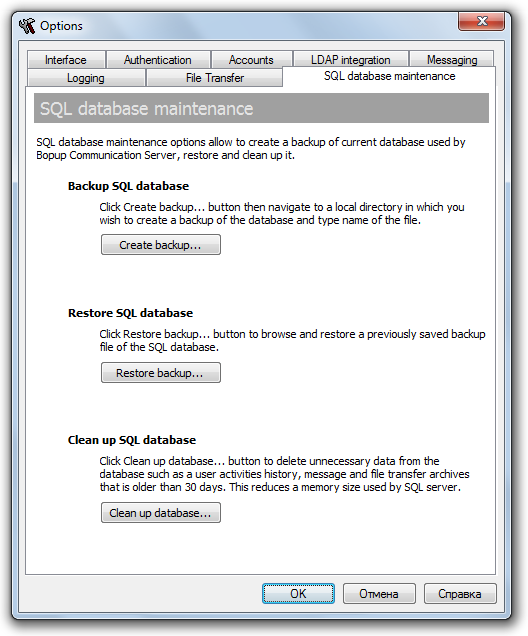
Version 3.3.17 of Bopup Communication Server adds new options to manage SQL database used by the IM server. The new version has added a new "SQL database maintenance" tab in the Options dialog box.

Now the Management Console includes functionality to backup SQL database to a file or restore the database from a previously saved backup file. A function to clean up the database has been also added. It deletes unnecessary data such as message and file transfer archives, user's session activities history that is older than 30 days. This function reduces a size of the SQL database that affects to a memory size used by MS SQL Server.
Now the Management Console includes functionality to backup SQL database to a file or restore the database from a previously saved backup file. A function to clean up the database has been also added. It deletes unnecessary data such as message and file transfer archives, user's session activities history that is older than 30 days. This function reduces a size of the SQL database that affects to a memory size used by MS SQL Server.
Subscribe to:
Posts (Atom)