January 28, 2013

IM Server improves a restore of SQL backups and printing Message History

New version 4.1.4 of Bopup Communication Server has been released on January 27, 2013. It is a not mandatory update but it fixes and improves some useful features of the software.

What's new:

Added new option in the SQL Database Maintenance dialog to restore database backups created on another server

The SQL Database Maintenance dialog of the Management Console adds a new check box that says the console that a SQL database backup (that is intended for restore) was created on another SQL Server and/or another instance of the communication server. It is very important because in that case the backup will be restored with WITH REPLACE option.

Added UAC verification to control status of the IM service

Now the Management Console checks token of administrator account (UAC) under which it is running in Windows Vista and later. If there is no necessary rights to control the IM service from the Welcome page then appropriate message is shown and starting/stopping options for the service are unavailable. In order to control the service the Management Console must be launched with "Run as administrator" option selected from context menu in Windows.

Improved showing and printing Message History containing long messages

New version of Bopup Communication Server fixes issues with displaying and printing long text messages in Message History. We removed scrollbars in the edit boxes that contain the message text and now each conversation is shown and moved to a printing device in whole.

Download Bopup Communication Server version 4.1.4

January 7, 2013

B Labs wishes you a Happy and Prosperous 2013 year!

Hi everyone! This is our first post in new year and we would like to congratulate our existing customers and future clients on joining to new 2013! We wish all our users a Happy New Year and hope that it will make you and your business more prosperous and successful. We believe that new 2013 year will bring great news and things in different area including our IM software too. We plan to release our first mobile IM client application for Android platform within the next two months. Hope you will enjoy it because it lets move the communication to a new level. Thanks for staying with us!

December 22, 2012

Great updates of the IM software!

Today is the time to release great updates both of the IM server and messenger software. We released new releases of Bopup Communication Server version 4.1.3, Bopup Messenger 6.1.3 and Bopup Observer 5.1.2

What's new:

Automated rebuild of Contact Lists on the IM server works better and smoothly
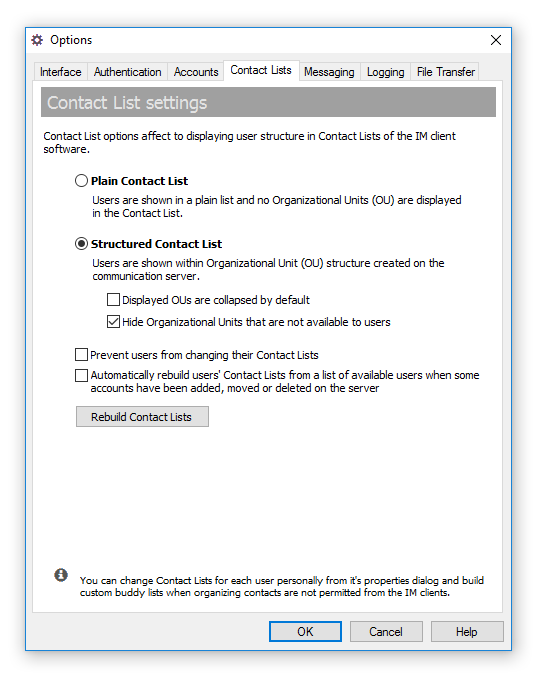
The latest version of the communication server improves function of rebuilding users' contacts when some minor or great changes occur in user structure. Now status of Contact Lists are changed in the db even administrator declines immediate rebuild if users are moved to another Organizational Unit, accounts enabled/disabled or permissions have been edited for some OU. This gives a possibility to rebuild contacts manually from the Options dialog when all changes in the console are done.

Update contacts in the messenger on-the-fly
Another great addition in the software is automated delivery of newly built Contact Lists to connected users when the contacts have been manually and automatically re-organized in the Management Console. In this case the server notifies online users and force them to retrieve their Contact List again. Now rebuilt buddy lists are shown in the messenger instantly without it's restart and reconnect.

Send files faster and do not want for a recipient's response
The server adds new option that extends File Transfer functionality. It allows to transmit files and folders immediately on the server first even the recipient is online. Thus the sender has to do not wait while the recipient accepts or declines the transfer because the server receives it instantly. The new option can be found on the File Transfer page of the Options dialog box in the Management Console.

Fixed saving and restoring positions of the messengers on Desktop
Since prior versions of the messenger software added function to show the IM client on the Taskbar some our customers were experience issues with showing messenger windows on user's desktop. The new updates fix those issues that occurred if user closes minimized window from Taskbar.

No invalid text appended on sending graphic "smiles" in messages
Bopup Messenger fixes error when strange symbols appended and displayed on recipient's side after some graphic smiles.

Receive and find received files and documents easily
The latest versions of the messengers add new settings on the File Transfer tab in the Options dialog that allows to create sub-folder to place a received data and includes sender's name. In addition to existing option that create the same subdirectory named current date it is easy now to find files and documents received in the past. By the way, that setting are now moved to user's interface and available on the File Transfer page.

Conversations include group messages too within received private messages
The latest version of Bopup Messenger shows group messages too within personal messages received from selected contact when you open a conversation dialog (sending message window). Group messages sent by that user are marked with green color while personal messages received from him are red and ours messages are always blue.

Download latest versions of the IM software now

December 7, 2012

Bopup IM Live Chat is changed but working again

We were experiencing troubles with our Live Chat function on the website in the past few months because the messenger form stopped working in the middle of August 2012. That was very annoying issue and problem for us and our customers. Since our Live Chat feature was based on Windows Live Messenger platform we tried to find some references on Microsoft's website and support forums. But nothing and no one helped us.

We also noticed that a lot of Windows Live platform has been changed in the past months, like live.com, outlook.com websites, and thought all the time that the issue we are having with the Live Chat form is a temporary problem. But we were in wrong...

Confirmed: Microsoft To Kill Windows Live Messenger in 2013
Microsoft has officially confirmed that the company will discontinue Windows Live Messenger in 2013, moving all users over to Skype in Q1. This move will include migrating Messenger’s 100 million users to Skype’s platform.

That's the reason why we were having troubles with our Live Chat website form all the past time — Microsoft is slowly killing services related to Windows Live Messenger platform.

Today we migrated and started to use a new Live Chat feature, it looks simply and works like the form from Microsoft. Thus our Live Chat function has been restored and now available on our websites again. Welcome!

November 28, 2012

New version 4.1.2 of Bopup Communication Server

We released new update of the communication server software, and it's version 4.1.2 is available for download. This latest release comes with minor improvements and changes and this is not a priority update for the software.

Are you still using "old" versions of the IM software?

If you still use old versions of the communication server and messenger clients then it is a good time today to upgrade to the latest versions. Even you have oldest versions like version 3.3 installed you can easily and quickly migrate to the latest software. We have a document that overviews all the steps you need to follow on upgrade, check it out here http://updates.bopup.com/upgrading_to_version_4.0_instruction.html

Summary:
  1. Install new version of the IM server over existing software
  2. Upload new versions of the messengers (MSI packages) on the server through Management Console in order to update the IM clients
  3. Enjoy with functions available in new versions

Download Bopup Communication Server version 4.1.2

November 27, 2012

New version of Bopup IM Client SDK added support for VB.Net developers

Bopup IM Client SDK version 1.0.2 has been released and now available for download. This version added new IServerClientVB interface, structures and defines which are especially designed for VB.Net developers.


Since our existing IServerClient interface is primarily designed for Microsoft Visual C++ programmers then it makes hard to use our IM SDK because many of data and types must be marshaled and casted between Microsoft Visual Basic .Net source code and the interface's structures and methods. The IServerClientVB solves this problem because it is Automation-compatible interface and operates with standard VB data types such as String, Array, etc.

For more information on using this interface and it's methods refer to Online Help documentation available at http://www.bopup.com/onlinehelp/sdk/vbnet_developer_guide/interfaces/iserverclientvb/overview.html

The new version of Bopup IM Client SDK added sample code in VB.Net in addition to Visual C++ 6.0 sample projects that show how to connect to the communication server, send/receive various of data to/from the IM server, transmit and get instant messages. Develops and add IM & chat functionality with VB.Net environement in a few minutes!

Download Bopup IM Client SDK version 1.0.2

October 24, 2012

Access the instant messengers from Taskbar on Windows desktop

New versions both of Bopup Messenger and Bopup Observer client software added a new setting to the Options dialog that allows to show the application in Taskbar. This is a useful addition because it is possible to access and bring the main window of the messenger on the front of Windows desktop if it is already open by clicking it's icon in Taskbar.

The server-side application, Bopup Communication Server, has been also updated. It comes with new version of Setup.ini Configuration Tool that supports then new IM client setting.

The IM client software also improved applying settings that are instantly downloaded from the communication server. Previously downloaded options are now deleted from the messenger if there is no any settings file uploaded on Bopup Communication Server. This function allows to reset current settings in the messengers simply by removing configuration file from Management Console.

The latest version of Bopup Messenger improved a speed of sending messages. No delay occurs in the client if text messages are typed quickly and sent rapidly. Even there is some error with empty message field or selected recipient in the interface shown balloon tooltips do not block and do not freeze any more!

Download the latest releases of Bopup Messenger 6.1.2, Bopup Observer 5.1.2 and Bopup Communication Server 4.1.1

October 19, 2012

Updated Bopup IM Client SDK

Bopup IM Client SDK version 1.0.1 has been released. This version of Software Development Kit provides support for the latest version 4.1 of Bopup Communication Server and allows to receive structured tree-based contacts. It also includes updated CSClient.DLL and SecPrvdr.DLL COM modules that caused issues with their registration in Windows system.

Please note that SDK documentation has been updated too because it added new structures and constant definitions.

Download Bopup IM Client SDK version 1.0.1

October 14, 2012

Bopup Messenger User's Guide is available in a PDF file

Now User's Guide for Bopup Messenger client is available in a stand-alone PDF file. This documentation file includes help information for the product including software screens. A similar file is provided for Bopup Observer client too.

Thus it is possible now to browse help documentation for the messenger software online at Online Help, view CHM help files that are installed within the products or just download PDF help files to read the domentation locally on a computer or even print it.

Download Bopup Messenger User's Guide in a PDF file

October 13, 2012

Minor but useful updates of Bopup IM clients

We released new updates for the messenger software. Bopup Messenger version 6.1.1 and Bopup Observer 5.1.1 include some minor changes but important and useful additions.

Sending messages works faster

The new version of the messenger client removes a little delay on sending new messages in the conversation dialog. Prior versions disabled both the Send message button and message field while an outgoing message was delivering to the IM server. And this caused some nasty experience when outgoing messages are typed fast and need to be sent quickly. So we decided to remove the delay and to do not make the controls inactive. And the messenger "flies" now! Really!

Make it tiny

Now you can make the main window of the messenger shorter and thinner. It's a very useful ergonomic feature.

File Transfer dialogs remember their desktop positions

Both the sending and receiving files dialogs in the messenger now remember and keep their positions in order to restore the windows on the next appearance. If you transfer documents and set some Advanced options (available to Administrators and Power Users) then those settings are also remembered for subsequent transfers.

A lot of other improvements, minor changes and fixes

Download Bopup Messenger version 6.1.1. and Bopup Observer 5.1.1

October 9, 2012

Structured Contact Lists, instant update of IM client settings... Meet new versions of Bopup IM software!

We are happy to announce that new versions of Bopup IM software have been released. These major updates both of the communication server and instant messenger clients bring all-new and powerful functionality which makes our software more better, handy and useful.

What's new:

Structured Contact Lists

There was very annoying question in our software: plain Contact Lists in the messenger clients. Yes, it works fine if there is a little amount of users on the messaging network. But what's about if there is 50, 100 or more users?

New version 4.1.0 of Bopup Communication Server added a new option that allows to deliver structured, tree-based contacts to connected users. Now users can be shown under their Organizational Units like you they are shown in Management Console on the server.


Instant update of IM clients settings

Another important features is a delivery new and changed settings to the messenger clients without having to wait for a new release. Now client settings can be distributed to users "on-the fly" — on the next connection to the IM server. New versions of the messengers always check for updated settings once they establish a connect with the IM server and download a new set of options if it is available.


Setup.ini Configuration Tool is now a part of the IM server

Do you know about our Setup.ini Configuration Tool? Did you have a chance to use it? Forget about changing and modifying the setup.ini file youself to set the options for the messenger software. Because we built a great tool that let generate or edit existing configuration file through a graphic interface that is similar to the Options dialog of Bopup Messenger.


Now this configuration tool is included to the communication server package. And it is also integrated to server's interface when you create and change IM client settings. Just click to edit the settings and the tool automatically uploads them onto the server.


Multiple conversations are opened in cascade mode

Bopup Messenger added a useful functions that checks and opens multiple sending dialogs in a cascade mode. This prevents a newly opened window from overlapping existings.


Show branding logo in the main window of Bopup Observer

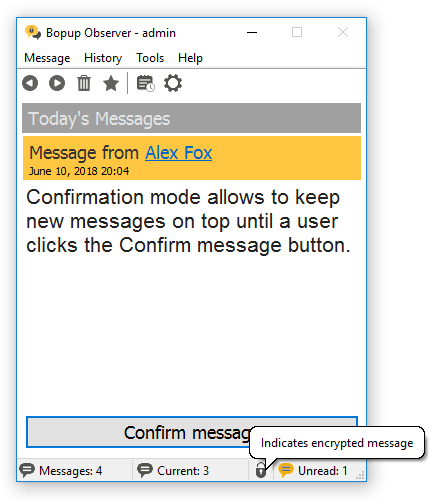
Bopup Observer now shows a branding logo uploaded on the IM server in it's main window too. We added a "Today's Messages" title too (like in Bopup Messenger client) to have a space to get branding logo visible.


Download Bopup Communication Server 4.1.0, Bopup Messenger 6.1.0 and Bopup 5.1.0

August 22, 2012

Our Live Chat support is now working again

We glad to inform customers and visitors that Live Chat sales & support is now available again on our websites. The Live Chat messenger stopped working about 1 month ago due to Microsoft's platform issues and we were not able to response to inquiries and questions via website messenger form. Anyway now it is working again that gives another way to reach us more quicker and faster.