March 14, 2020

Bopup Communication Server version 5.6.1 released

New update of the instant messaging server is available for download. It's recent release is version 5.6.1 which added some new functionality and fixes minor issues.

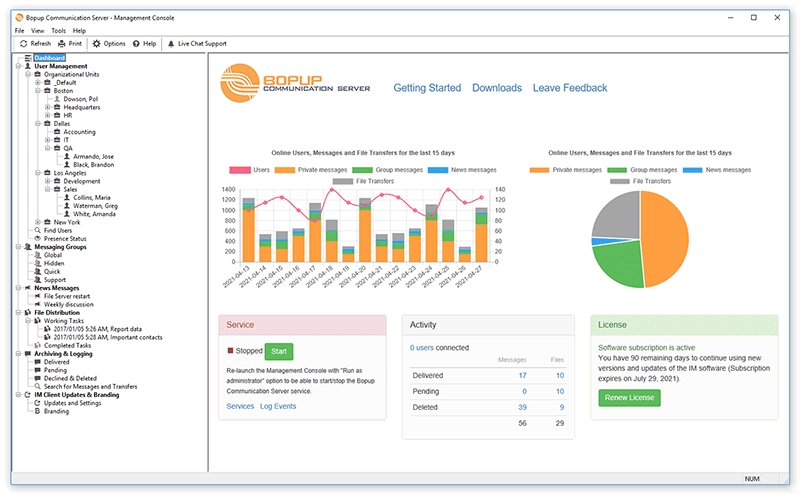
Management Console of the IM server (Dashboard screen)
What's new:

Added function to export message archive to CSV files
In addition to existing function that saves message history selected in Management Console to text files we extended the export functionality and added support to export archive to CSV files. CSV format is a text format in which the data is separated with semicolons. Such files can be opened in Microsoft Excel and similar office apps where the data is shown in different columns.

Added interface improvements in Management Console running in remote mode
This change belongs to the server console when it is running in administrator mode to manage a remote instance of Bopup Communication Server. Since the service module is running remotely in such cases then the console does not show Services and Event Log links on Dashboard screen. Also it changed a status of the service from Unknown to Running (since the remote console was  able to connect to IM server) without options to Start/Stop service.

Fixed error in remote Management Console if a wrong password is entered
There is an important fix in the server console that improves functionality of Management Console installed in administation mode. The new version fixes an error when an incorrect password is entered in the console on startup in order to connect to the server instance.

There are another fixes and mprovements that the new version 5.6.1 has.

Download Bopup Communication Server version 5.6.1 — Enterprise text messaging with Active Directory (domain) and mobile apps support
March 10, 2020

Meet Bopup IM on YouTube

We are proud to announce our YouTube channel where we will review our software, it's possibilities, explain various features including configuring and managing both the server and messenger software. This will be in form of video tutorials and help including some tips & tricks.


We believe that our videos on YouTube will be useful and helpful both for new and existing customers. Our software grew up and added many new functions and options that existing customers may not familiar with.

Today we uploaded first video video as a tutorial which explains an initial installation of Bopup IM system. It overviews a downloading process both for Bopup Communication Server and Bopup Messenger client, installation and configuring, creation of a user account on the IM server and subsequent connection from the IM client application.


The video provides subtitles in English and Russian languages that can be enabled through player controls.

March 4, 2020

Improvement update of the messenger client

We updated Bopup Messenger app for desktop and released it's version 7.2.1 This is bugfix and improvement update of the messenger software.

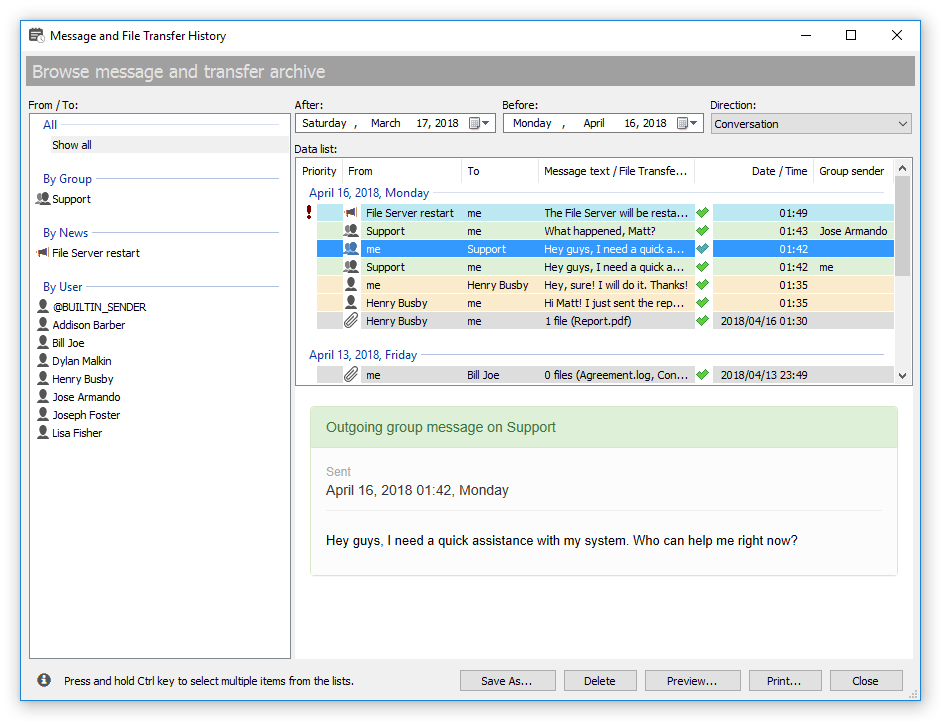
Version 7.2.1 added displaying thumbnail images in Message History for all types of sent and received single files. That thumbnail is shown in preview area once the file transfer is selected in the list. The thumbnail shows a small preview for delivered image files and system icon for all other types of files.

Message History dialog of the IM client app

The new release also fixes issue with duplicate messages shown in conversations. This bug came from previous version 7.2.0 and we strongly recommend to update that version to the new one.

Download Bopup Messenger version 7.2.1 — Quick and simple LAN messenger that works over Internet

February 29, 2020

Cheap and managed cloud-based IM for business

Do you know that we offer our Bopup IM as a hosted instant messaging service for private users and business? This cloud-based solution works for end-users in a similar way like they use a self-hosted communication server except some great benefits:


Guaranteed 24/7 uptime
We guarantee 24/7 uptime of hosted Bopup Communication Server that can be run servers on Windows 2012/2016/2019 operating systems phisycally located in Moscow, Russia and Europe. This is the best choice for companies and offices that do not have a stand-alone server within 99.9% uptime accessible from Internet.

Cheap pricing per each user connection
We offer a flat price for each user per month, it is $1.50 per Bopup Messenger connection and only $1.20 per Bopup Observer. Check our calculator to see how the cost depends on a number of users.

Free version upgrades
There is no subscription service because we do update the hosted instant messaging server by ourselves immediately per customer's request in order to do not interrupt the IM service. The software will be always up-to-date within all new functions available.

Easy remote management
Control and manage the IM service like it is running locally. We do provide credentials to connect to the communication server instance from a local Management Console.

Free re-branding feature
For cloud-based solution we offer the rebrand function at no cost. It is included to monthly cost of the service and allows to rename Bopup brand shown in the client applications.

Dedicated IP address and DNS name
All hosted messaging servers have a dedicated IP address. We also configure a DNS name of the communication server in form of .bopup.me for easy remembering and using it by end-users in the messenger apps. That subdomain name is desired and chosen by customer.

In addition we can do daily backups of the server database to avoid any force majeure situations.

Interested in our cloud-based Bopup IM? It is easy to start, just go to the Orders page and switch to Hosted IM. Enter the number of IM clients you need to support and pay a monthly fee. We will run and configure a ready-to-use IM server for you within few hours. That'all! Still have questions? Then contact us via Live Chat or Support form at https://www.bopup.com website.


February 25, 2020

Major update of the instant messaging server

New version 5.6.0 of Bopup Communication Server has been released.


In this release we fully rebuilt app's files in order to remove the dependency from libpq.dll module which is related to support of PostgreSQL/Postgres Pro database server. We added such support in version 5.5.0 and noticed that the core service started to crash suddenly with a fault address located in libpq.dll So we decided to build a separate setup package with support of Postgres servers and do not link program files with this third-party library if regular Microsoft SQL Server database family is used.

Removing the dependency of libpq.dll module also reduced sizes of all installation packages because it required Microsoft Visual C++ 2010 redistributable files which we could remove.

Download Bopup Communication Server version 5.6.0 — Enterprise IM server and Active Directory and message archiving support

February 9, 2020

The messenger shows image thumbnails in conversation dialog and Message History

There is a great update of the messenger app available. We released version 7.2.0 of Bopup Messenger software which added support for image thumbnails shown in conversations and Message History window.

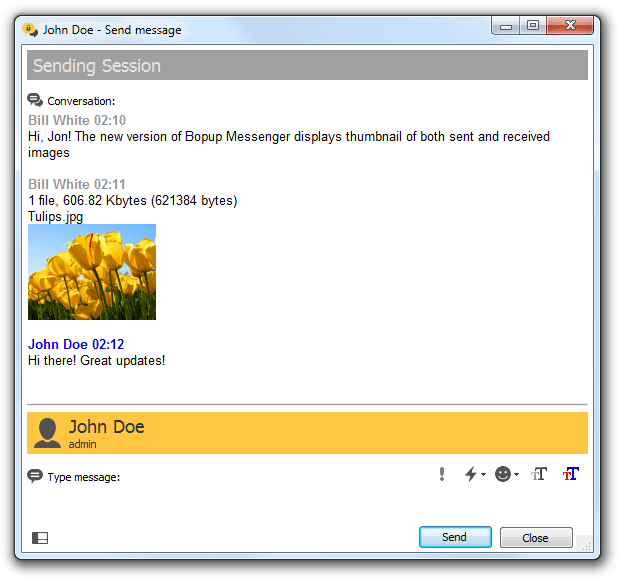
Conversation window shows thumbnails of transferred image files
Those thumbnails are shown for image files including .bmp, .jpg, .png, .gif, .tiff and many others formats if they are transferred between users. A user can click on thumbnails of received images to see a picture in a full size (opened in a system defined viewer app). So now it is easier and handy to exchange screenshots since they are displayed in conversations!

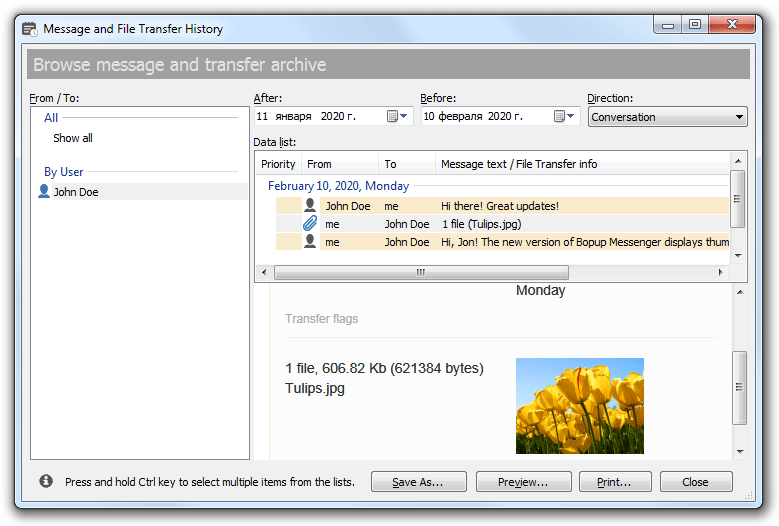
In addition the Message History dialog also shows such previews for sent and received images.

Message History displays thumbnails for exchanged images
We plan to release some other additions and improvements soon including file exchange usability. Stay connected!

Download Bopup Messenger version 7.2.0 — Corporate messenger with built-in message and file encryption

January 25, 2020

The messenger now loads past messages directly in conversation dialog

We updated both Bopup Messenger and Bopup Observer client applications and there is a major change of the messenger software which now avoids a missing function and lets view past messages in conversation.

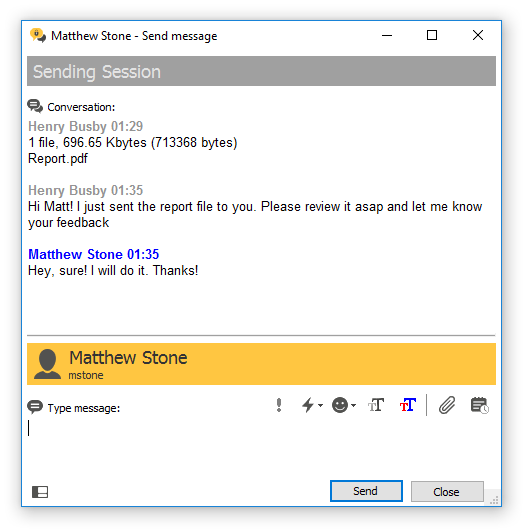
New version 7.1.0 of Bopup Messenger added a great improvement to load messages and file transfers from history file and to show them in conversations. Thus conversations now always display 10 previously sent/received data even the messenger client has been just started and no matter if the messages were sent today or few weeks ago. It also loads and appends next 10 messages when a conversation window is scrolled up to see an earlier data.

Scroll up the conversation to see earlier messages

There are also minor bugfixes in Message History dialog which displayed some issues for File Transfers data. We strongly recommend to update Bopup Messenger to achieve new functions and improve overall usability of using the software.

Download Bopup Messenger version 7.1.0 and Bopup Observer version 6.0.8 — Office chat clients for secure and quick real-time text messaging

January 20, 2020

Bopup Messenger and Bopup Observer updates

In the last days of outgoing 2019 year we released new versions of the IM client software. It is Bopup Messenger version 7.0.11 and Bopup Observer version 6.0.7.

The messenger fixes an annoying issue with the splitter position in the conversation dialog that could hide new incoming message. There are also fixes and improvements in both clients added that are related to Russian localization strings and opening links in instant messages which include symbols in Russian.


December 6, 2019

Отдел продаж и техподдержки доступен по бесплатному номеру 8-800

Мы с радостью сообщаем нашим новым и существующим клиентам, что теперь связаться с нами можно в том числе и по бесплатному телефонному номеру 8-800-505-2228


Мы с удовольствием ответим на все ваши возникшие вопросы касающиеся приобретения наших программных продуктов Bopup, а также на вопросы технического характера. Звонок на номер бесплатен для всех регионов России как с мобильных так и со стационарных телефонов. Номер доступен в рабочие дни с 12:00 до 24:00 часов по Москве. 

В то же время нам можно отправить электронное сообщение на адрес support@bopup.ru, использовать живой чат на сайте www.bopup.ru или отправить сообщение используя форму обратной связи

December 5, 2019

Bopup Communication Server version 5.5.5

There is a minor update of the instant messaging server available. We released new version 5.5.5 of Bopup Communication Server application.


Most important changes added to it's setup packages that now correctly installs Microsoft Visual C++ 2010 Redistributable on 64-bit versions of Windows. The server require that redistributable since it supports Postgres/Postgres Pro database families. So this update is important for new customers.

Download Bopup Communication Server version 5.5.5 — A private instant messaging server running as a self-hosted application for Windows

December 3, 2019

Improved version of the messenger app for Android

New version of Bopup Messenger for Android platform has been released today. It is version 1.7.1 that added improvements and minor fixes.


The new version fixes error if empty Contact List is being saved by a user. There was also another issue with duplicate contacts if offline messages are received on app startup.

As always the app can be download from our website at https://www.bopup.com/downloads/ or updated using Googley Play store.

November 28, 2019

Black Friday 2019: 50% off for each new purchase!

We glad to announce a great sale offer for Bopup IM software applications. It starts tomorrow on November 29, 2019, the Black Friday day, and offers 50% discount for each order for Bopup Communication Server, Bopup Messenger or Bopup Observer products including product bundles.


In order to get a discount use FRIDAY2019 coupon code on order page. Be hurry to use the offer, it ends on the next Friday, on December 6, 2019!